Who is a portable keyboard suitable for?

Prolific writers travelling light

If you work on learning goals, timetables and notes on the train, you’ll need to consider the available work surface as well as your keyboard. Deutsche Bahn says that many seats have fixed or fold-down tables, but not every seat does.

Tablet users who make lots of edits

If you switch between parts of a document and apps while creating a training plan, you may need a touchpad or an integrated tablet stand. Apple describes a trackpad on the Magic Keyboard Folio for iPad (A16); Samsung lists a touchpad on the EF-DX825 for certain Galaxy Tab models.

People using multiple devices

If you edit your plan on more than one device, check which operating systems are supported and how to switch between devices. ProtoArc describes pairing with and switching between three devices on the XK01; Logitech lists several mobile and desktop operating systems for Keys-To-Go 2.

What should you look for when choosing one?

Priority What to check before buying Who it matters most to
Pack size and work surface Compare the folded and open dimensions with your bag and the table space available; make sure you have a stable surface to work on. If I want to travel light but still write at the train table, both the packed size and the space it takes up in use matter to me. Around 33 % of consumers have this priority.
Longer typing sessions and layout Check the layout of the specific version and its width when open. If you type detailed schedules, you’ll need a suitable key layout and enough room to write. Around 25 % of consumers prioritise longer typing sessions and layout.
Compatibility with your device Check your tablet model, operating system version, supported connection and, where relevant, how to switch between devices. If I want to use a keyboard or cover with a device I already own, that specific combination needs to be compatible. Device compatibility is the main priority for around 25 % of consumers.
Pointer control Check whether the version you choose has a touchpad and whether your device supports the gestures you need. If you often want to move the cursor while planning without having to make room for a separate mouse, pointer control is particularly important. Around 17 % of consumers have this priority.

Common buying misconceptions

  • Only checking the folded size

    The ProtoArc XK01 is 38,5 cm wide when open. On the train, what matters is whether the keyboard will fit on the work surface you actually have available.

    Before buying, compare the keyboard’s open footprint with the space where you plan to use it, and make sure you have a stable surface. ProtoArc recommends using the XK01 on a stable surface rather than on your lap.

  • Assuming a tablet cover will work with any tablet

    The Apple and Samsung covers described here are designed for specific tablet models. The Apple Magic Keyboard Folio also has a software requirement.

    Check the full tablet model name and the required software version. If you regularly switch devices, a universal keyboard may be better suited to your needs.

    If you switch to an unsupported tablet, you may need a different keyboard cover.

  • Assuming a touchpad will work in every app

    An integrated touchpad alone doesn’t guarantee that the gestures you need for your training plan will work in your app.

    Test the key editing steps on the specific device and in the app you plan to use.

  • Assuming the stated battery life matches your own usage

    Claimed battery life won’t necessarily reflect how long the keyboard lasts with your particular usage. Don’t assume you’ll have access to a power socket for your keyboard.

    Check how the specific model is powered, and check its battery or charge level before you travel.

    If your model uses replaceable batteries, consider taking spares for longer journeys.

Key keyboard brands at a glance

ProtoArc

Folding keyboards with a German layout, including versions with and without a touchpad.

  • ProtoArc says the XK01 can switch between three paired devices.
  • The manufacturer recommends using it on a stable surface. The stated weight of 297 g applies to the XK01 TP with touchpad.

Logitech

Keys-To-Go 2 is a slim, non-folding keyboard for a range of mobile operating systems.

  • Logitech lists an integrated key cover and support for multiple operating systems.
  • Choose the right layout version; this model does not fold.

Apple

The Magic Keyboard Folio is a keyboard and stand designed specifically for the iPad (A16).

  • Apple lists a detachable keyboard, a trackpad and an adjustable stand.
  • The version listed is compatible with the iPad (A16) and requires iPadOS 18.3 or later.

Samsung

The Book Cover Keyboard EF-DX825 is listed for certain Galaxy Tab models.

  • Samsung describes a touchpad and function keys.
  • Compatibility and some additional features depend on the tablet model and software.

Lenovo

The ThinkPad TrackPoint Keyboard II has an integrated TrackPoint for pointer control.

  • Lenovo lists Bluetooth or a USB dongle, with Windows and Android as supported systems.
  • The keyboard listed weighs 0,49 kg; iPad compatibility is not confirmed in the product overview.

Joybuy products for planning your training on the go

This selection includes folding keyboards with and without a touchpad, as well as a slim touchpad model for planning your training on the go.

Inateck Foldable Mini Keyboard N0153BK with touchpad

Inateck Foldable Mini Keyboard N0153BK with touchpad

A folding QWERTZ keyboard with a touchpad and multiple device connections may suit you if you want to type and control the cursor while you’re out and about.

The product details list a weight of 228 g, 15-mm keys, three Bluetooth channels, and support for iPadOS, Android and Windows.

View at Joybuy

Inateck Foldable Bluetooth Keyboard N0158BK with number pad and mouse set

Inateck Foldable Bluetooth Keyboard N0158BK with number pad and mouse set

This folding QWERTZ keyboard is an option if you’d like a mouse and adjustable stand included in the set, as well as a keyboard for typing.

Specifications include 99 keys, three Bluetooth channels, and compatibility with Windows, iOS and Android.

View at Joybuy

Inateck KB01105 tablet keyboard with touchpad

Inateck KB01105 tablet keyboard with touchpad

This slim model combines typing and cursor control, making it an option if you’re looking for a portable keyboard for a tablet or compatible computer.

Specifications include a German QWERTZ layout, Bluetooth, support for up to three devices, and compatibility with iPad, Android tablets and Windows devices. It is listed as 5 mm thick and weighs 228 g.

View at Joybuy

UNIQ Forio Foldable Bluetooth Keyboard in Green/Braided Green

UNIQ Forio Foldable Bluetooth Keyboard, Green/Braided Green

This folding keyboard is an option if keeping your luggage light and using it with different device platforms are your main priorities.

The product details list a weight of 175 g, 65 keys, Bluetooth, and support for iOS, Windows, macOS and Android. A USB-C charging cable is included.

View at Joybuy
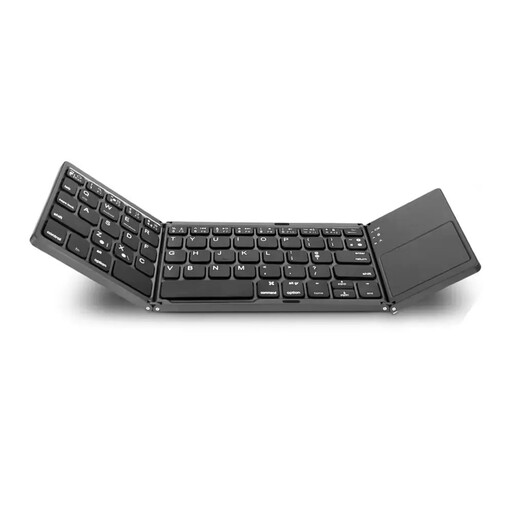
VoxorAI B033 folding Bluetooth keyboard with touchpad and number pad

VoxorAI B033 folding Bluetooth keyboard with touchpad and number pad

This folding model combines typing with a touchpad, so you won’t need to make room for a separate mouse on the train.

Specifications include 64 keys, Bluetooth, and support for iOS, Android and Windows. When folded, it measures 157,5 × 98 × 15,8 mm.

View at Joybuy

Frequently asked questions

Can I use a folding keyboard on my lap?

Don’t count on it with the ProtoArc XK01: ProtoArc recommends using this model on a stable surface rather than on your lap. For other keyboards, check their design and the space available at your seat.

How should I prepare my keyboard before travelling by train?

Pair the keyboard with the device you plan to use before setting off, and test that it works. For the XK01, ProtoArc describes pairing and switching between paired devices using BT1, BT2 or BT3. Also check your model’s layout and battery or charge level.

Do I need constant Wi-Fi to plan my training on the train?

You don’t need constant Wi-Fi to type on a Bluetooth keyboard. For online documents, connectivity depends on the train and route: Deutsche Bahn lists Wi-Fi across its ICE fleet, as well as on some Intercity services and selected regional trains. Where possible, save the documents you need to your device beforehand.

What are my rights if the keyboard I bought is faulty?

According to the Verbraucherzentrale, consumers in Germany can assert their statutory rights if a newly purchased product is faulty, within two years of it being handed over or received.

Can I put an old keyboard in my household bin?

No. The Umweltbundesamt explains that old electrical equipment must be collected separately. Only remove batteries or rechargeable batteries before returning the keyboard if you can do so without damaging it, and dispose of them separately.