For writing seminar questions without a plug socket, choose a portable keyboard that connects to the device you already use and is charged before your session, or has fresh batteries ready to go. Then think about your workspace: a foldable keyboard takes up less room in your bag, while a one-piece compact keyboard can make longer editing sessions more comfortable. A keyboard case with a tablet stand can also make setting up easier. In every case, check the key layout, screen positioning and power requirements of both the keyboard and your writing device.
Which keyboard suits which needs
Writing seminar questions on a tablet or mobile phone
You’ll need a connection to your mobile device and a layout that lets you enter questions and punctuation reliably. Check that your specific combination of device and operating system is supported.
Long sessions without a plug socket
If you’ll be drafting and editing questions during a longer session, plan ahead for how both your keyboard and writing device will be powered.
Moving between seminar rooms with minimal luggage
If you often pack away your writing equipment, weigh up how much space it takes, the key layout and how practical it is to position your screen.
What to look for when buying
Foldable Bluetooth keyboard
A good fit if: A small folded size matters more than having a continuous keyboard surface for shorter writing sessions. Hama describes the Travel 450 as a foldable 65% model with a German QWERTZ layout.
Worth considering: A foldable design alone doesn’t tell you how comfortable the keyboard will be for editing longer questions.
One-piece compact keyboard
A good fit if: You write longer texts or switch between compatible devices. Logitech says the Pebble Keys 2 K380s can switch between three devices, while CHERRY lists three Bluetooth channels for the KW 7100 MINI BT.
Worth considering: The keyboard doesn’t fold, so its layout and the space needed for the keyboard and screen must suit your workspace.
Separate keyboard with key cover
A good fit if: You carry your tablet or mobile phone separately from your keyboard and want to protect the keys while you’re out and about. Logitech describes the universal Keys-To-Go 2 as a keyboard for multiple operating systems.
Worth considering: A key cover doesn’t automatically double as a screen stand. COMPUTER BILD also lists the need for an additional stand case as a drawback of the Keys-To-Go 2.
Keyboard case with tablet stand
A good fit if: You want to prop up a compatible tablet without carrying a separate stand. Hama describes the Travel 600’s case as a fold-out tablet stand.
Worth considering: Check that your tablet sits securely in the intended position and that the whole setup fits on the surface available.
Custom-fit tablet keyboard case
A good fit if: You have a specifically supported tablet and want an integrated case rather than a separate universal keyboard.
Worth considering: The fit is designed for a particular tablet model, so check the exact device variant before buying.
| Priority |
What to check when buying |
Especially important if |
| Connection and compatibility |
Check Bluetooth support, operating system, the specific keyboard variant and how it works in the writing app you use. |
If I want to write seminar questions on my existing mobile phone, tablet or laptop, the connection needs to work with that exact device. Around 25% of consumers put compatibility first. |
| Power |
Check the keyboard’s battery or charge level; your writing device also needs enough power for the session. |
If I’m writing for a long time away from a plug socket, I want to plan ahead for power and charge levels. Around 25% of consumers prioritise writing without interruptions caused by a flat battery or depleted batteries. |
| Keys and layout |
Check the German QWERTZ variant, the punctuation and editing keys you need, and how the keyboard feels to type on. |
If I’m repeatedly reworking and correcting questions, the keys I need must be easy to reach. Around 20% of consumers pay particular attention to comfortable typing and a suitable layout. |
| Size when packed away |
Consider both the packed size and the space the keyboard takes up when unfolded. |
If I often move between seminar rooms, I care about how compactly the keyboard can be packed away. Around 15% of consumers prioritise pack size. |
| Screen positioning |
Check whether it has a stand and whether the keyboard and screen will fit on the surface available. |
If I need to set up my tablet and keyboard together at the seminar venue, a suitable setup is essential. Around 15% of consumers put practical screen positioning first. |
Common misconceptions
-
A keyboard cover automatically doubles as a tablet stand
A cover can protect the keys without propping up the screen. COMPUTER BILD says the Keys-To-Go 2 needs an additional stand case, while Hama specifically describes the Travel 600 case as having a stand function.
Check the keyboard and screen setup together, based on where you’ll actually be writing.
If your writing device doesn’t have its own stand, you may need an additional way to prop it up.
-
Foldable automatically means comfortable for longer texts
The Hama Travel 450’s foldable 65% format doesn’t, by itself, tell you whether the keys you need will be easy to reach when editing.
Check the punctuation, arrow keys and the corrections you make most often on the specific layout.
-
A wireless keyboard is ready to use without any preparation
A keyboard with a rechargeable battery needs to be charged before your session; if it uses disposable batteries, check their charge level. Your connected mobile phone, tablet or laptop also needs enough power.
Before a session away from a power source, test both the power supply and the connection to your writing device.
Brands and models to consider
Logitech
If you’re looking for a separate keyboard for a tablet, mobile phone or laptop, consider the universal Keys-To-Go 2 or the one-piece Pebble Keys 2 K380s.
- Logitech says the Pebble Keys 2 K380s can switch between three devices. COMPUTER BILD highlights the Keys-To-Go 2’s light weight and comfortable typing experience.
- The Keys-To-Go 2 doesn’t replace a screen stand; COMPUTER BILD also notes that it has no backlighting. These points apply to this model, not both keyboards.
CHERRY
The KW 7100 MINI BT and KW 9200 MINI are compact keyboards for multiple devices, with different connection options.
- CHERRY lists three Bluetooth channels, a carry case and battery-status LEDs for the KW 7100 MINI BT. For the KW 9200 MINI, the manufacturer describes Bluetooth, wireless receiver and wired connection channels.
- Check which connection types your writing device supports and which features you actually need. A wireless receiver and cable aren’t required for a Bluetooth connection.
Hama
The Travel 450 and Travel 600 offer different portable setups: a foldable model and a case that can be used as a tablet stand.
- Hama describes the Travel 450 as a foldable 65% model with a German QWERTZ layout; the Travel 600 has a case that doubles as a stand.
- The Travel 450 needs charging before you write without a plug socket. You should also check the charge level of the rechargeable Travel 600 before your session.
Samsung
The Smart Keyboard Trio 500 is a separate Bluetooth option worth considering, particularly if you already own compatible Samsung mobile devices.
- Samsung describes pairing and switching between up to three devices.
- The pairing process and available features can vary by device. Check how it works with your device and writing app.
Joybuy products for writing on the go
The models below include foldable and one-piece Bluetooth keyboards for writing on the go. For each one, check the connection to your writing device, the key layout and the power needed for your session.
 No image available
Inateck Bluetooth Keyboard KB01003G
A one-piece keyboard for writing on the go, ideal if you’re looking for a German QWERTZ layout.
The product name lists three Bluetooth connections and enlarged keycaps. Before your session, check that the layout suits your device.
View at Joybuy
 No image available
Inateck Foldable Mini Keyboard N0153BK
A foldable keyboard for writing when keeping your bag compact is a priority.
The product name lists a QWERTZ layout, a touchpad and three Bluetooth channels. Check that the compact layout suits the way you write and edit.
View at Joybuy
 No image available
NAXSIR foldable Bluetooth keyboard with magnetic stand
A foldable option if you want to set up your keyboard and screen together.
The product name lists a rechargeable battery and a magnetic stand for a mobile phone or tablet. Charge the keyboard before a session without a plug socket.
View at Joybuy
 No image available
Inateck Tablet Keyboard KB01105 with touchpad
A one-piece keyboard with a touchpad for writing on the go with a compatible tablet or computer.
The product name lists model KB01105 and a touchpad. Check the keyboard language in your device settings; otherwise, the version described may swap the Y and Z keys.
View at Joybuy
 No image available
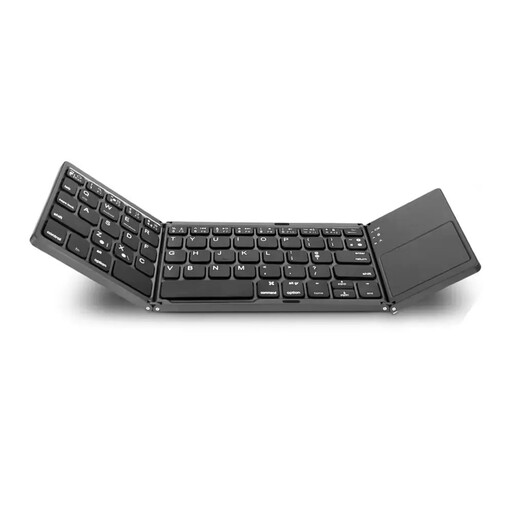
VoxorAI B033 foldable Bluetooth keyboard with touchpad and number pad
A foldable keyboard for writing on the go if you’d like an integrated touchpad and number pad.
The product name lists Bluetooth and a foldable design. Check that the stated device compatibility and key layout suit your writing device.
View at Joybuy
Frequently asked questions
What should I try before the seminar when pairing my keyboard?
Pair the keyboard in advance with the exact device and writing app you plan to use. Test umlauts, punctuation and the editing keys you need; for models other than the Samsung Smart Keyboard Trio 500, follow the relevant instructions.
Do I need anything besides the keyboard if there’s no plug socket?
Yes. Your mobile phone, tablet or laptop also needs enough power for the session. If you’re using a separate keyboard, plan for a secure way to position the screen too; according to COMPUTER BILD, the Keys-To-Go 2’s protective cover doesn’t replace an additional stand case.
What should I know about batteries, rechargeable batteries and guarantees?
Check whether the specific keyboard uses disposable batteries or has a rechargeable battery that needs charging before your session. EU consumer information states that purchases from professional sellers are generally covered by a statutory minimum guarantee of two years from receipt; this is separate from any additional manufacturer’s guarantee.
How should I dispose of an old keyboard and its batteries in Germany?
Electrical waste must not go in household rubbish. It should be collected separately, for example at a recycling centre or an appropriate take-back point. The German Environment Agency recommends removing batteries and rechargeable batteries before disposal where possible, and disposing of them separately.


