First, choose a keyboard that suits your device and the navigation features in your drawing software. A separate Bluetooth keyboard can be used with different devices, while a keyboard cover with a touchpad is only an option for compatible tablets. Then check the layout, the keys and gestures you need, and how much space you have for the screen and, if necessary, a mouse. According to Autodesk, two-finger touchpad gestures do not work for panning in AutoCAD LT 2026.
Which keyboard suits which user?
For reviewers who switch between devices
If you open plans on a tablet and a laptop in turn, device and operating system compatibility, as well as a keyboard that’s easy to stow away, are important factors. Logitech describes the Keys-To-Go 2 as compatible with multiple operating systems; CHERRY lists three Bluetooth channels for the KW 7100 MINI BT.
For reviewers who work through lots of drawing steps
If you often switch between views, commands and comments, check how your particular application handles panning, zooming and keyboard shortcuts. Autodesk documents a limitation on panning with two-finger touchpad gestures in AutoCAD LT 2026.
For reviewers short on desk space
If you also need room for paperwork or a mouse alongside the screen, consider the whole work setup, not just how compact the keyboard is when packed away. A separate compact keyboard and a compatible Surface keyboard cover offer different ways to organise your input devices and workspace.
What to look for when buying
First, check that the keyboard is compatible with your device and drawing software. Then consider the navigation you need and the space available for your screen, keyboard and, if necessary, mouse.
| What to consider |
What to check before buying |
Who this matters most to |
| Device compatibility |
Check the operating system and device model. For a keyboard cover, make sure your device is explicitly listed as compatible. |
If I want to use the same keyboard with my tablet and laptop, it needs to work with both. Around 36% of consumers rank compatibility with their existing device as their top priority. |
| Drawing navigation |
Test the keys you need, zooming and panning in your application. Check whether you’ll also need a mouse. |
If I often move around and navigate drawings, the gestures and commands in my software need to work. Around 29% of consumers put drawing navigation first. |
| Space and portability |
Compare the space taken up by the keyboard and screen; check whether the tablet can stand securely without the keyboard. |
If I need room for paperwork on the kitchen table too, I want to be able to put the keyboard away easily once I’ve finished reviewing. Around 21% of consumers prioritise clear desk space and portability. |
| Power and connectivity |
Check how the exact model is powered and whether your device has a suitable port for any USB receiver you need. |
If I plan to use the keyboard regularly, I want to know how it’s powered and whether the required connection is available. Around 14% of consumers put readiness to use and connection type first. |
Common buying mistakes
-
Assuming a familiar model has a German keyboard layout
The Joybuy versions of the CHERRY KW 7100 MINI BT and Rapoo E9050L are listed with US or US-international QWERTY layouts. This can affect special characters and keyboard shortcuts.
Check the layout details and product images for the exact version before deciding whether the key arrangement suits the way you type.
-
Assuming a touchpad will let you pan in CAD
Autodesk notes that two-finger panning does not work in AutoCAD LT 2026, although pinch-to-zoom works in the configuration described. This does not necessarily apply to other programmes.
Check the gestures supported by your own application. For the configuration described by Autodesk, you can use a mouse with a middle button or the PAN command.
-
Mistaking a key cover for a tablet stand
Logitech describes the Keys-To-Go 2 cover as protecting the keys during transport, not as a stand for the tablet.
Plan to set up the screen separately and securely at the kitchen table.
Key brands at a glance
Logitech
The Keys-To-Go 2 is a separate keyboard you can carry between a tablet and laptop, while the POP Icon Keys is a compact Bluetooth keyboard for use at a desk.
- Logitech says the Keys-To-Go 2 supports multiple operating systems and has an integrated key cover.
- The cover is not designed as a screen stand. A review of the POP Icon Keys cannot automatically be applied to the Keys-To-Go 2.
CHERRY
The KW 7100 MINI BT is a compact, standalone multi-device keyboard for use when desk space is limited.
- CHERRY lists three Bluetooth channels, flip-out feet and an included pouch.
- The Joybuy version described here is listed with a US-international QWERTY layout. Be sure to distinguish between the different layout options.
Microsoft
The Surface Pro 13-inch Flex Keyboard is a keyboard cover with a touchpad for specifically compatible Surface Pro devices.
- Microsoft says it can be used attached to the device or detached; Windows 11 is required for detached use.
- The cover is not a universal keyboard for any tablet. Autodesk also documents a limitation on two-finger panning in AutoCAD LT 2026.
Rapoo
According to the manufacturer, the E9050L is a compact keyboard with Bluetooth and 2.4 GHz connectivity.
- Rapoo lists USB-C charging and a USB receiver.
- The Joybuy version described here is listed with a US QWERTY layout. The manufacturer's claims about comfort and battery life are not independent test results.
Joybuy products
The Joybuy products below include separate multi-device keyboards and tablet keyboards or covers with a touchpad, designed for reviewing drawings on the go.
 No image available
Inateck KB01003G Bluetooth keyboard, QWERTZ
According to the product description, you can connect it to up to three devices, making it easy to switch between them.
QWERTZ layout; 1.5 mm key travel; weighs 217 g and measures 285 mm across.
View at Joybuy
 No image available
Inateck N0153BK foldable Bluetooth keyboard with touchpad
According to the product description, its foldable design and integrated touchpad are intended for portable typing and cursor control.
QWERTZ layout; three Bluetooth channels.
View at Joybuy
 No image available
Inateck KB01105 tablet keyboard with trackpad
If you’re looking for a tablet keyboard with cursor control, the product title lists an integrated trackpad and German QWERTZ layout.
5 mm thick; weighs 228 g; listed as suitable for iPad, Android tablets, Windows and laptops.
View at Joybuy
 No image available
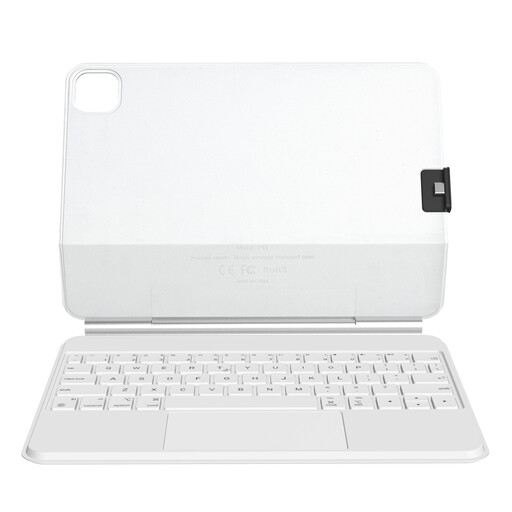
Rexsun P11-2 tablet keyboard cover with trackpad, white
This device-specific cover may suit you if your iPad model is compatible with the version on offer.
The title lists the iPad Pro 11-inch and iPad Air 10.9 or 11-inch. According to the variant details, it is designed for iPad Pro 11-inch models with M5/M4 chips; check compatibility with your exact model.
View at Joybuy
 No image available
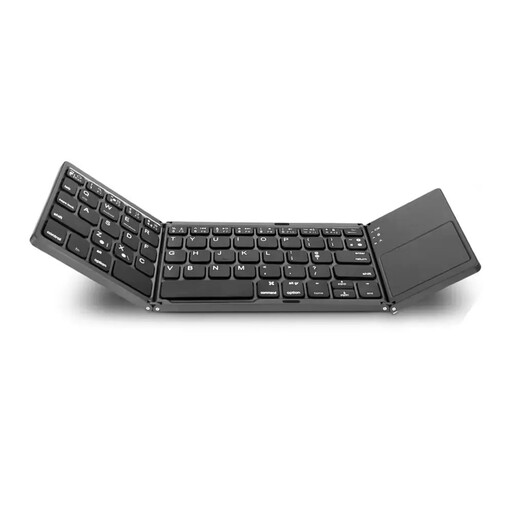
VoxorAI B033 foldable Bluetooth keyboard with touchpad
The product title describes a foldable device that combines a keyboard and touchpad; a number pad is also listed.
Folded dimensions: 152 × 97 × 12 mm; 140-mAh battery; described as supporting iOS, Android and Windows.
View at Joybuy
Frequently asked questions
Is a keyboard with a touchpad enough for panning around drawings?
Not in every piece of software. Autodesk notes that two-finger touchpad panning does not work in AutoCAD LT 2026, although pinch-to-zoom does. Alternatives suggested by Autodesk include using a mouse with a middle button or the PAN command. Don’t assume this applies to other programmes.
Can I use the Surface Pro 13-inch Flex Keyboard separately from the screen?
Yes. Microsoft says it can be used separately with Windows 11. To charge it, reconnect the keyboard to the Surface Pro. Before buying, check that it is compatible with your exact Surface Pro model.
What should I look for in the keyboard layout and power supply?
Compare the layout on offer with the characters and keyboard shortcuts you need. The Joybuy versions described here of the CHERRY KW 7100 MINI BT and Rapoo E9050L are listed with US or US-international QWERTY layouts. Also check how your chosen version is powered and whether you’ll need a suitable port for a USB receiver.
Who should I contact if a product develops a fault after I buy it in Germany?
For consumer purchases, statutory rights relating to faulty goods are the seller’s responsibility and are separate from any voluntary manufacturer’s guarantee. The Verbraucherzentrale generally describes a two-year statutory warranty covering the goods being free from defects at the time of delivery; the specific rights depend on the circumstances.
What does the CE mark mean on a Bluetooth keyboard?
The CE mark is the manufacturer’s own declaration that the relevant requirements have been met; it is not an independent performance test. Among other things, the Bundesnetzagentur oversees compliance with relevant requirements and checks details such as labelling, product identification and manufacturer information.


