For following appliance instructions at the kitchen table for longer periods, a display that’s easy to position and ideally has an anti-glare finish, plus the option to use portrait orientation, are good places to start. Before choosing, check that your source device can actually output video through the USB-C port you plan to use; HDMI may require a separate power supply. A smaller display takes up less table space, but leaves less room for the instructions.
Who reads appliance instructions at the kitchen table?
Laptop users reading PDFs
If you want to keep instructions open while using an appliance, portrait orientation, an anti-glare finish and compatible USB-C video output are particularly important. ASUS and Lenovo describe portrait use on certain models; your source device’s USB-C video output must be compatible.
Readers with limited table space
If the monitor, instructions and appliance you’re using all need to fit on the kitchen table, you’ll need to balance display size against the space available. Dell lists the P1425 as having a 14-inch display.
Readers using an HDMI source
If you want to connect via HDMI, remember to factor in the monitor’s power supply as well as the signal connection. Verbatim says the 49590 model needs an additional power adapter when using HDMI.
What should you look for when buying?
First, check that you can read the instructions clearly on the display and position the monitor as needed. Then compare the connections, power requirements and space needed with what your kitchen table can accommodate.
| What you need |
What to check when buying |
Who it matters to |
| Instructions that are easy to read |
Check the anti-glare finish, portrait orientation, resolution and zoom level using one of your own PDFs. |
If I want to read instructions while using an appliance, I need to be able to make out the text and page layout clearly on the display. Around 34% of consumers put instruction readability first. |
| A video connection that works with your device |
Check your source device’s video output and make sure it supports the relevant USB-C video mode or HDMI input. |
If I want to connect my laptop, tablet or another device, the specific port must output a video signal. Around 27% of consumers prioritise having the right video connection. |
| Space and positioning |
Compare the screen size, stand and footprint required with the table space available. |
If the monitor and appliance I’m using need to fit on the kitchen table at the same time, I want to limit the space they take up without choosing a display that’s too small for my PDF. Around 20% of consumers put space requirements first. |
| Power supply and cables |
Check the power requirements for your chosen connection and whether a power adapter is included. |
If I connect the monitor via HDMI, I want to know whether it needs a separate power connection. Around 13% of consumers prioritise power requirements and cable management. |
| Purchase and additional costs |
Check what’s included and whether you’ll need any extra cables or power adapters for your planned connection. |
If I’m planning a complete set-up, I want to know in advance which parts are included and what else I’ll need. Around 6% of consumers focus on the total cost of a fully working set-up. |
Common buying misconceptions
-
A USB-C connector guarantees video transmission
Whether the monitor receives a picture depends on whether the specific USB-C port on your source device supports the required video output. ASUS says the MB166CR requires DisplayPort Alt Mode.
Before buying, check your source device’s video output and make sure it matches the monitor’s required input.
-
HDMI automatically means a one-cable set-up
According to the manufacturer, the Verbatim 49590 needs an additional power adapter for HDMI; this is listed as included.
Check the signal connection, power source and what’s included together for the specific model.
-
Models with similar names are identical
A product name such as “PM14” alone doesn’t prove that a listing is for the same model as a similarly named variant.
Check the full model number and the connections you need against the product information for the specific listing.
Brands to consider
ASUS
The ZenScreen MB16AHV and MB166CR are worth considering for different connection options and viewing documents in portrait orientation.
- ASUS says these models have anti-glare Full HD IPS displays and can be positioned in different ways. The MB16AHV offers USB-C or Mini HDMI; the MB166CR needs compatible DisplayPort Alt Mode for USB-C video.
- According to ASUS, the advertised automatic rotation depends on software. These details apply to the models listed, not all ZenScreen monitors.
Lenovo
The L15 is a 15.6-inch model for viewing documents in portrait orientation with a compatible USB-C source device.
- Lenovo lists an anti-glare Full HD IPS display, portrait orientation and an adjustable stand.
- Using USB-C requires a compatible video output on your laptop or other source device.
Dell
The Pro P1425 is a 14-inch option if a smaller screen matters more to you than extra space for documents.
- Dell lists a resolution of 1920 × 1200 pixels, an IPS display and tilt adjustment for the P1425.
- Check your instructions at your preferred text size and display settings; the display specifications alone don’t tell you whether they’ll be comfortable to read.
Verbatim
The 49590 portable monitor is a 14-inch Full HD option with USB-C or HDMI.
- Verbatim lists a built-in stand and connection cables as included. The manufacturer also lists a power adapter for HDMI.
- When using HDMI, you’ll need to allow for an additional power connection. Check that model number 49590 matches the specific listing.
Portable monitors at Joybuy
These portable monitors are worth considering for reading appliance instructions at the kitchen table. Their product names mention USB-C and, in some cases, HDMI as well. Check your source device’s video output and, for the specific listing, whether CE marking is required and review the product information.
 No image available
Portable 15.6-inch monitor, Full HD
An option if you’re looking for a portable monitor with USB-C and HDMI connections; check that your USB-C device can output video.
15.6 inches; 1080p Full HD; 60 Hz; IPS panel; USB-C and HDMI; stand.
View at Joybuy
 No image available
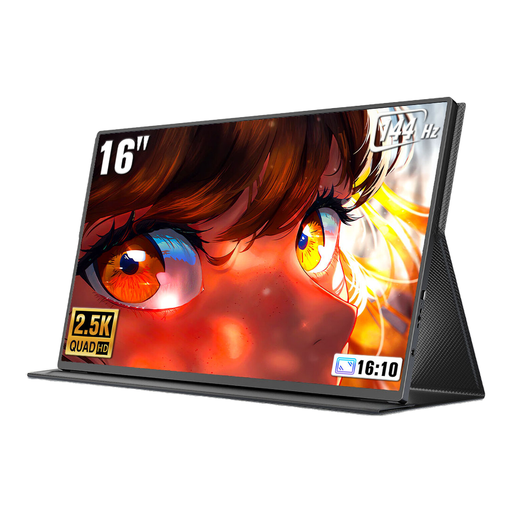
UPERFECT 16-inch monitor, 2560 × 1600
An option if you’re considering a 16:10 display at the stated resolution for documents; check that the connection is compatible with your source device.
16 inches; 2560 × 1600 pixels; 16:10; QLED; Mini HDMI and Type-C; VESA-compatible.
View at Joybuy
 No image available
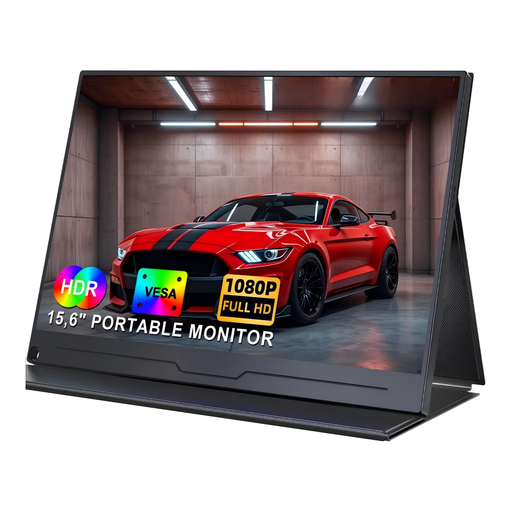
UPERFECT 15.6-inch monitor, Full HD
An option if you’re looking for a portable Full HD monitor with a USB-C connection; check your device’s video output.
15.6 inches; 1920 × 1080 pixels; IPS panel; HDR; USB-C.
View at Joybuy
 No image available
UPERFECT 15.6-inch monitor with adjustable stand
An option if you’re looking for a built-in adjustable stand and a choice of USB-C or Mini HDMI.
15.6 inches; Full HD; IPS panel; 100% sRGB; USB-C and Mini HDMI.
View at Joybuy
 No image available
UPERFECT 18.5-inch monitor, Full HD
An option if you’re considering a larger portable display; check that its screen size will fit on your kitchen table.
18.5 inches; 1920 × 1080 pixels; 120 Hz; matte IPS display; USB-C and Mini HDMI; VESA-compatible.
View at Joybuy
Frequently asked questions
Can I use any USB-C port for video?
No, a USB-C port doesn’t automatically transmit a video signal. Check the video output on your specific source device and make sure it meets the monitor’s requirements; ASUS says the MB166CR requires DisplayPort Alt Mode.
How can I display a long set of instructions on the monitor?
If your chosen model can be positioned in portrait orientation, you can rotate a portrait-format PDF page to match and adjust the zoom level. According to ASUS, automatic rotation on the MB16AHV depends on software.
What should I bear in mind when using HDMI?
According to Verbatim, the 49590 needs an additional power adapter for HDMI, which the manufacturer lists as included. Check the connection and what’s included for the exact model version in the listing.
Are a manufacturer’s warranty and your statutory rights the same thing?
No. Your statutory rights for faulty goods apply against the seller; a warranty is a voluntary offer with its own terms and conditions. For consumer purchases of new goods, the Verbraucherzentrale generally describes a two-year period for statutory rights.
Which markings and disposal rules are relevant?
Check whether the specific monitor version needs CE marking under the relevant EU rules and whether it has it; the requirement doesn’t automatically apply to every product. According to the European Union, monitors with a screen area of more than 100 cm² fall under WEEE marking rules. Old devices must be collected separately, not put in general waste; take-back terms depend, among other things, on the retailer and whether you’re buying an equivalent new product.


