Anyone editing lists with a second view
If you work on bibliography entries alongside a catalogue, PDF or notes, text on the additional display should be easy to read at your preferred font size.


For working on your bibliography at a library desk, choose a portable monitor that keeps text clear at your usual font size and has video and power connections that work with your laptop. A 14-inch model takes up less desk space, while a larger screen gives you more room to work. Touch is most useful if you want to interact with entries directly on the second display.
If you work on bibliography entries alongside a catalogue, PDF or notes, text on the additional display should be easy to read at your preferred font size.
If you often set up and pack away your workspace, remember that the stand, cables and power supply all take up space alongside your monitor and laptop.
If you want to touch or annotate entries on the second screen, check that the touchscreen works with your source device and the software you use.
First, check that your bibliography is easy to read on the available screen. Then make sure the video output, power supply and desk space all work for you.
| What matters | What to look for | Who is it especially important to? |
|---|---|---|
| Readability | Try a typical list page using your preferred font size and scaling; consider the resolution, screen size and anti-glare finish. | If I want to read bibliography entries alongside a PDF or catalogue, font size on the available screen matters to me. Around 34% of consumers put readability first. |
| Connections and power | Check USB-C video output, the right type of cable and the power supply. For the TD1655 connection described, ViewSonic requires DP 1.2 Alt Mode and power from the source device. | If I want my second monitor to display an image from my existing laptop and stay powered during a session, the connections need to be compatible. Around 33% of consumers prioritise connections and power. |
| Space and portability | Allow for the dimensions of the monitor, laptop and stand, as well as your bag and cables, at your intended workspace. | If I often change library desks, I want to be able to fit everything in and set it up easily. Around 25% of consumers prioritise space and portability. |
| Direct input | Check whether the specific model supports touch and, if applicable, a stylus; make sure it works with your device and the software you use. | If I want to select or annotate entries directly on the second display, direct input is essential. Around 8% of consumers prioritise touch controls. |
Your source device’s port must support the right video output. For the USB-C connection described for the TD1655, ViewSonic specifies DP 1.2 Alt Mode and power from the source device.
Check your laptop, monitor and cable specifications together to make sure they work as a complete connection.
The right font size also depends on scaling and your seating position. Screen dimensions alone don’t determine how comfortable a bibliography is to read.
Try a typical list page with your intended scaling and usual viewing distance.
For the ZenScreen Ink MB14AHD, ASUS lists the monitor battery as “NA”; the battery information refers to the stylus.
Check the display’s power supply separately from the information about its accessories.
Dell Germany lists the portable P1425 as a 14-inch monitor with a resolution of 1920 × 1200 pixels.
ASUS’s German specifications cover different ZenScreen models: the 15.6-inch MB16ACV and the touch-enabled MB14AHD, which comes with a stylus.
ViewSonic Germany describes the TD1655 as a portable touchscreen monitor with a fold-out stand.
HP describes the E14 G4 as a portable, anti-glare 14-inch FHD monitor.
Lenovo lists the L15 as a 15.6-inch portable FHD monitor.
The range includes portable 14-inch monitors, laptop extenders with multiple screens and a 15.3-inch model. Before buying, check that the connection works with your laptop and review the information on the EU conformity and energy labelling requirements that apply to each product.
 Image unavailable
Could be worth considering if you want to use two extra screens with your laptop at the same time.
Check that your laptop supports the connection required and that two additional displays will fit your workspace.
 Image unavailable
The 14-inch size could work as an extra screen at a library desk, provided there’s room for both your laptop and monitor.
Check that your laptop’s USB-C functionality supports the connection the monitor needs.
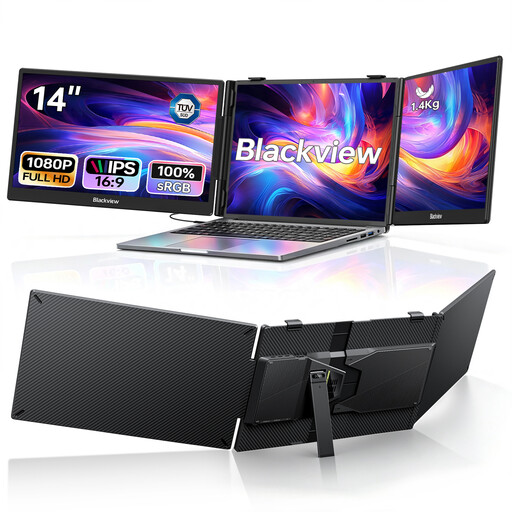 Image unavailable
A laptop extender with two additional displays could be a good option if you want to view several documents or workspaces at once.
Check your device’s USB-C video output and allow space for the complete setup.
 Image unavailable
Its compact size could be a good fit if you need one extra screen for your laptop at a library desk you use from time to time.
When packing, remember to allow for a protective sleeve, cables and the space needed for the stand.
 Image unavailable
A larger screen could be a good choice if there’s room on your library desk for the monitor, laptop and your other materials.
Factor in the dimensions and weight, along with your bag and other work materials.
No. The USB-C port must also support the right video output. For the TD1655 connection described, ViewSonic specifically requires DP 1.2 Alt Mode and power from the source device. Remember to check the cable too.
Position the stand so your laptop, monitor and cables fit on the available desk, then check readability using a typical list page. Follow the instructions for your specific model when cleaning or transporting it.
No. Your statutory rights are a legal entitlement against the seller; a guarantee is an additional voluntary promise with its own terms. The European Commission says that, in general, sellers are liable for covered lack of conformity for two years.
Devices within the relevant scope must meet EU electromagnetic compatibility requirements, including the required CE marking. The European Commission also lists ecodesign and energy labelling rules for covered electronic displays. You should check which requirements apply to each specific model.