
Lieferung heute & morgen

Qualitätsgarantie

Willkommens-Angebote freischalten: KOSTENLOSE Lieferung | Bis zu 80 % RABATT | Kostenlose 30-Tage-JoyPlus-Testphase
App herunterladen
A portable monitor can serve as a second screen on the go, an external monitor for your laptop, or a display for your games console or smartphone. In practice, though, screen size isn’t the only thing that matters. The connections, power supply and compatibility all determine whether a portable screen is genuinely practical for your laptop, home office, studies or gaming.
USB-C describes the shape of the connector, but that’s all. To transmit a picture, the USB-C port on your source device must support DisplayPort Alt Mode or a comparable video output standard. Some ports only provide power or data.
So before you buy, check the following:
A USB-C monitor can make for a particularly tidy set-up with compatible devices. For PS5, Xbox, older laptops or PCs, an HDMI monitor is often the more practical choice.
A portable gaming monitor with a 120 or 144 Hz refresh rate can display movement more smoothly than a 60 Hz model. However, your laptop, graphics card or games console must be able to output the relevant frame rate, and the cable you use must support it.
For office work, streaming and word processing, a Full HD monitor with a 60 Hz refresh rate is often enough. For fast-paced games, 120 or 144 Hz may be worth considering. Always look at the refresh rate alongside the resolution, connection type and response time.
A 14-inch monitor is easy to carry and will often fit in a laptop bag. Models measuring 15.6 to 16.1 inches provide more screen space, but usually weigh a little more. Larger models from 17 inches upwards are better suited to a permanent desk set-up or to travellers who prefer a bigger display.
Aspect ratio matters, too: 16:9 is common for games consoles and videos, while 16:10 gives you extra vertical space for documents and websites.
For 14 to 16-inch screens, Full HD at 1,920 × 1,080 pixels is common for office work, video and general use. A 2K or 2.5K model such as the ARZOPA Z1RC displays more pixels and can show text and fine details more sharply. A 4K portable monitor with 3,840 × 2,160 pixels is suited to high-resolution content and a larger workspace, but requires more bandwidth and can place greater demands on your graphics hardware when gaming.
IPS panels offer viewing angles of up to 178 degrees, according to the product information. For bright indoor spaces, a brightness of around 300 cd/m² or higher is a useful guide. Colour gamut, such as sRGB, is particularly relevant for photo editing and colour-consistent content. Figures such as 100% or 106% sRGB should be treated as manufacturers’ technical specifications, and don’t replace checking whether a monitor suits your particular needs.
Many portable monitors draw power via USB-C. With an HDMI connection, you’ll often need an additional USB cable or power adapter. For use on the go, a built-in stand, protective cover or VESA compatibility can be handy. Place the monitor on a stable, flat surface and make sure it has enough ventilation. Cables and power adapters should meet the requirements in the user manual.
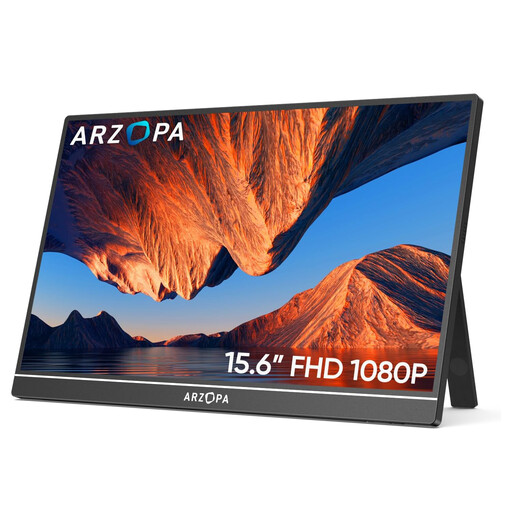
Why it suits this type of user: This 15.6-inch Full HD monitor combines a popular screen size with USB-C and HDMI ports for laptops, PCs, Macs and games consoles.
The specifications clearly list Full HD, 60 Hz, USB-C and HDMI, making it easier to check the connections you’ll need before buying.
15.6-inch IPS panel, 1,920 × 1,080 pixels, 60 Hz, two USB-C ports and HDMI.
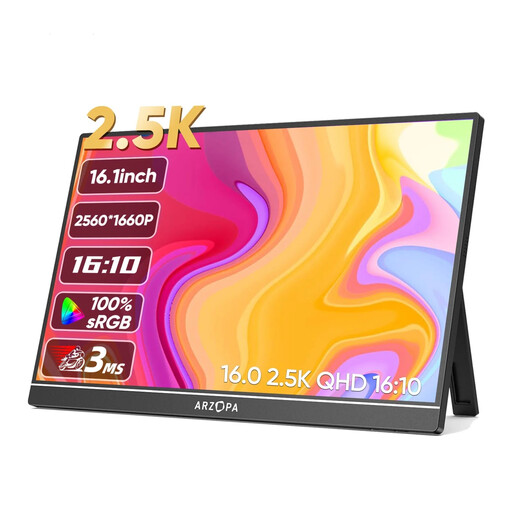
Why it suits this type of user: With a resolution of 2,560 × 1,600 pixels and a 16:10 aspect ratio, this monitor is designed for people who work on documents, spreadsheets or detailed content while travelling.
The 16:10 aspect ratio and 2.5K resolution are clearly stated, so you can judge the usable workspace by more than just the screen size.
16 inches, 2,560 × 1,600 pixels, IPS panel, 350 cd/m² and 60 Hz.
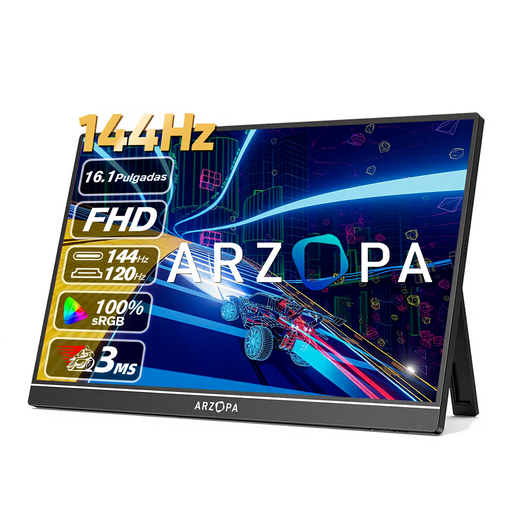
Why it suits this type of user: For gaming on a laptop, PC, PS5, Xbox or Nintendo Switch, you get 144 Hz, Full HD and HDMI, alongside two USB-C ports.
The refresh rate is listed alongside the resolution, response time and connections. This lets you check whether your hardware can actually output 144 Hz.
16.1 inches, 1,920 × 1,080 pixels, 144 Hz, 300 cd/m², 13 ms and 106% sRGB according to the product specifications.
We’ve put together a complete, regularly updated list of products that meet these strict selection criteria and fully comply with the safety regulations in force in the EU.
With a compatible USB-C port, a full-featured USB-C cable is often all you need for both picture and power. If your laptop doesn’t support video output via USB-C, you’ll usually need HDMI for the picture and USB-C or USB-A for power. The exact set-up depends on the monitor and laptop.
Its lifespan depends on the panel, electronics, how it’s transported and how it’s used. Use a protective cover, avoid putting pressure on the screen and disconnect all the cables before storing it away. Check the manufacturer’s warranty and replacement service details before buying.
It generally uses less power than a large desktop monitor, but consumption depends on brightness, resolution and power supply. If you’re using a laptop, a screen powered via USB may reduce its battery life. For longer sessions, it’s worth using a mains socket or a suitable power bank with enough output.