If you want to discuss digital colours in a café, look for documented colour-gamut and calibration details rather than focusing on size or resolution alone. ASUS, for example, provides this information for the ProArt PA148CTV, while EIZO emphasises the importance of a calibrated, consistent workflow for colour-critical work. Clear, easy-to-see details and a stable stand can be more important when you’re reviewing a layout together. Before you go, check that your specific source device supports video output over USB-C and supplies enough power. A preview in a café doesn’t guarantee the same colours in the final print.
Who might find a portable monitor useful in a café?
Designers approving colours
If you want to discuss digital colours, look for documented colour-gamut and calibration details. ASUS provides this information for the ProArt PA148CTV; EIZO highlights the importance of a suitable calibrated monitor and a consistent workflow for colour-critical work.
Designers presenting from a laptop
If you want your laptop to power the monitor at a café table using a single cable, check the video output and power capabilities of your specific device. ASUS and ViewSonic outline the requirements for a USB-C connection.
Designers reviewing layouts together
If you want to look at type, spacing and design variations together, you’ll need a display that’s easy to read from your seats and a stand that works for you. Lenovo describes the ThinkVision M14d as having a 16:10 display with 2240 × 1400 pixels; AOC describes the 16T3EA as a 15.6-inch monitor with an integrated stand.
What should you look for when choosing one?
First decide whether colour or reviewing layout details together is your priority. Then check that the connections, power supply and footprint will work at your café table.
| What matters |
What to check before buying |
Who is this especially important to? |
| Design colours |
Check that the colour gamut suits your file, and look at calibration and colour mode. |
If I want to discuss digital colours, I compare the colour-gamut and calibration details with my workflow. Around 29% of consumers in this decision-making situation say colour is their top priority. |
| Video signal and power |
Check video output, power delivery and cable compatibility with your source device; allow for an additional power supply if needed. |
If I want the monitor to work with my laptop at a café table, I check the video signal and power supply in advance. Around 29% of consumers prioritise connectivity and power. |
| Easy viewing while you talk |
Compare screen size, resolution, aspect ratio and viewing angle for your seating position. |
If we’re assessing type and spacing together, I want both people to be able to see the details. Around 24% of consumers put readability first. |
| Portability and set-up |
Consider the weight, dimensions, stand and cables you’ll need. |
If I’m carrying the monitor around and setting it up on a small table, I look for a light design and a stable stand. Around 18% of consumers prioritise portability and set-up. |
Which buying misconceptions should you avoid?
-
A USB-C port doesn’t guarantee a video signal
The port needs to support the right video output and supply enough power. A plug may fit physically without providing a connection that’s powerful enough for the monitor.
Check the capabilities of your laptop, tablet or phone against the monitor’s requirements and the cable you plan to use.
-
Colour-gamut coverage isn’t the same as colour accuracy
A percentage figure for colour gamut doesn’t tell you about every possible colour variation, nor does it guarantee an accurate print proof.
If colour is critical, check the calibration details, colour mode and your whole workflow. EIZO describes a suitable calibrated monitor as part of colour-critical work.
A suitable colour workflow may require extra time and effort for calibration and colour management.
-
Don’t assume the headline and specification table say the same thing
The Joybuy product page for the ARZOPA Z1RC lists 500 Nits in the headline and 350 cd/m² in the specifications. If brightness matters for your presentation conditions, check which figure is correct.
Before you decide, check the exact model variant and the relevant information from the manufacturer or retailer.
Which brands are worth considering?
ASUS
The ProArt PA148CTV is designed for creative discussions where colour specifications and touch control matter.
- ASUS specifies 100% sRGB and 100% Rec.709, as well as factory calibration, for the PA148CTV.
- For a single-cable USB-C connection, ASUS requires DisplayPort Alt Mode and a power output of at least 10 W from the source device. ASUS Dial and Control Panel in ProArt Creator Hub are supported on Windows only, according to ASUS.
Lenovo
The ThinkVision M14d is a 14-inch display with a 16:10 aspect ratio, designed for reviewing fine layout details.
- Lenovo specifies a resolution of 2240 × 1400 pixels, 100% sRGB and a net weight of 600 g for the M14d.
- Colour-gamut coverage doesn’t tell you how much the colours vary on an individual device. The ThinkVision M14d is not the same model as the touchscreen M14t Gen 2.
ViewSonic
The TD1655 is designed for shared presentations with touch control.
- ViewSonic specifies Full HD, 10-point touch and a foldable stand.
- According to ViewSonic, full USB-C functionality depends on the capabilities of the source device; in particular, check video and power delivery.
AOC
The 16T3EA is a portable 15.6-inch Full HD second screen for conversations and shared viewing.
- AOC specifies an IPS panel, USB-C power delivery and an integrated stand for the 16T3EA.
- These specifications alone don’t prove that it’s suitable for colour-critical approval.
ARZOPA
The Z1RC is a 16-inch display with a 16:10 aspect ratio, designed to show more detail.
- ARZOPA specifies a resolution of 2560 × 1600 pixels and 123% sRGB for the Z1RC.
- The sRGB figure alone doesn’t confirm individual colour accuracy. The Joybuy product page lists different brightness figures, so check which is correct before basing your decision on them.
Portable monitors at Joybuy
The Joybuy products below are portable second screens for looking at designs and layouts together at a café table. Check compatibility with your own source device, and remember that colour-gamut figures alone don’t prove individual colour accuracy.
 No image available
KEFEYA 16-inch monitor with rotating magnetic stand
The rotating magnetic stand makes it easier to position the screen at a café table; check that your source device supports the connection.
16 inches; 1200P; IPS; USB-C with video, data and power delivery; 120% sRGB; 300 Nits; 0.76 kg.
View at Joybuy
 No image available
UPERFECT 16-inch 2K monitor, 144 Hz
The 16:10 aspect ratio and resolution are useful details if you want to look at smaller layout elements together; check the connections required for your specific device.
16 inches; QLED; 2560 × 1600 pixels; 16:10; 1200:1; 450 Nits; 144 Hz; Mini HDMI and USB-C; VESA-compatible.
View at Joybuy
 No image available
ARZOPA Z1RC, 16 inches, 2.5K
The 16:10 aspect ratio and 2560 × 1600 pixels are useful for viewing layout details. Check the brightness specification if it’s important for how you plan to use the monitor.
IPS; 2560 × 1600 pixels; 16:10; USB-C and HDMI; 123% sRGB; 810 g.
View at Joybuy
 No image available
UPERFECT 15.6-inch monitor with integrated stand
The integrated adjustable stand makes it easier to set up the screen for shared viewing; the sRGB figure doesn’t prove individual colour accuracy.
15.6 inches; IPS; 1920 × 1080 pixels; 100% sRGB; 300 Nits; USB-C and Mini HDMI.
View at Joybuy
 No image available
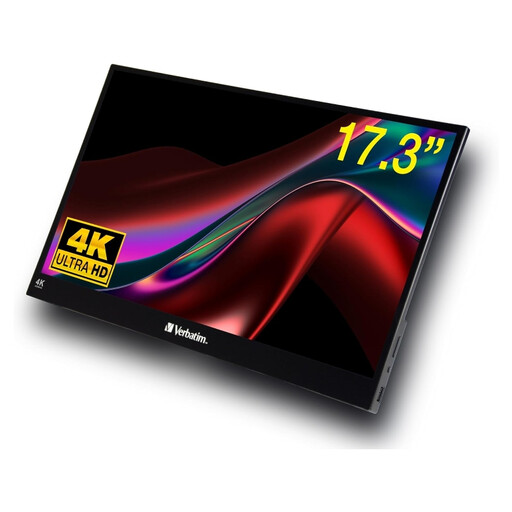
Verbatim PMT-17, 17.3-inch touchscreen monitor
The touchscreen could be useful for going through design variations together; check that your operating system supports it first. Its size and weight mean it takes up more room on the table and in transit than a smaller, lighter display.
17.3 inches; Full HD; IPS; touch; USB-A, USB-C and HDMI; power supply and cable included according to the product description; 1.63 kg.
View at Joybuy
Frequently asked questions
Will any USB-C port provide video and power?
No. Check the video output and power delivery capabilities of your specific laptop, tablet or phone. For a single-cable connection to the PA148CTV, ASUS specifies DisplayPort Alt Mode and at least 10 W; this isn’t a general requirement for all monitors.
Can I use a portable monitor to approve a print-ready design?
Not on the basis of resolution, HDR or a colour-gamut percentage alone. For colour-critical work, EIZO describes using a suitable calibrated monitor and a consistent colour workflow; a café display is still only a preview under the conditions there.
How should I prepare for a presentation at a café table?
Beforehand, test the video connection, power supply, screen orientation and stand angle using the same device and cable you plan to take with you. If you’re choosing a touchscreen model, also check that your operating system supports it; ASUS notes that certain PA148CTV features depend on the operating system.
Who should I contact in Germany if there’s a fault after purchase?
For a purchase from a trader, EU consumer law provides a legal guarantee of at least two years from receipt of the goods; the seller is responsible for legal claims. This is separate from any additional manufacturer’s warranty.
Do online purchases come with a right to cancel?
Consumers generally have 14 days to withdraw from online purchases without giving a reason; the Council of the European Union notes that there are exceptions. Check the terms of the specific trader. The right to withdraw is separate from claims relating to faulty goods.


