What to consider when buying
Check the video connection and power supply first, then compare the aspect ratio, footprint and extra features.
| Consideration |
What to check when buying |
Who should pay particular attention |
| Screen space and legibility |
Check the aspect ratio, resolution and scaling together using a typical draft. Lenovo Germany lists the M14d as 14 inches, 16:10 and 2240 × 1400 pixels; Dell Germany lists the P1425 as 14 inches and 1920 × 1200 pixels. |
If I want to keep my draft and sources open at the same time, I need a clear display at my usual scaling. Around 29% of consumers would put screen space and legibility at the top of their list. |
| Video connection and power |
Check that the laptop port supports video output, and match the cable and power supply for both devices to your planned setup. Lenovo Germany lists USB-C with DP 1.2 Alt Mode and power delivery of up to 65 W for the M14d; this does not describe the capabilities of every laptop. |
If I work in a café without a reliable power socket, the connection needs to work and the setup needs enough power for the planned session. Around 36% of consumers would prioritise connectivity and power. |
| Desk space and portability |
Measure the space on the table for the monitor and its stand alongside your open laptop; consider the weight and accessories together when assessing portability. Lenovo Germany lists the M14d’s net weight as 600 g, while ASUS Germany gives the MB16ACV as around 0.9 kg. |
If my café table is small and I want to carry the screen with me, a stable setup and a portable overall package matter. Around 21% of consumers would make space requirements and portability a priority. |
| Image checking and direct input |
For image layouts, check the specifications for the exact model. For touch, also check the data connection and software compatibility. Verbatim lists 10-point multitouch and 45% NTSC for model 32400. |
If I want to review newsletter images on the second screen or work directly on it, I need a display or input method suited to that task. Around 14% of consumers would prioritise image checking or direct input. |
Portable monitors at Joybuy
This selection features portable extra screens for working on newsletters on the go, from compact single monitors to larger or multi-screen setups. Before buying, check the video connection, power supply and available table space in particular.
 No product image available
Portable 14-inch FHD monitor, 60 Hz
Described as an extra screen for using with a laptop on the go; its compact size may suit a small café table.
The title lists 1080p, 60 Hz, built-in speakers and USB-C, but no HDMI connection. The stated compatibility with 14- to 16-inch laptops doesn’t replace checking video output.
View at Joybuy
 No product image available
PM14R, 14 inches, 1920 × 1200
The 16:10 aspect ratio is worth considering if you’d like extra vertical screen space for writing.
The title lists an IPS display with a resolution of 1920 × 1200 pixels, plus USB-C and Mini-HDMI. For use in a café, you’ll also need to check that it connects to your laptop.
View at Joybuy
 No product image available
Blackview SCM5, 14 inches, FHD IPS
The adjustable stand may be useful when setting the monitor up beside your laptop; check that it fits on your café table.
The listed features include FHD, IPS, an 18,2 mm profile and an adjustable stand. Stated compatibility with different laptop sizes doesn’t confirm compatibility with a particular connection.
View at Joybuy
 No product image available
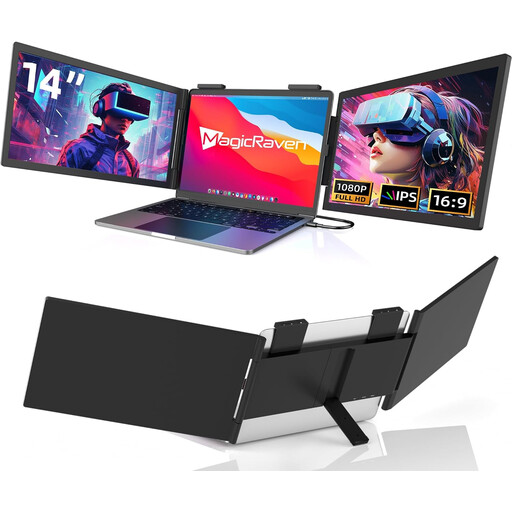
Portable 14-inch dual-screen extender
This extender adds two extra screens to your laptop; the multi-screen setup needs more table space than a single additional monitor.
Listed features include two FHD IPS screens, 60 Hz, HDMI, USB-A and USB-C. Check the connections and make sure you have enough room for the whole unit when open.
View at Joybuy
 No product image available
Blackview TABLE 9, 16 inches, 16:10
The 16:10 aspect ratio may suit newsletter drafts if you’d like more vertical screen space and have enough room at your café table.
The title lists a pull-out, rotating magnetic stand. Take the 16-inch screen size into account when planning where to set it up.
View at Joybuy
Frequently asked questions
Is a USB-C port on my laptop enough to connect a second screen?
No, the connector shape alone isn’t enough. Lenovo specifies DisplayPort Alt Mode for the ThinkVision M14d’s USB-C video connection, so check your laptop’s video output, cable and power supply against the specific monitor.
How should I set up the monitor for longer newsletter articles?
Measure the available table space with your laptop open, then check the stand angle and text size using a typical draft. Assess how much usable screen space you have at your actual display scaling, especially if you want to arrange several documents side by side.
How much battery life will I lose if I work without a power socket?
A monitor powered by your laptop still uses electricity, and the effect on battery life depends on the specific laptop and connection setup. Test your planned session with your devices and, if needed, take a suitable external power source.
What are my rights when buying online in Germany?
According to the consumer advice centres, online orders generally come with a 14-day right to cancel, starting from the day you receive the goods. Your statutory rights if goods are faulty are separate from any voluntary guarantee; check the information about the specific contract and returns before buying.
Is public café Wi-Fi safe to use with newsletter data?
Not necessarily. Germany’s Federal Office for Information Security warns of the risks of using unfamiliar Wi-Fi networks. Follow your organisation’s security rules when working with confidential drafts or contact details. Choosing a monitor won’t resolve this IT security issue.


