Writers with a small café table
You want to see your draft and research side by side, but have limited space and often carry the screen with you. Check the dimensions, weight and stability of the stand.


A compact 14-inch model is an obvious choice for a small café table. If you want your draft and research visible at the same time and have enough room, a 16-inch display could work well. Verbatim lists the PM-14 at 540 g, while Lenovo lists the ThinkVision M16 at 980 g. These manufacturers’ figures apply to specific models, not all monitors of the same size. You’ll also need a compatible video output and enough power.
You want to see your draft and research side by side, but have limited space and often carry the screen with you. Check the dimensions, weight and stability of the stand.
You compare your text, outline and sources as you write, and can clear more space on the table for them. Check the aspect ratio, resolution and text scaling rather than focusing on the pixel count alone.
You can’t count on being able to sit near a socket when working in a café. The key things to check are your laptop’s power output, the connection type and, where relevant, whether the monitor has its own battery.
First check your laptop’s video signal and power supply, then consider the space available and how clearly it displays text. This will help you decide whether adding a screen to your café table is practical.
| What to consider | What to check | Who should pay particular attention? |
|---|---|---|
| Connection compatibility | Check your laptop’s video output, the monitor’s input, DisplayPort Alt Mode and the power output required. | If I want to connect the monitor via USB-C, my laptop must also provide the right video signal. Around 31% of consumers put connection compatibility first. |
| Desk space and portability | Compare the dimensions with the stand set up and the weight including the case against the space available on your table and in your bag. | At a small café table, I want room for my laptop, screen and writing materials without carrying unnecessary weight. Around 25% of consumers prioritise desk space and portability. |
| Readable text area | Check a typical page of text and a research window at your preferred scaling, taking the aspect ratio and resolution into account. | If I want to see my manuscript, outline and sources at the same time, what matters is having a usable text area at a comfortable scaling level. Around 25% of consumers put this first. |
| Power supply | Check the monitor’s power requirements and your laptop’s output. If the monitor has a built-in battery, consider how long you need it to last. | Without reliable access to a socket, I need a power setup that will actually work in a café. Around 19% of consumers prioritise being able to work without reliable access to a socket. |
A USB-C port alone doesn’t confirm that your laptop can provide the video signal required or enough power for the monitor.
Before buying, compare the connection specifications for both devices and check that the cable setup you have in mind will work.
According to the manufacturer, the Verbatim PM-14 needs an additional power adapter when connected via HDMI.
With HDMI, plan for the video signal and power supply separately, and check the requirements for the specific monitor.
An additional power source may mean you need another socket and cable at your café table.
A larger monitor takes up more space and may weigh more to carry. Lenovo lists the ThinkVision M16 as 16 inches and 980 g, while Verbatim lists the PM-14 as 14 inches and 540 g.
Check that your laptop and monitor, with the stand open, will fit on the table. Then assess how clearly text appears at your preferred scaling level.
A larger screen may take up more room when you pack and set it up.
A voluntary manufacturer’s warranty is separate from your statutory rights against the seller if goods are faulty. The European Union sets a minimum legal guarantee of two years from the date you receive the goods.
Compare the terms of any additional protection plan with your statutory rights and the specific warranty conditions.
The PM-14 is a compact 14-inch option; other models from the brand cater to different needs.
The ThinkVision M16 has a 16:10 aspect ratio, while the M14t Gen 2 is a smaller touchscreen option.
The gram +view 16MR70 is an option for writers considering a 16-inch secondary display with a higher resolution.
The ZenScreen Go MB16AHP is an example of a portable monitor with its own battery.
The Dell Pro P1425 is a 14-inch option with a 16:10 text area.
These portable secondary screens are designed for writers who want to work on a manuscript and research side by side on a laptop. Check the space required, connection and power needs for each model.
 No image available
Described as a portable laptop monitor for creating a second workspace; a 16-inch display needs room beside your laptop.
16 inches, FHD 1200P and a 360° rotating magnetic stand; weight according to the product description: 0.76 kg.
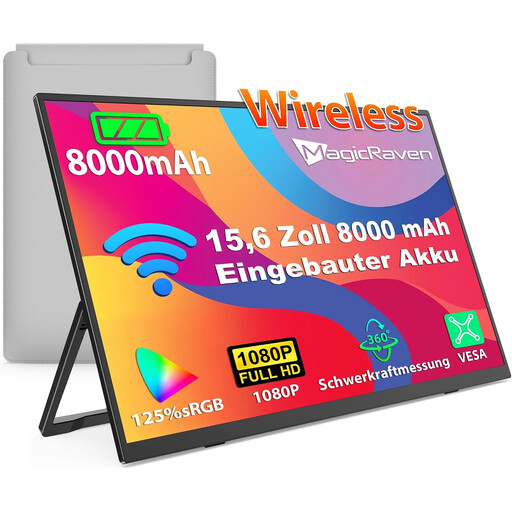 No image available
The built-in battery is useful if you can’t rely on finding a socket in the café; capacity alone doesn’t tell you how long it will last.
15.6 inches, 1080p FHD, IPS, 60 Hz and 8000 mAh.
 No image available
The 14-inch size is worth considering if you have limited room on the table for an extra screen.
14 inches, FHD, IPS and an adjustable stand.
 No image available
The 16:10 aspect ratio could work well for a manuscript and research if there’s enough room on your café table.
16 inches, 16:10, 2560 × 1600 pixels and 810 g.
 No image available
The built-in adjustable stand can be handy when setting the monitor up at a café table; check that you can position the display as needed.
15.6 inches, 1920 × 1080 pixels, IPS, USB-C and Mini-HDMI.
No. Your laptop must provide the video signal the monitor needs and enough power through the port. For the PM-14, Verbatim specifies DisplayPort Alt Mode and a sufficient power supply; for the 16MR70, LG requires DP Alt Mode and a power output of more than 7.5 W.
It depends on the model. Verbatim specifies an additional power adapter for using the PM-14 via HDMI. Check the power requirements for your specific monitor and plan your cables accordingly.
Measure the space beside your laptop with the monitor set up, and check whether you can read your draft and research side by side at your preferred text scaling. A larger display takes up more room, so weight and dimensions matter just as much as screen size.
No. Capacity alone doesn’t tell you how long the battery will last. If you want to work without a socket, check the battery life stated for the specific model and remember that you may need to charge the monitor too.
For online purchases from a trader in the EU, you generally have a 14-day cooling-off period from delivery, subject to legal exceptions. The European Union’s Your Europe website also explains that you may have to pay return costs if the seller doesn’t cover them and has properly informed you of this.