When working on a club timetable at a library table, the key considerations are a clear, readable workspace, a suitable size and compatible video connections. A 14-inch model with a 16:10 aspect ratio can be a compact choice when space is tight; a larger display offers more screen area but also takes up more room on the table and in your bag. Before buying, check whether your laptop’s USB-C port supports video output and how the monitor is powered. ASUS Support notes that video transmission over USB-C requires the computer’s port to support the relevant video function.
Who is a portable monitor suitable for?
Timetables with lots of rows
If you want to edit appointments while keeping your documents in view, compare the aspect ratio and resolution rather than looking at screen size alone. Lenovo Germany lists the ThinkVision M14d as a 14-inch, 16:10 monitor, while ASUS Germany lists the ZenScreen MB166C as a 15.6-inch, 16:9 model.
For a laptop and a small table
If you regularly set up and pack away your workspace in the library, compact dimensions and suitable video connections matter more than the largest possible screen. Check your laptop’s USB-C capabilities and the monitor’s requirements before planning a single-cable setup.
For an HDMI laptop or uncertain USB-C support
If you’re not sure whether your laptop can output a video signal over USB-C, or you want to use HDMI, check that the video input and power supply will work with your specific setup before buying. ASUS Support explains that plug-and-play requires the USB-C port to support video.
What should you look for when buying?
| Requirement |
What to look for |
Who is this important for? |
| Clear, readable workspace |
Compare the aspect ratio and native resolution, then check that the text scaling is easy to read. |
When I’m editing lots of rows in the club timetable and keeping documents open alongside it, I want to be able to read both clearly. That’s why around 36% of consumers put screen space first. |
| Suitable video connection |
Check that your specific laptop USB-C port supports video output and that the monitor has a compatible input. |
When I already have a laptop, I want to know before setting up whether its USB-C port actually outputs video. That’s why around 29% of consumers focus on connection compatibility. |
| Portability and space on the table |
Check the overall dimensions and weight, including the stand, against your bag and the library table. |
When I regularly carry my monitor and laptop with me, I want to be able to set everything up quickly at the table and pack it away again easily. That’s why around 21% of consumers prioritise portability and the space it takes up. |
| Power supply |
Check the monitor’s power requirements separately from whether a power adapter is actually included. |
When I want to keep my setup as simple as possible, I need to know in advance whether I’ll need a power adapter. That’s why around 14% of consumers prioritise the power supply. |
Avoid common selection mistakes
-
Assuming USB-C guarantees a video signal
USB-C ports can support different functions. For the ASUS ZenScreen MB166C to transmit a picture, the laptop’s port must also support display output.
Check the specifications of your specific laptop port against the monitor’s video inputs.
If the connection isn’t compatible, you may need additional hardware, or a different monitor may be a better match for your laptop.
-
Assuming power pass-through means no adapter is needed
A USB-C power pass-through specification doesn’t automatically mean the monitor can be powered without an adapter. ViewSonic states that the VA1655 requires an external power adapter for power delivery.
Check the video connection, monitor power supply and laptop charging as separate functions.
According to ViewSonic, an external power adapter is required to power the VA1655.
-
Choosing by screen size alone
A larger display can take up more space on the library table and in your bag. A smaller 16:10 model uses its screen area differently from a larger display.
Compare the dimensions of your table and bag with the screen format and your planned timetable layout.
Key brands at a glance
Lenovo
The ThinkVision M14d is a specific example of a compact 14-inch, 16:10 monitor for working on documents on the go.
- Lenovo lists the M14d as having a 2240 × 1400 resolution, two USB-C ports with DP Alt Mode and a net weight of 600 g.
- These specifications apply to the M14d. Check compatibility with your laptop and make sure the selected scaling is easy for you to read.
ASUS
The ZenScreen MB166C is a portable, anti-glare 15.6-inch Full HD display with USB-C.
- ASUS specifies an IPS display and an anti-glare surface for the MB166C.
- For video transmission over USB-C, the laptop port must support display output. This isn’t guaranteed for every USB-C port.
Dell
The Dell Pro P1425 is a 14-inch, 16:10 alternative for a compact portable second screen.
- Dell lists the P1425 as having a 1920 × 1200 resolution, IPS and an anti-glare display.
- Check the connections and power supply on your own laptop; the model specifications don’t replace this compatibility check.
ViewSonic
The VA1655 is a portable Full HD option with a folding stand and USB-C power pass-through.
- ViewSonic describes the VA1655 as having a 60 W USB-C solution and a folding stand.
- According to ViewSonic, an external power adapter is required for power delivery.
ARZOPA
The A1M is a larger 17.3-inch Full HD option with USB-C and HDMI.
- ARZOPA lists the A1M as having a 17.3-inch screen, as well as USB-C and HDMI.
- Consider the larger screen size against the available space on your library table and in your bag.
Joybuy products for working on the go with a laptop
The Joybuy products below are portable second screens for working on a laptop. The models range from 15.6 to 16 inches and, depending on the model, offer USB-C and HDMI or Mini HDMI.
 Image unavailable
UFYQL M156F04, 15.6-inch FHD IPS
For a laptop workspace with an extra screen; USB-C video transmission requires video output from the laptop port.
15.6 inches, 1920 × 1080, IPS, USB-C and HDMI. A smart cover stand and VESA mounting are listed.
Joybuy
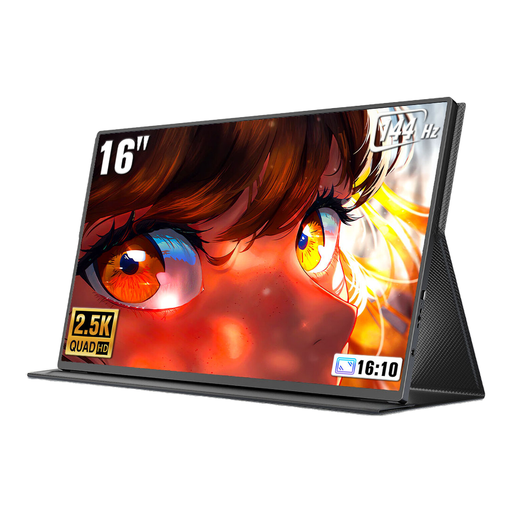 Image unavailable
UPERFECT, 16 inches, 2560 × 1600, 16:10
The 16:10 format could be useful for viewing timetable rows. Check in advance whether your laptop can output a video signal over USB-C or Mini HDMI.
2560 × 1600, 16:10, 144 Hz, QLED, 450 nits, USB-C and Mini HDMI.
Joybuy
 Image unavailable
ARZOPA Z1RC, 16 inches, 2560 × 1600, 16:10
For working on a laptop on the go with an extra screen; check that your setup supports USB-C video output and separate power.
2560 × 1600, 16:10, IPS, USB-C and HDMI. The product is listed as weighing 810 g.
Joybuy
 Image unavailable
UPERFECT, 15.6-inch Full HD, adjustable stand
The built-in adjustable stand is handy for positioning the monitor on a library table. Check whether your laptop can output a video signal over USB-C or Mini HDMI.
1920 × 1080, IPS, USB-C and Mini HDMI.
Joybuy
 Image unavailable
ARZOPA A1, 15.6 inches, 1920 × 1080 IPS
Described as a portable second screen for a laptop; bear the listed weight of 780 g in mind when carrying it.
15.6 inches, 1920 × 1080, IPS, USB-C and HDMI. Connection cables are included according to the product description. USB-C video transmission requires video output from the laptop port.
Joybuy
Frequently asked questions
Is a USB-C port on my laptop enough to connect a second monitor?
Not necessarily: the specific laptop port must support video output, for example via DisplayPort Alt Mode, and be compatible with the monitor’s video input. ASUS notes that the ZenScreen MB166C requires the laptop port to support display output. You’ll also need to check the power supply.
How do I set up the screen for working in the library?
First, check the video connection and power supply, then place the monitor securely on its intended stand. You can then set it up as an extended display on your laptop and adjust the text scaling for readability. The display options available depend on your laptop.
Do I need a power adapter for USB-C power pass-through?
It depends on the model. ViewSonic states that the VA1655 requires an external power adapter for power delivery. Check the power connections and what’s included with the specific model, rather than assuming that a wattage specification means it can be used without an adapter.
What are my rights when returning an item bought online?
For eligible distance purchases in the EU, you generally have a 14-day cooling-off period from the date of delivery; exceptions and possible return costs should be taken into account. The European Union’s Your Europe website distinguishes this from your statutory rights against the seller if goods are faulty. A voluntary manufacturer’s warranty is separate.
Can I put an old monitor in household rubbish?
No. The German Environment Agency explains that waste electrical and electronic equipment must be collected separately. Use an appropriate collection point and check what return options your retailer offers.


