A portable second screen is useful for programme text, reference sources and sheet music, provided it’s compatible with your laptop and can be set up securely on a library table. A 14-inch model takes up less desk space; a 16-inch screen with a 16:10 aspect ratio gives you more physical room for documents, but needs more space. Before buying, check your laptop’s video output and power supply, as well as the library’s rules.
Who is a portable monitor for?
Programme editors working with lots of sources
If you’re editing programme text and want to keep work details, reference sources or sheet music in view at the same time, extra screen space for documents is important. Make sure text and page layouts are easy to read on the second screen.
Concert planners working on the move
If you move between the library and other workspaces, your monitor, stand and cables all need to fit in your bag and on the available table space. Weight and how it can be set up matter just as much as screen size.
Working without a reliable mains socket
If you’re relying on your laptop to power the monitor, check whether its port can provide both a video signal and enough power. HDMI alone doesn’t tell you how the monitor will be powered.
What should you look for when choosing one?
First decide what matters most at your library workspace: a compatible connection, more room for documents, easy portability or a comfortable viewing experience.
| Consideration |
What to check before buying |
Who is this most important to? |
| Connection and power supply |
Check your laptop model and supported video output; consider power requirements, cables and whether a mains socket is available. |
If I need to rely on a working connection and power supply at my library workspace, I check the video signal and power separately. Roughly 33% of consumers put connection and power supply first. |
| Space for programme text and sources |
Compare screen size, aspect ratio and resolution; check the text at the scaling setting you want to use. |
If I want to read programme text alongside sources or sheet music, enough usable screen space is essential. Around 27% of consumers prioritise room for documents. |
| Portability and desk space |
Check the weight including any accessories you’ll need, dimensions, stand and the space available on your table. |
If I regularly carry my monitor and work materials with me and set them up in a limited space, the overall balance of weight and footprint matters. Around 20% of consumers focus mainly on portability and space. |
| Reading comfort and usability |
Check the anti-glare finish, viewing angle and readability of your own materials; consider touch only if you have a specific need for it. |
If I want to read longer texts comfortably or use the second screen directly, the display should suit the way I work. Around 20% of consumers prioritise reading comfort or usability. |
Avoid common buying mistakes
-
Assuming USB-C guarantees video output
A USB-C port alone doesn’t tell you whether your laptop can send a video signal through it. Some monitors also have specific power requirements.
Check the specifications for your laptop model and chosen monitor before planning to use a single-cable connection.
Depending on the connection, you may need a suitable adapter, a different connection setup or an additional power supply.
-
Assuming HDMI also powers the monitor
Verbatim specifies a separate power adapter for the PM-14 and PMT-15-4K when connected via HDMI. This applies to these models and shouldn’t be assumed to apply to other monitors.
Plan for the video signal and power supply separately, especially if you can’t be sure of having access to a mains socket at your chosen library workspace.
With these Verbatim models, an HDMI connection may require an additional power connection and the supplied power adapter.
-
Assuming 4K or touch is automatically the best choice
For text work, the benefits of resolution and touch depend on how you view and use your documents. A high native resolution doesn’t automatically make small text more comfortable to read.
Try your own materials at the scaling setting you want to use, and choose touch only if you actually want to operate the screen directly.
-
Comparing screen size alone
Your monitor will share the table with your laptop, books and sheet music. A more compact device takes up less space, but its smaller screen limits how much of a document you can see.
Compare the dimensions, stand, weight and cables you’ll need with the space available at your intended workspace.
Key brands at a glance
Lenovo
The ThinkVision M16 offers more document space in a 16:10 format; the M14t Gen 2 is a smaller touchscreen model.
- Lenovo lists the ThinkVision M16 as having a 16-inch screen, 1920 × 1200 pixels, two USB-C ports and a weight of 980 g.
- The specifications for the M14t Gen 2 – 14 inches, 2240 × 1400 pixels and touch – apply to that separate model, not the M16.
Verbatim
The PM-14 is a compact second screen for text; the PMT-15-4K offers touch and 4K.
- According to the manufacturer, the PM-14 weighs 540 g and offers USB-C and HDMI.
- The manufacturer says the PM-14 and PMT-15-4K also need a power adapter when connected via HDMI. Touch and 4K apply to the PMT-15-4K.
LG
The Gram +view 16MQ70 is a higher-resolution second screen in a 16:10 format.
- LG lists the 16MQ70 as having a resolution of 2560 × 1600 pixels and being usable in portrait or landscape orientation.
- According to LG, this model requires DisplayPort Alt Mode and USB-PD output power of over 7,5 W from the connected laptop. It has no built-in battery. Newer +view model names don’t automatically refer to the same product.
ASUS
The ZenScreen MB16ACV is an anti-glare 15,6-inch second screen with USB-C.
- ASUS lists a resolution of 1920 × 1080 pixels, a USB-C port with DP Alt Mode and a tilting stand.
- According to ASUS, this model has no HDMI port or speakers.
Dell
The P1425 is a 14-inch model with a 16:10 resolution, designed for a compact document workspace.
- Dell lists the P1425 as having a resolution of 1920 × 1200 pixels, an IPS panel and a stand.
- According to Dell, this model has no speakers. Check that its connection and power supply are compatible with your laptop.
Joybuy products for working on concert programmes
This selection includes portable second screens for programme text and reference sources, from compact 14-inch models to larger 15,6- or 16-inch screens.
 No image available
Blackview TABLE 9, 16 inches, 16:10
The 16-inch screen with a 16:10 aspect ratio is designed to give you an extra view of programme text and reference sources.
The product name mentions an extendable, rotating magnetic stand and compatibility with PCs, smartphones, tablets and MacBooks. It also lists 100 W reverse charging.
Joybuy
 No image available
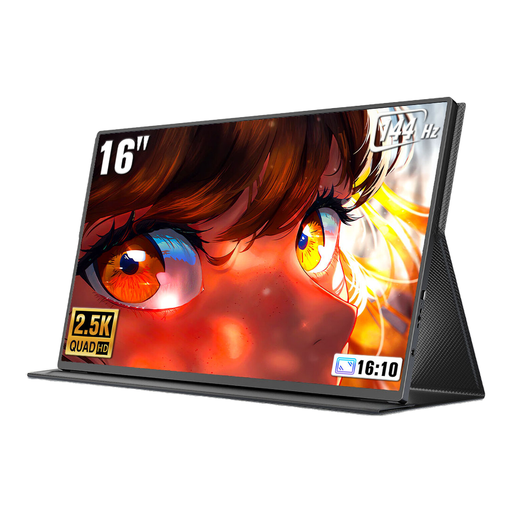
UPERFECT 16 inches, 2560 × 1600
The listed screen size and 16:10 aspect ratio make this a larger option for viewing documents alongside your laptop than a 14-inch model.
The product name lists 2560 × 1600 pixels, QLED, 144 Hz, Mini-HDMI and Type-C. Check which ports on your laptop provide video signal and power.
Joybuy
 No image available
Arzopa Z1RC, 16 inches, 2560 × 1600
The 16-inch screen with a 16:10 aspect ratio is designed for viewing longer documents on a second screen.
The product name lists an IPS display with 2560 × 1600 pixels, as well as USB-C and HDMI. An adjustable stand and VESA compatibility are also listed.
Joybuy
 No image available
UPERFECT Portable Monitor, 15,6 inches
A portable second screen with a built-in adjustable stand could be a good alternative if you want to change the viewing angle at your library table.
The product name lists a 15,6-inch screen, 100 % sRGB and a built-in adjustable stand. Check the connection specifications to make sure they’re compatible with your laptop.
Joybuy
 No image available
PM14R, 14 inches, 1920 × 1200
The compact 14-inch screen is designed for workspaces with limited room; compared with 16-inch models, it leaves less space for documents.
The product name lists an IPS display with a 16:10 aspect ratio, as well as Type-C and Mini-HDMI. The product description also lists a carry case.
Joybuy
Frequently asked questions
How do I set up the second screen for writing?
Connect it using a video port that’s compatible with your laptop, and make sure it has the power it needs. Then choose extended display mode, arrange the screens to match your desk setup and adjust text scaling if needed. The number of external screens supported depends on the specific model, particularly with a Mac.
Can I use the monitor at any library desk?
You can’t assume that monitors are allowed at every library desk. The rules of the individual library and any instructions given on site will apply. The Bavarian State Library’s house rules apply to its own building and require visitors not to obstruct or disturb others.
What extra costs and rights should I consider when buying?
Check whether your type of connection requires a power adapter or additional cables. For goods bought from a trader in the EU, Your Europe, the European Union’s information portal, states that you’re generally entitled to a legal guarantee of at least two years. For standard online distance purchases, you generally have 14 days from delivery to cancel; statutory exceptions apply. The right to cancel and your rights if goods are faulty are different.


