For a clear design review, your portable monitor should be compatible with your source device’s video output and power supply, and easy to set up at the presentation venue. If you need to make a definitive assessment of colour, an advertised colour gamut alone is not enough: EIZO describes a colour management workflow that includes monitor calibration. Larger or glossy displays can also take up more space or be more reflective when you’re on the move.
Who a portable monitor is right for
Designers who need colour approval
If you present designs on the go, distinguish between discussing a design and making a definitive assessment of its colours. For approval, calibration and colour management matter just as much as the stated colour gamut. EIZO explains their role in the colour management workflow.
Presenters using different devices
If you switch between a laptop, tablet or other source devices, check before your meeting that the device can output a video signal through the connection you want to use, and find out what cables and power supply you’ll need. ViewSonic and Verbatim’s manufacturer information outlines different connection and power requirements.
Designers presenting on the move
If you take your monitor to client meetings, weigh up its screen size, weight and stand against your luggage and the space available to set it up. Dell lists the P1425 as a 14-inch model with a tilting stand, while ASUS gives the MQ17QH a net weight of 1.17 kg.
What to look for when buying
First, decide whether you just want to discuss a design or need to make a definitive assessment of its colours. Then check your source device’s video output, cables and power supply, as well as the monitor’s size and how it can be set up at your usual presentation venue.
| Priority |
What to check before buying |
Who it matters most to |
| How the design’s colours look |
Distinguish between presenting a design and making a definitive assessment of its colours. Check the colour gamut of the specific model and factor in a colour management workflow if you need approval. |
If I need to make a definitive assessment of colours, a wide-gamut figure alone isn’t enough; I also need a suitable colour workflow. Around 33% of consumers put colour assessment first. |
| Video signal and power supply |
Check your source device’s video output, the monitor’s input, cables and power source together. According to the manufacturer, the Verbatim PMT-15-4K also needs the supplied power adapter when connected via HDMI. |
If I travel to meetings with different devices, I want to know in advance that the video signal and power supply will work together. Around 27% of consumers prioritise reliable connectivity. |
| Portability and setup |
Compare the specific model’s weight, dimensions and stand with your bag and the table you usually present from. |
If I take my monitor to several meetings and often have little room to set it up, a practical balance between packed size and setup matters to me. Around 20% of consumers put portability first. |
| Shared viewing and usability |
Check text size, zoom and viewing angle from where you plan to sit. Touch is only a deciding factor if your source device supports the feature you want. |
If I want to discuss design details with others, they should be easy to see from our seats. Touch is an added benefit for me only if my device supports it. Around 20% of consumers prioritise viewing together. |
Common buying and usage pitfalls
-
Assuming a wide colour gamut guarantees accurate colour approval
A stated wide colour gamut doesn’t prove that the display is correctly set up for a specific colour approval.
Before buying, decide whether you just want to discuss colours or need to assess them definitively. For approval, include calibration and colour management in your workflow; EIZO describes these steps in its workflow.
Calibration and colour management may require extra preparation.
-
Assuming USB-C guarantees a working single-cable connection
A USB-C connector alone doesn’t tell you whether your source device can output a video signal through that port or power the monitor. According to the manufacturer, the Verbatim PMT-15-4K also needs a power adapter when connected via HDMI.
Before your meeting, test the monitor with the actual source device, the cable you plan to use and the required power source.
Depending on the connection, you may need an additional power adapter or a compatible cable.
-
Choosing a larger or glossy display without considering where you’ll present
A larger screen is of little use if the monitor and laptop won’t fit on the table or reflections obscure details.
Compare the specific model’s finish, weight and dimensions with the places where you usually present.
-
Assuming you automatically have a private right to cancel when buying for work
The statutory right to cancel a distance purchase under § 312g BGB applies to consumers; § 355 BGB generally sets a 14-day cancellation period. According to the Verbraucherzentrale, whether you count as a consumer depends on whether the purchase is attributable to a commercial or self-employed professional activity.
Check the purpose of your purchase and the returns policy separately from any manufacturer’s warranty.
If a purchase doesn’t qualify as a consumer purchase, the statutory 14-day right to cancel may not apply.
Brands to consider
ASUS
The ZenScreen MQ16FC and MQ17QH models cater to different priorities around screen size and portability.
- ASUS lists the MQ16FC as having a 16-inch OLED panel with 1920 × 1200 pixels; according to the manufacturer, the foldable MQ17QH offers a 17.3-inch screen and a resolution of 2560 × 1920 pixels.
- These OLED models have glossy screens. A stated colour gamut doesn’t prove that the display has been calibrated for accurate colour assessment.
Lenovo
The ThinkVision M14t Gen 2 combines a compact design with touch controls for discussing details together.
- Lenovo lists this model as having a 14-inch screen, 2240 × 1400 pixels, 100% sRGB and 10-point touch.
- The benefits of touch depend on your source device, and the sRGB figure is no substitute for checking colour accuracy in use.
Dell
The Pro 14 Plus P1425 is a compact IPS option for presentations without touch controls.
- Dell lists a 14-inch screen, 1920 × 1200 pixels, an anti-glare finish and a tilting stand.
- These specifications don’t prove that it’s suitable for definitive colour approval.
ViewSonic
According to the manufacturer, the VP16-OLED is designed for creative work, while the VG1655 is a differently positioned IPS option for mobile presentations.
- ViewSonic advertises the VP16-OLED as offering 100% DCI-P3 and Delta E < 2. These are manufacturer claims, not values independently measured here.
- ViewSonic lists typical coverage of 64% sRGB for the VG1655. The models therefore differ in their stated colour gamut, but that doesn’t establish how accurately colours will appear in your specific workflow.
Verbatim
The PMT-15-4K is aimed at people looking for a portable 15.6-inch display with 4K resolution and touch.
- Verbatim lists a resolution of 3840 × 2160 pixels and 10-point touch.
- According to the manufacturer, an HDMI connection also requires the supplied power adapter. The high resolution alone doesn’t prove that colours will be displayed accurately.
Joybuy products for mobile presentations
The following Joybuy products include portable monitors for presenting designs on the move, from compact laptop extensions to larger displays.
 No image available
UPERFECT 16-inch 2K 144 Hz monitor
A good choice if you’d like a larger, high-resolution display for a presentation on the move.
The product title lists a 16-inch QLED display with 2560 × 1600 pixels, a 16:10 aspect ratio and 1200:1 contrast, as well as Mini HDMI and Type-C.
The title also gives a brightness of 450 nits and lists VESA compatibility.
Joybuy
 No image available
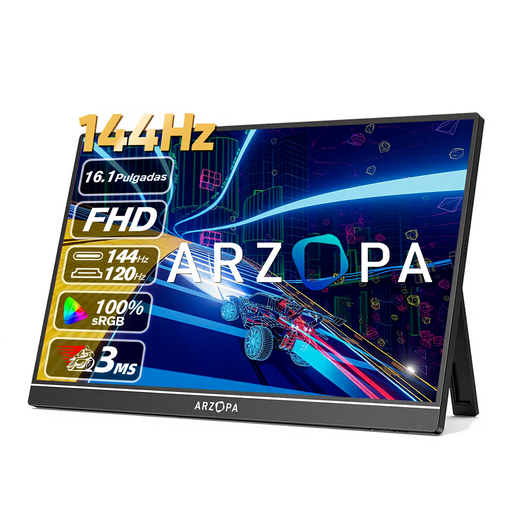
ARZOPA Z1FC 16.1-inch FHD monitor, 144 Hz
A good choice if you’re looking for a portable display for design reviews and want to take the stated colour gamut into account.
The title lists a 16.1-inch IPS display with 1920 × 1080 pixels and 106% sRGB. A colour gamut figure alone doesn’t prove that the display is calibrated or colour-accurate.
The product description lists a built-in stand and a weight of 780 g.
Joybuy
 No image available
Blackview SCM6 14-inch FHD IPS monitor
A good choice if you want to set the monitor up directly beside your laptop and present where table space is limited.
The product title lists a 14-inch IPS display with Full HD resolution, a built-in stand and compatibility with 13- to 17-inch laptops.
The title also gives a weight of 600 g and a thickness of 4.5 mm.
Joybuy
 No image available
UPERFECT 15.6-inch FHD IPS monitor
A good choice if you’re looking for a portable display with a built-in stand for presenting designs on the move.
The title and product description list a 15.6-inch IPS display with 1920 × 1080 pixels. The stated 100% sRGB coverage is no substitute for checking colour accuracy or using a suitable colour workflow.
The product description lists an adjustable built-in stand.
Joybuy
 No image available
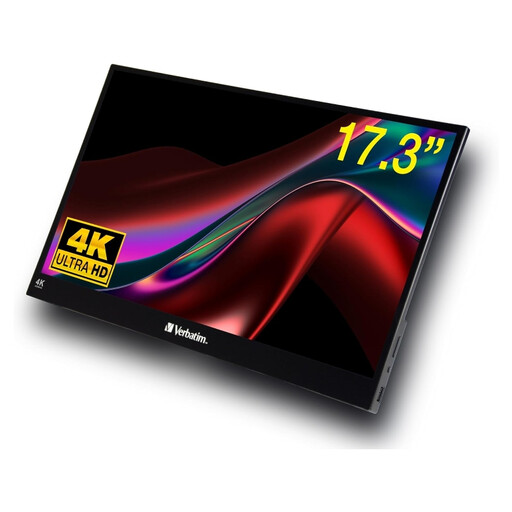
Verbatim PMT-17 17.3-inch Full HD touchscreen monitor
A good choice if you want to discuss design details together on a larger touchscreen.
The product description lists a 17.3-inch Full HD IPS display with touch controls, as well as USB-C, HDMI and USB-A. A neoprene protective case and cables are also included.
The stated weight is 1.63 kg, which is worth bearing in mind when travelling between meetings. According to the product description, functionality may vary with non-Windows systems.
Joybuy
Frequently asked questions
Can I treat a high DCI-P3 figure as approval for print colours?
No. A colour gamut figure alone doesn’t prove that colours can be assessed reliably. For soft proofing, EIZO describes a colour management workflow that includes monitor calibration and, where necessary, printer profiling.
What should I set up before my first client meeting?
Test video output, cables and power with the exact laptop or tablet you plan to take with you. According to the manufacturer, the Verbatim PMT-15-4K needs a power adapter for HDMI. Also check display scaling and your seating position using the actual design.
Are statutory consumer rights and a manufacturer’s warranty the same thing?
No. The Verbraucherzentrale distinguishes statutory rights against the seller from a voluntary warranty. If you’re buying for work, check the terms of the contract and, for a manufacturer’s warranty, what it covers.
Do I automatically have a 14-day right to cancel if I buy a monitor for work?
No. The statutory right to cancel a distance purchase under § 312g BGB applies to consumers; § 355 BGB generally sets a 14-day cancellation period. Whether a particular purchase qualifies as a consumer purchase depends on its purpose. The Verbraucherzentrale distinguishes consumers from people buying for a commercial or self-employed professional activity.
What markings should I look for on a monitor being offered for sale?
The German Federal Network Agency states that products covered by the relevant EU harmonisation legislation must carry a CE marking. Check the marking and make sure the specific product being offered can be identified; a brand name or general brand description doesn’t prove that a particular product complies.


