For working on your dissertation in a café, a portable 14-inch monitor is a sensible choice if desk space and travelling light are priorities. A 16-inch model gives you more screen space, but takes up more room. Before you buy, check whether your laptop’s USB-C port supports video and supplies enough power. An HDMI connection may require a separate power supply. How useful two screens are depends on the task; a DGUV laboratory study involving ten participants does not prove a general productivity benefit for working in a café.
Who is a portable monitor for?
Read sources alongside your manuscript
If you want to keep PDFs, notes or reference management software open alongside your text, usable screen space is an important consideration. In 2016, the DGUV studied various screen-based tasks with ten participants; the findings cannot simply be applied to dissertation work in a café.
Travel light
If you often change where you work and need to set up your laptop and monitor on a small table, consider the weight, dimensions and stand together.
Work without a free socket
If you plan to power the monitor from your laptop, check whether its USB-C port supports video and provides enough power. An HDMI connection may require a separate power supply.
What should you look for when buying?
First, work out how much room you have for your monitor and laptop. Then check that your laptop and monitor will work together with the connection you plan to use, and find out how the screen will be powered.
Compact 14-inch monitor
A good fit if: you often change where you work or use a small table.
The trade-off: the smaller display gives you less physical screen space for your manuscript and sources.
Larger 16-inch monitor
A good fit if: you work at the same table for longer periods and want more space for your documents.
The trade-off: according to the manufacturer, the Lenovo ThinkVision M16 weighs 980 g and takes up more room in your bag and at the café.
4K or touchscreen model
A good fit if: you genuinely need touch controls or the higher resolution for other tasks.
The trade-off: there is no proven productivity benefit for writing alone; an HDMI connection may require a power supply.
| Consideration |
What to check before buying |
Who it matters most to |
| Space for text and sources |
Compare the screen size, aspect ratio, resolution and preferred text size with your own documents. |
If I want to read a PDF and my manuscript side by side, I need enough space to read them comfortably. Around 31% of consumers are mainly interested in working with text in parallel. |
| Portability and desk space |
Check the dimensions with the stand attached, as well as the weight of the monitor and any accessories you need. |
If I often move between cafés, I want to carry my monitor and laptop comfortably and have room to set both up. Around 25% of consumers prioritise keeping luggage and setup space to a minimum. |
| Connection and power |
Check that USB-C supports DisplayPort Alt Mode and provides enough power. If you plan to use HDMI, check the power requirements of the specific model. |
If a socket isn’t always available, I want to know whether my laptop can power the monitor. Around 25% of consumers have these connection and power requirements. |
| Readability and positioning |
Check the stand, tilt and stated brightness. Where possible, assess text size and reflections in similar lighting conditions to those you’ll be working in. |
If I work in different seats, I want to position the screen well and read text comfortably. Around 19% of consumers particularly value readability and positioning. |
Common buying mistakes
-
Assuming your laptop’s USB-C port guarantees video and power
A USB-C port alone doesn’t confirm that it can transmit a video signal or provide enough power for the monitor. For single-cable use with the Verbatim PM-14, the manufacturer requires DisplayPort Alt Mode and sufficient power.
Check the specifications for your laptop’s port, and make sure your laptop, the monitor input and the cable you plan to use are compatible before you buy.
-
Comparing screen size alone
A larger display takes up more room. Resolution and scaling also affect how large text appears on screen.
Compare the space it takes up, weight, aspect ratio and text size using your own documents.
-
Assuming HDMI provides all the power you need
According to the manufacturer, the Verbatim PM-14 also requires a power supply when connected via HDMI.
Plan how you’ll power the monitor at your intended workspace, and check the requirements of the specific model.
Brands to consider
Verbatim
The range includes a lightweight 14-inch monitor, as well as separate 4K and touchscreen models.
- Verbatim says the PM-14 weighs 540 g and offers USB-C and HDMI.
- For single-cable USB-C use, your laptop needs compatible video and power capabilities. HDMI requires a separate power supply.
Lenovo
The ThinkVision M14d is a 14-inch model with a 16:10 aspect ratio and 2240 × 1400 pixels; the ThinkVision M16 has a 16-inch screen.
- Lenovo lists the M14d at 600 g, and the M16 as a 16-inch model with 1920 × 1200 pixels, weighing 980 g and featuring two USB-C ports with DP 1.2 Alt Mode.
- For both models, check that your laptop supports the required USB-C video mode.
LG
The gram +view 16MQ70 is a 16-inch model with a 16:10 aspect ratio and 2560 × 1600 pixels.
- LG describes USB-C ports on both sides and an adjustable cover.
- LG’s description of an especially wide setup refers to using the monitor with an LG gram 16; it does not automatically apply to other laptops.
Dell
The Dell Pro P1425 is a portable 14-inch monitor with 1920 × 1200 pixels and a tilting stand.
- The information on Dell’s German product page relates to the P1425.
- Check the USB-C connection and power supply with your specific laptop.
ASUS
The ZenScreen MB16AHG is a 15.6-inch model with USB-C and Mini HDMI.
- ASUS lists a fold-out stand and two USB-C ports with DP Alt Mode.
- The stated 144 Hz refresh rate has no proven additional benefit for dissertation writing.
Joybuy products for working with sources
Portable second screens for laptops, ideal for working with sources at a café table, including compact and larger display sizes.
 No image available
Portable laptop monitor, 15.6 inches, FHD
Could be worth considering for keeping sources and your manuscript on separate screens, if a 15.6-inch monitor fits on your café table.
Features listed in the product title: 1080p FHD, 60 Hz, IPS, HDR, built-in speakers, HDMI, USB-C and stand.
View at Joybuy
 No image available
KEFEYA portable laptop monitor, 16 inches
Could be a good fit if you want more space for text and sources and have a table large enough to accommodate it.
Features listed in the product title: FHD 1200P and 16:10. The product description lists a weight of 0.76 kg and a rotating magnetic stand; it also specifies two USB-C ports and Mini HDMI.
View at Joybuy
 No image available
Portable 14-inch dual-screen extender
Could be worth considering for working with documents side by side, if a dual FHD screen extender is compatible with your laptop.
Features listed in the product title: 14 inches, FHD 1080p, 60 Hz, IPS, HDMI, USB-A and USB-C. It is listed as compatible with laptops with screen sizes from 14 to 16.5 inches.
View at Joybuy
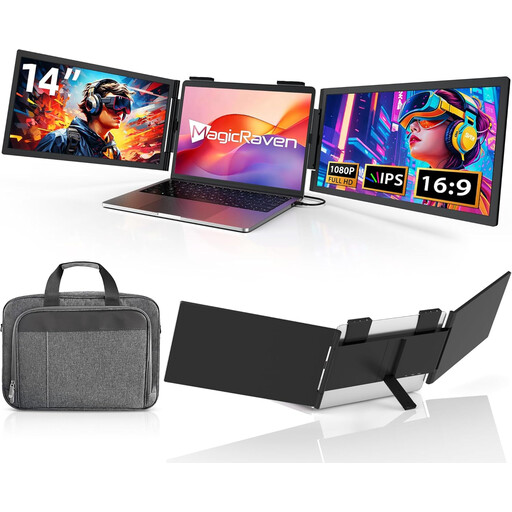 No image available
Portable 14-inch laptop monitor
Could be a good option for a compact setup with a carry case, if your laptop supports video and power over USB-C.
Features listed in the product title: 1920 × 1080, IPS and 60 Hz. The description specifies USB-C for video and power; HDMI is not listed in the product title. Check the connection with your laptop.
View at Joybuy
 No image available
Blackview SCM5, portable 14-inch monitor
Could be worth considering for a compact laptop setup, if a 14-inch screen and adjustable stand suit your workspace.
Features listed in the product title: FHD, IPS, 18.2 mm profile and adjustable stand.
View at Joybuy
Frequently asked questions
Will any USB-C port on my laptop support video and power?
No. For single-cable use with the Verbatim PM-14, the manufacturer requires DisplayPort Alt Mode and sufficient power. Check your laptop’s port specifications and the connection you plan to use; other monitors may have different requirements.
Can I connect a monitor via HDMI if there isn’t a spare socket in the café?
It depends on the model. According to the manufacturer, the Verbatim PM-14 and Verbatim 4K touchscreen model also need a separate power supply when connected via HDMI; HDMI alone does not fully power these models.
How should I set up two screens for longer writing sessions?
Position your manuscript and sources so you can work with a comfortable text size and as few distracting reflections as possible. The DGUV describes a laboratory study with ten participants and three standardised screen-based tasks; it does not establish a fixed setup or prove a productivity benefit for your café workspace.
What happens if the monitor develops a fault: manufacturer’s guarantee or statutory rights?
For a consumer purchase in Germany, statutory warranty rights are claims against the seller; a guarantee is a separate, voluntary commitment. The remedy available in a particular case depends, among other things, on the fault and the circumstances of the purchase. The Verbraucherzentrale distinguishes between these two rights.
How should I dispose of an old portable monitor?
Electrical and electronic waste must not go in household rubbish. The Umweltbundesamt recommends taking it to a recycling centre or an appropriate retailer take-back point; check the relevant acceptance conditions before returning it.


