For event notes without access to a mains socket, the power supply should suit the planned duration. A monitor battery, a separate power bank and power from the source device are different solutions. Next, check whether your specific device delivers both a picture and enough power through the connections provided; a USB-C plug alone does not guarantee a single-cable connection.
Who is a portable monitor suitable for?
Event teams without access to a mains socket
If your notes need to stay visible for a set period, factor in the monitor battery, an external power source and the conditions attached to any quoted battery life. ASUS, Verbatim and ViewSonic describe different power options for their respective models.
Teams using different source devices
If you connect different laptops or mobile devices at various events, check the video output, power supply, cable and, if applicable, touch data connection for each device. ViewSonic lists these requirements for the TD1655, while ASUS notes that touch support depends on the operating system.
Note-takers at small tables
If you need to read text from your chosen position and often carry or reposition the screen, consider the display format, weight and stand together. Lenovo lists the ThinkVision M14d as having a 14-inch display, a 16:10 aspect ratio and a net weight of 600 g; ViewSonic describes the TD1655 as having a fold-out stand.
What should you look for when buying?
First, work out how the monitor will be powered for the planned event duration. Then check the connection to your source device, followed by readability and setup at the venue.
Monitor with a built-in battery
Suitable if: You don’t want the monitor to rely on the source device’s battery.
Bear in mind: ASUS quotes up to four hours for the ZenScreen Go MB16AHP in DP Alt Mode at 100% brightness. This is a manufacturer’s figure, not a guarantee for every setup, and a video signal is still required.
Monitor with a separate power bank
Suitable if: You want to carry a power source separate from the source device. Verbatim describes the Light #32088 as a 14-inch monitor with a magnetically attached 5000-mAh power bank.
Bear in mind: Capacity alone won’t tell you how long it will last at an event; test the complete setup using the connection you plan to use.
Externally powered monitor
Suitable if: Your laptop or power bank can power the monitor and you’re looking for a compact display for documents. Lenovo lists the ThinkVision M14d as having a 14-inch display, a 16:10 aspect ratio and 2240 × 1400 pixels.
Bear in mind: Power passthrough is not a substitute for a monitor battery; check the video output and power supply of your source device.
| What matters |
What to check before buying |
Who is it important to? |
| Power supply |
Compare the power source and the conditions attached to any quoted battery life with the event duration; test the complete setup at the brightness you need. |
If I need to display notes until the end of an event without access to a mains socket, I’ll choose a power source to suit the duration. Around 36% of consumers say power supply is their main concern. |
| Device compatibility |
Check the video output, DisplayPort Alt Mode, power output, monitor input and required cables. For touch, also check the data connection and operating system support. |
If I connect different laptops or mobile devices, I want to know in advance whether each one can transmit a picture and, if needed, power or touch data. Around 29% of consumers say device compatibility is their main concern. |
| Readability |
View a typical page of notes at the planned scaling and from your actual seated position; also consider the display format and desk space required. |
If I need to take event notes from a particular spot, I’ll check the text size and viewing distance rather than comparing resolution alone. Around 21% of consumers say readability is their top priority. |
| Transport and setup |
Compare the weight of the complete setup, stand angle, cable routing and the amount of desk space required. |
If I often carry and reposition the screen, the weight of the power accessories matters just as much as having a suitable stand. Around 14% of consumers say transport and setup are their main concern. |
Common buying misconceptions
-
‘Has USB-C’ doesn’t automatically mean it supports video and power
For the ViewSonic TD1655’s specified single-cable connection, the source device’s USB-C port must support DisplayPort 1.2 Alt Mode and power delivery.
Check the capabilities of the specific port on your device against the monitor’s requirements before relying on the connection.
-
A power bank’s capacity doesn’t tell you exactly how long it will last
Verbatim lists the supplied power bank for the Light #32088 as having a capacity of 5000 mAh. On its own, this figure doesn’t tell you how long the monitor will run at your chosen brightness or with your chosen connection.
Test the monitor, source device, connection and display settings together for the length of time you need.
-
Power passthrough or a stylus battery isn’t a monitor battery
In the German specification for the ASUS ZenScreen Ink MB14AHD, the monitor battery is listed as ‘NA’; the battery note refers to the supplied stylus.
Check how the monitor itself is powered, and consider batteries for accessories separately.
Key brands and product ranges
ASUS
The ZenScreen MB16AHP and MB16AMTR mainly differ in whether you need a display only or touch as well.
- ASUS quotes up to four hours for both models; for the MB16AHP, this applies in DP Alt Mode at 100% brightness.
- This is a manufacturer’s figure, not an independent measurement. The MB16AMTR’s 10-point touch function depends on the operating system.
Verbatim
The Light #32088 combines a 14-inch touch monitor with a separate, magnetically attached power bank.
- Verbatim lists the supplied power bank as having a capacity of 5000 mAh.
- The capacity figure doesn’t establish how long it will last in your particular event setup; the power bank is part of the kit you’ll need to carry.
Lenovo
The ThinkVision M14d provides a compact display for documents with compatible USB-C source devices, provided an external power supply is available.
- Lenovo lists a 14-inch display, a 16:10 aspect ratio, 2240 × 1400 pixels and a net weight of 600 g.
- Power passthrough is not the same as a built-in monitor battery. Video and power compatibility must match your source device.
ViewSonic
The TD1655 offers touch and a fold-out stand if your source device or an external power source can power the monitor.
- ViewSonic describes two USB-C ports and a fold-out stand.
- ViewSonic recommends a power bank or mains socket for longer use. Touch via Mini-HDMI also requires a USB connection.
AOC
The 16T2 is another option, with a 15.6-inch touch display and Smart Cover.
- On its German product page, AOC describes the display, touch function and connection setup.
- Check the power supply for your specific event setup; the available information doesn’t confirm how long it will last in these conditions.
Monitors for taking notes on the go
The portable monitors below are worth considering as an additional screen when you’re out and about. For use without access to a mains socket, check the monitor’s power supply and the video and power capabilities of the source device for each model.
 No image available
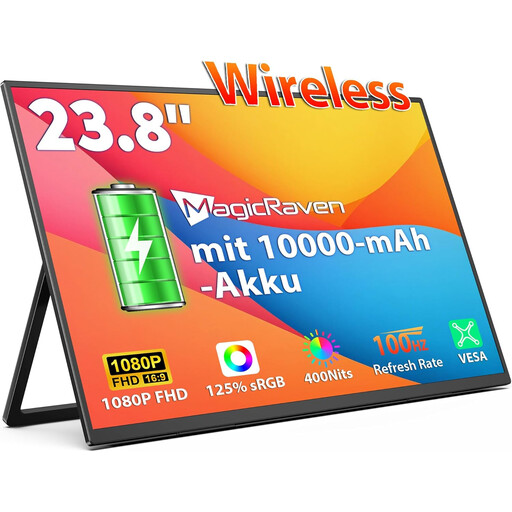
Portable 23.8-inch monitor with a built-in 10,000-mAh battery
An option if you’re looking for a portable monitor with a built-in battery for taking notes on the go; this alone won’t tell you how long it will last at an event.
23.8 inches, 1080p FHD, IPS, 100 Hz; supports AirPlay and Miracast.
View on Joybuy
 No image available
Blackview DCM6 PRO, portable 14-inch monitor
Could suit note-taking with a compatible laptop if a 14-inch secondary display works for your setup.
Full HD; specified for laptops from 13 to 17.3 inches. Before using it without access to a mains socket, check how both the monitor and source device will be powered.
View on Joybuy
 No image available
Portable 16-inch monitor with 2.5K resolution and a built-in 8000-mAh battery
An option if you’re looking for a portable monitor with a built-in battery and wireless connectivity for compatible devices.
16 inches, 2.5K resolution, IPS; supports AirPlay and Miracast. Battery capacity alone doesn’t tell you how long it will last in your setup.
View on Joybuy
 No image available
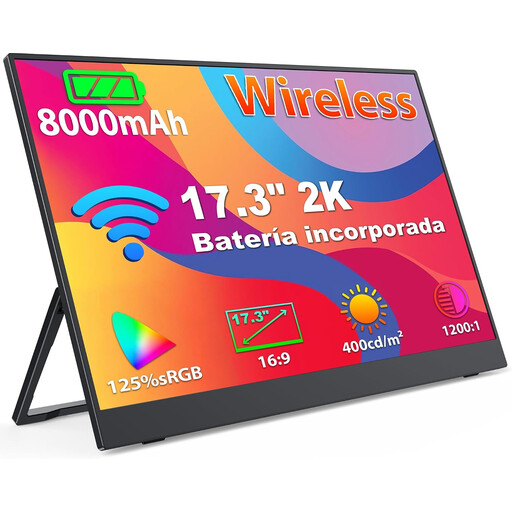
Portable 17.3-inch monitor with 2K resolution and a built-in 8000-mAh battery
Could be worth considering if you’re looking for a larger portable display with a built-in battery for taking notes.
17.3 inches, 1440p IPS display; supports AirPlay and Miracast. The actual battery life depends on the complete setup.
View on Joybuy
 No image available
Blackview SCM5, portable 14-inch FHD IPS monitor
A possible choice for taking notes on a compatible laptop if you’d like an adjustable stand.
18.2 mm thick, 1.5-W speakers; specified for laptops from 13 to 17.3 inches. Check in advance how the monitor will be powered in your setup.
View on Joybuy
Frequently asked questions
Is one USB-C cable between a laptop and monitor enough?
Only if the laptop’s selected video port supports the required DisplayPort Alt Mode and provides enough power. For the TD1655’s single-cable connection, ViewSonic specifically lists DisplayPort 1.2 Alt Mode and power delivery as requirements.
How do I set up the screen for event notes?
Before the event, connect the video input and power source you plan to use, set up your notes view, then check readability and stability at the actual location. If you want touch to work over Mini-HDMI with the ViewSonic TD1655, you’ll also need the USB connection described in the manual.


