A portable monitor is a good option for planning lessons at a café table, provided your laptop and monitor support the same video signal path and there is enough room on the table. Depending on how much space you have, you could choose a compact 14-inch model or a larger 15.6-inch display for working with text. Touch is mainly useful if you want to annotate directly on the second screen. Lenovo, ASUS and ViewSonic list these model features in their manufacturer specifications; a USB-C connector alone does not guarantee video output or a particular laptop battery life.
Who is a portable second monitor suitable for?
Lesson planners working with a laptop and multiple sources
If you want to see your lesson plan and reference materials side by side while writing, first check your laptop’s video signal path and make sure documents will be easy to read. Lenovo and ViewSonic specify connection requirements for their respective models; Lenovo lists a 16:10 aspect ratio for the ThinkVision M14d.
Lesson planners at small café tables
If you regularly carry both your monitor and laptop, weigh up usable screen space against weight and the space they take up. Lenovo lists a net weight of 600 g for the ThinkVision M14d, while ASUS lists 0.9 kg for the ZenScreen MB16ACV. These figures apply to the devices themselves, not your entire bag.
Lesson planners who annotate directly on screen
If you want to interact with or annotate content directly on the second screen, check for touch support and any accessories you may need. Lenovo and ViewSonic describe touch features for their respective ThinkVision and TD1655 models.
What should you look for when choosing one?
First check the video signal and connection, then consider screen space, portability and power. Touch is an additional factor if you want to work directly on the screen.
| Priority |
What to check when buying |
Who should pay particular attention? |
| Connection and video output |
Check that your laptop port supports video output and matches the monitor’s input and cable. |
If I want to read my lesson plan and reference materials side by side on my laptop, I need a reliable video signal path. Around 29% of consumers say connection compatibility is their top priority. |
| Readability of lesson plans and reference materials |
Consider screen size, aspect ratio, resolution and your preferred text size together. |
For longer periods of writing, I want to consider text size and the space available for documents together, rather than focusing only on the pixel count. Around 22% of consumers say readability is their top priority. |
| Portability and table space |
Consider the dimensions, weight and stand, as well as the space available beside your open laptop. |
If I carry the monitor regularly and set it up at small café tables, the balance between screen space and the room it takes up matters to me. Around 21% of consumers prioritise portability and table space. |
| Power |
Check the power requirements, whether it can be powered through the laptop port and, if necessary, which external power sources are suitable. |
If I’m working somewhere without a guaranteed power socket, I want to know how the monitor and laptop will be powered together. Around 21% of consumers say power is their top priority. |
| Touch and handwriting input |
Check for touch support, and whether the type of stylus you need is available. |
If I want to annotate directly on the second screen, having the right input method matters more than touch alone. Around 7% of consumers say touch is their top priority. |
Which buying and usage mistakes should you avoid?
-
Assuming a USB-C connector guarantees video compatibility
The shape of the connector alone does not tell you whether your laptop can output a video signal through that port. For the ViewSonic TD1655’s advertised single-cable USB-C setup, the manufacturer requires DisplayPort Alt Mode and power delivery through the port.
Compare the specifications for your specific laptop port with the monitor’s signal and power requirements.
If the connection is not compatible, you may need to use a different connection method.
-
Using the monitor’s power consumption to estimate your laptop’s battery life
Figures for a monitor’s power consumption alone do not describe the energy needs of your entire laptop setup. Battery life depends on the devices you use together and how they are powered.
Test your actual setup’s battery life before a long session without access to a power socket.
You may need a suitable external power source for longer use.
-
Overlooking who else can see lesson materials on the extra screen
A second screen may make your content visible to people nearby. The GDPR protects personal data, but it does not set a blanket rule for every lesson plan worked on in a café.
When working with personal information, follow your school’s requirements and keep the screen out of view of others.
Key brands to consider
Lenovo
The ThinkVision M14d and M14t Gen 2 cater for different document-viewing and touch requirements.
- Lenovo lists a 14-inch screen, 2240 × 1400 resolution, a 16:10 aspect ratio and a net weight of 600 g for the M14d.
- Lenovo lists touch functionality and a net weight of 700 g for the M14t Gen 2.
- Before buying, check connection compatibility and whether the passive stylus on the M14t Gen 2 suits the way you work.
ASUS
The ZenScreen MB16ACV is a 15.6-inch second monitor designed for USB-C connections with compatible video output.
- ASUS lists Full HD, an anti-glare surface, a net weight of 0.9 kg and a USB-C input.
- Check that your laptop can output the required video signal via USB-C. Features may vary by region.
ViewSonic
The TD1655 is designed for people who want to use a touch-enabled second screen while on the go.
- ViewSonic describes 10-point multi-touch and a foldable stand.
- For the advertised single-cable USB-C setup, the manufacturer requires DisplayPort Alt Mode and power delivery through the port.
AOC
The 16T3EA is a 15.6-inch Full HD model with USB-C power and a built-in stand.
- AOC lists Full HD and a built-in stand.
- According to AOC, the automatic orientation feature described requires i-Menu software to be enabled.
Joybuy products for compact laptop workspaces
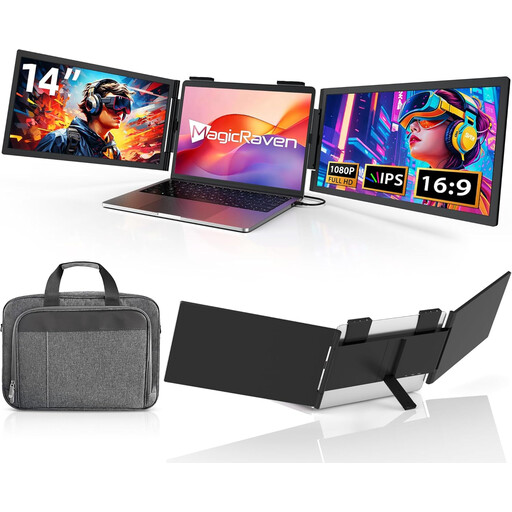
These portable 14-inch monitors are designed for compact laptop workspaces where you need to work with lesson plans and reference materials.
 No image available
Portable 14-inch FHD monitor
The 14-inch format is a compact option for adding a second laptop display when working with lesson plans and reference materials.
Listed in the product title: FHD 1080p, 60 Hz, IPS, and HDMI, USB-A and USB-C ports. Described as compatible with 14 to 16.5-inch laptops, as well as Windows, Mac and Android.
View at Joybuy
 No image available
Portable 14-inch FHD monitor with USB-C
This portable 14-inch model is described as a way to add a second display to a compact laptop workspace.
Listed in the product title: FHD 1080p, 60 Hz, IPS, built-in dual speakers and a carrying case. The title mentions USB-C but no HDMI port; it is listed as compatible with Mac, Windows and Chrome.
View at Joybuy
 No image available
Blackview DCM6 PRO, 14-inch
The product title describes this model as a portable laptop extender monitor for a multi-screen setup.
Listed in the product title: 14 inches, Full HD and a three-screen setup. Described as suitable for laptops from 13 to 17.3 inches.
View at Joybuy
 No image available
Blackview SCM5, 14-inch
The adjustable stand is useful when setting up a second display at a café table.
Listed in the product title: FHD, IPS, 18.2 mm thickness, a 1.5 W speaker and an adjustable stand. Described as compatible with laptops from 13 to 17.3 inches.
View at Joybuy
 No image available
Blackview DCM5, 14-inch, 16:9
The 14-inch format is described as suitable for a portable laptop workspace with an additional display.
Listed in the product title: IPS and a 16:9 aspect ratio. Described as compatible with laptops from 13 to 17 inches, as well as Windows, Mac and mobile devices.
View at Joybuy
Frequently asked questions about portable monitors
Is a USB-C port on my laptop enough for video and power?
No, the connector shape alone is not enough to confirm compatibility. For the ViewSonic TD1655’s USB-C connection, the manufacturer requires DisplayPort Alt Mode and power delivery through the port; check that your specific laptop port meets these requirements.
Is touch essential for planning lessons?
Touch is mainly useful if you want to annotate or enter information directly on the second screen. It is not essential if you only need to read and type; if needed, also check whether a suitable stylus is included.
How do I choose a monitor for a small café table?
Compare the screen area with the space beside your open laptop, and take the stand and weight into account. A more compact model may save space, while actual readability also depends on resolution and your chosen text size.
What should I consider when working with personal lesson materials in a café?
When working with personal information, check your school’s requirements and keep the screen out of view of others. The GDPR protects personal data; the specific requirements for a lesson plan depend on its content and your school’s rules.


