Minute-takers with lots of documents
If you want to read and edit decisions, the agenda and a draft at the same time, look for clearly legible text and a setup that fits your workspace.


A portable monitor can work well for taking minutes in the library if the text is easy to read, it fits on your desk, and your laptop supports the planned video and power connections. A compact model takes up less desk space, while a larger one gives you more physical screen area but also needs more room. If you’re working with confidential information, also check whether people sitting nearby can see your screen.
If you want to read and edit decisions, the agenda and a draft at the same time, look for clearly legible text and a setup that fits your workspace.
If you’ll be working from your laptop battery, check before buying that the port you plan to use can output video and provide enough power for the monitor.
If confidential information is on screen, consider where you’re sitting and the viewing angle. Germany’s Federal Office for Information Security points out that people sitting nearby may be able to read sensitive information when you’re working on the move.
First check that you can position the screen so it’s easy to read at your desk and that it’s compatible with your laptop’s port. Then check the power supply and how you’ll protect confidential information.
| Buying criterion | What to check before buying | Who is it important to? |
|---|---|---|
| Screen space for documents | Compare the screen size, resolution, anti-glare surface and preferred text scaling with your own laptop. | If I need to read minutes and templates side by side, the text should be easy to read where I’m sitting. That’s why around 26% of consumers put screen space first. |
| Video connection | Check that the video output of your specific laptop port matches the monitor’s inputs. | For the second screen to show an image, I need a compatible signal path between my laptop and monitor. That’s why around 26% of consumers prioritise a reliable connection. |
| Power supply | Check the monitor’s power requirements, whether the laptop port you plan to use can power it and whether you’ll need a separate power source. | If I’m working without access to a socket, the power supply needs to last for the time I plan to work. That’s why around 21% of consumers check the power supply first. |
| Desk space | Compare the monitor and stand with the space available beside your laptop and documents. | At a shared library table, I need a setup that fits alongside my documents. That’s why around 16% of consumers prioritise a compact setup. |
| Confidential information | Before displaying sensitive meeting details, check your seating position, the viewing angle and any applicable confidentiality requirements. | If other people could see my screen, I need to display sensitive information so they can’t read it. That’s why around 11% of consumers put confidentiality first. |
A USB-C connector alone doesn’t mean that your laptop’s port can output a video signal. ASUS requires a port with display functionality for the ZenScreen MB166C’s video connection.
Check the capabilities of the specific port on your laptop and compare them with the monitor’s inputs.
Depending on the port, you may need extra connection equipment, or a different monitor may be a better fit.
A 17.3-inch screen can give you more physical display area, but it needs a suitable place to stand. A 14-inch screen has a smaller physical display area.
Check the space available on your desk with the monitor and stand in place, and make sure the text scaling is comfortable to read.
Germany’s Federal Office for Information Security identifies the risk of people sitting nearby reading confidential information when you’re working on the move.
Position the screen so other people can’t see sensitive information. If that isn’t possible, work on it somewhere more suitable.
The ThinkVision M14d is a 14-inch option, while the L15 belongs to a different, larger product range. The M14d’s specifications don’t apply to the L15.
The ZenScreen MB166C and MB169CK differ in their ports and features.
The Pro P1425 is a 14-inch option for working with documents on the move.
The PM161Q B1bmiuux variant combines a 15.6-inch screen with HDMI and USB-C.
The TD1655 is worth considering if you genuinely need touch input on your second screen.
The A1M is a 17.3-inch option if having more physical screen space matters more to you than keeping your workspace especially compact.
The Joybuy products below are portable second screens that give you extra space for documents. Before buying, check that the connection, space requirements and power supply suit your laptop and workspace.
 No image available
For an extra screen for documents, provided the 16-inch model fits your workspace.
The product title lists FHD, 1200P and a magnetic stand that rotates through 360°.
 No image available
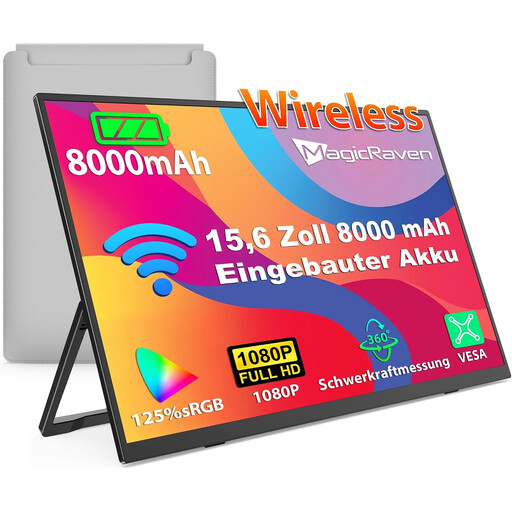
For an extra screen if you’re considering a model with a built-in battery; check that it will connect to your laptop.
The product title lists a 15.6-inch, 1080p Full HD IPS display, a 60 Hz refresh rate and a built-in 8000-mAh battery. AirPlay and Miracast are also listed.
 No image available
For a compact second screen, if your laptop size is suitable for the intended attachment.
The product title lists a 14-inch, 1080p IPS display with a 60 Hz refresh rate, plus HDMI, USB-A and USB-C. Compatible laptop sizes are listed as 14 to 16.5 inches.
 No image available
For an extra laptop screen, if your laptop is the right size for the intended attachment.
The product title lists a 14-inch Full HD screen and use with laptops from 13 to 17.3 inches.
 No image available
For an extra screen if you’re looking for a model with a built-in battery and the listed connection options.
The product title lists a 16-inch 2.5K IPS panel and a built-in 8000-mAh battery. AirPlay, Miracast and a VESA mounting option are also listed.
No, the connector shape alone isn’t enough. For the MB166C, ASUS requires a laptop port with display functionality. For the TD1655’s single-cable setup, ViewSonic specifies DisplayPort Alt Mode and power delivery. Check the port you plan to use in your laptop’s manual.
That may be an option if the monitor has a compatible HDMI input. Acer lists HDMI for the PM161Q B1bmiuux variant; also check how this specific model is powered.
Check the text scaling and that the monitor is stable, and make sure other people can’t read sensitive information on screen. Germany’s Federal Office for Information Security describes the risk of people sitting nearby reading your screen when you’re working on the move; this doesn’t mean there’s a general requirement to use a particular privacy screen.
When you buy from a business seller in the EU, you have statutory rights against the seller for at least two years from the date you receive the goods. An additional manufacturer’s warranty doesn’t replace these rights.
In its inspections, Germany’s Federal Network Agency checks, among other things, for the CE marking, identifiable manufacturer details, instructions and safety warnings in German, and a declaration of conformity. These checks don’t confirm that any individual product mentioned here complies with the requirements.