A compact 14-inch model is a good choice if you have a small library desk and need to carry your monitor around regularly. For longer report sections, a 16:10 display can provide more vertical space, provided you have room for it. First, check that your specific laptop port supports video output, and find out how both the monitor and laptop will be powered.
Who is a portable monitor for?
Anyone reading reports and sources side by side
If you want to keep a draft, comments or sources in view at the same time, compare the usable screen area and aspect ratio first. ASUS lists the ZenScreen MB16FC as a 16-inch, 16:10 display with a resolution of 1920 × 1200 pixels. Lenovo also lists a 16:10 display for the ThinkVision M14t Gen 2.
Anyone working at a small library desk
If your laptop, monitor and stand all need to fit on a limited surface, consider both the screen format and how much space the monitor takes up when set up. Lenovo lists the ThinkVision M14 as weighing 598 g; this is the monitor’s weight, not the weight of your entire setup.
Anyone relying on USB-C and portable power
If you can’t count on having a power socket nearby, check video output and power requirements separately for your specific laptop and monitor models. Lenovo and ASUS specify model requirements for USB-C video connections; ViewSonic requires an external power adapter for the VA1655’s charging function.
What should you look for when buying?
First, check the connections and power requirements. Then compare the screen space you need for documents with the desk space available. Finally, decide whether you really need touch controls or a particular screen orientation.
| Buying criterion |
What to check |
Who is it important for? |
| Laptop connection and power |
Check that the specific USB-C port supports video output, and confirm the power supply and cable requirements for your chosen model. |
If I can’t count on having a power socket at my library desk, the monitor needs to work with my laptop and I need to consider how it will be powered. Around 31% of consumers prioritise connections and power. |
| Screen space for documents |
Compare the diagonal size, aspect ratio and resolution of the specific model, and take your preferred text scaling on your laptop into account. |
If I want to read longer report sections and sources side by side, usable screen space is my main consideration. Around 31% of consumers prioritise screen space for documents. |
| Portability and desk space |
Check the monitor’s dimensions with its stand set up, and the weight of the monitor, case and cables. Measure the desk space available. |
If I regularly carry my laptop and second screen with me or work at a small desk, I need room for both. Around 25% of consumers prioritise portability and desk space. |
| Input and orientation |
If you want touch controls, check that they’re supported by your device and the applications you use. For portrait orientation, find out whether additional software is needed. |
If I want to make changes directly on the screen or often read reports in portrait orientation, touch controls and screen orientation are essential. Around 13% of consumers put these features first. |
Common buying pitfalls
-
Assuming a USB-C connector supports video output
Having the right connector doesn’t guarantee a picture. For the ThinkVision M14, Lenovo specifies DisplayPort 1.2 Alternate Mode and USB Power Delivery 2.0; ASUS notes that the laptop port must support display output for the MB16AHV.
Before choosing a cable or adapter, check the requirements of your chosen monitor and the capabilities of your specific laptop port.
-
Confusing Power Pass Through with battery power
Power Pass Through doesn’t automatically mean the monitor has its own battery. ViewSonic requires an external power adapter for the VA1655’s charging function.
Plan how all your devices will be powered at the library, and check that a suitable power source is available.
-
Assuming screen size tells you how much room you’ll have for documents
Diagonal size, aspect ratio and resolution describe different things. ASUS lists the MB16FC as offering 1920 × 1200 pixels in a 16:10 format; AOC lists the 16T3EA as having a resolution of 1920 × 1080 pixels.
Compare these specifications together and check your preferred text scaling rather than making your decision based on screen size alone.
A look at the key brands
Lenovo
The ThinkVision range includes compact USB-C models and dedicated touch-screen variants.
- Lenovo lists the ThinkVision M14 as weighing 598 g.
- For the M14, Lenovo specifies DisplayPort 1.2 Alternate Mode and USB Power Delivery 2.0 as laptop requirements. The M14t Gen 2 is a different model, with its own display and input features.
ASUS
ZenScreen models offer different combinations of document-friendly screen formats and connection options.
- ASUS lists the MB16FC as offering 1920 × 1200 pixels in a 16:10 format, along with Power Pass Through.
- ASUS says the laptop’s USB-C port must support display output for the MB16AHV. Specifications apply to each specific model.
ViewSonic
The VA1655 is a 16-inch Full HD option with USB-C and an adjustable stand.
- ViewSonic describes the model as having two USB-C ports and a foldable stand.
- According to ViewSonic, an external power adapter is required for the advertised charging function.
AOC
The 16T3EA is a portable 15.6-inch Full HD monitor with a built-in stand.
- AOC lists the 16T3EA as having a resolution of 1920 × 1080 pixels and Auto-Pivot.
- Check the specifications of the specific model for your intended use; features of other AOC monitors won’t necessarily apply.
Arzopa
The A1 is a documented 15.6-inch Full HD option with a stand, USB-C and HDMI.
- Arzopa lists the A1 globally as offering 1920 × 1080 pixels and weighing 742 g.
- Check the specific version and its compatibility with your laptop before relying on the manufacturer’s global specifications.
Joybuy product selection
The models below range from compact 14-inch monitors to larger displays with more room for documents, as well as a touch-screen option. Before buying, check that the connections and power supply work with your laptop, and make sure you have enough room at your library desk.
 No image available
Blackview SCM5, 14-inch Full HD IPS monitor
The 14-inch format is a compact option for a small library desk.
Features listed in the product name: Full HD, IPS and an adjustable stand.
View at Joybuy
 No image available
Blackview TABLE 9, 16 inches, 16:10
The 16:10 format is an option if you’re looking for more vertical screen space for documents than a compact display can offer.
Features listed in the product name: 16-inch screen and an extendable, rotating magnetic stand.
View at Joybuy
 No image available
Arzopa Z1RC, 16 inches, 2560 × 1600
The 16-inch format could suit working with drafts and sources, provided you have enough room on your desk.
Features listed in the product name: 16:10, IPS, 2560 × 1600 pixels, USB-C and HDMI.
View at Joybuy
 No image available
UPERFECT, portable 15.6-inch monitor
The 15.6-inch screen with a built-in stand is an option if you want a larger second screen without needing a separate monitor stand.
Features listed in the product name: adjustable stand and USB-C.
View at Joybuy
 No image available
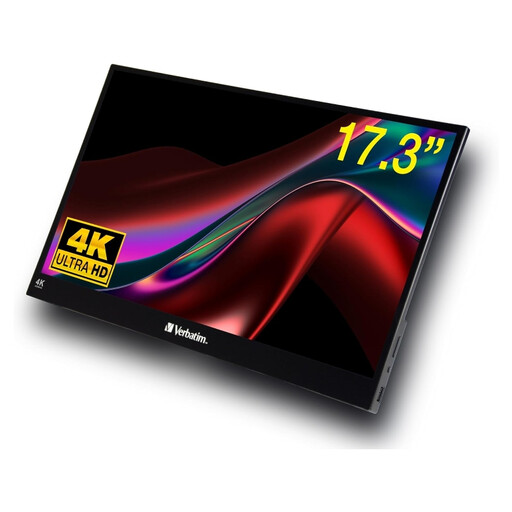
Verbatim PMT-17, 17.3-inch Full HD touchscreen
The touch-screen function is useful if you want to make changes directly on the display; the larger format takes up more space.
Features listed in the product name: Full HD, USB-A, USB-C and HDMI. The stated weight is 1.63 kg.
View at Joybuy
Frequently asked questions
Is a USB-C port on my laptop enough to display an image on a second monitor?
Not necessarily. For the ThinkVision M14, Lenovo requires DisplayPort 1.2 Alternate Mode and USB Power Delivery 2.0; ASUS notes that the laptop port must support display output for the MB16AHV. The requirements of the specific monitor and laptop port are what matter.
Can Power Pass Through replace a battery for a visit to the library?
Power Pass Through alone doesn’t mean the monitor has a built-in battery. ViewSonic requires an external power adapter for the VA1655’s charging function. Check how your combination of devices will be powered and how long you want to use them.
How should I clean a portable monitor after carrying it around?
ASUS recommends switching off the LCD or OLED monitor and disconnecting the cables. Gently clean it with a clean microfibre cloth. If needed, dampen the cloth with a little clean water; don’t apply water directly to the display. Also follow the instructions for your specific device.
What are my rights when buying a monitor online in Germany?
For a standard distance purchase, you generally have a statutory right to cancel, provided the relevant conditions are met and no legal exception applies. The cancellation period is 14 days and, for a typical purchase of goods, starts when you receive them. The German Federal Ministry of Justice’s Gesetze im Internet website also states that the limitation period for ordinary claims relating to defects is generally two years from delivery; this is different from a voluntary manufacturer’s warranty.


