A portable monitor can be a good choice for writing a play in the library, provided it fits on the table and your laptop can supply a video signal and power. If space is tight, a compact 14-inch model could work well. For longer text views, a larger display may be a better fit, as long as you have enough desk space and the right connections.
Who is a portable monitor suitable for?
Writers working with several texts at once
If you want to read your script, research or character notes at the same time, pay particular attention to a display format that’s easy for you to read and a suitable font size. Lenovo Germany and LG Germany list different display formats for their respective models.
Writers working at a small table
If there’s little room beside your laptop and papers, consider whether the monitor, stand and cables will fit in your workspace. A display’s compact dimensions alone don’t tell you how much space the complete set-up will need.
Writers without reliable access to a socket
If you need to plan your power supply before visiting the library, check the requirements of both the monitor and your laptop. Requirements vary between models.
What should you look for when choosing one?
First decide what kind of text view you need, then check the desk space, video output and power supply for your particular set-up.
| Criteria |
What to look for |
Who will find this most important? |
| Readable script text |
Open a typical script page using your preferred font size. Lenovo Germany lists the ThinkVision M14d as a 14-inch display with a 16:10 aspect ratio and 2240 × 1400 pixels; LG Germany lists the 16MR70 as a 16-inch display with a 16:10 aspect ratio and 2560 × 1600 pixels. Check for yourself which setting is easiest to read. |
If I want to read my script and notes side by side, the text needs to remain clear at my chosen scaling. Around 28% of consumers put text readability first. |
| Space and portability |
Compare the dimensions, including the stand and cable connection, with your planned workspace. Lenovo Germany lists the ThinkVision M14d’s net weight as 600 g, while ASUS Germany lists the MB16ACV at 0.9 kg; accessories may add extra weight. |
If there’s hardly any room beside my laptop and papers, and I need to pack the monitor away often, I need a set-up that fits on the table and is easy to carry. Around 22% of consumers prioritise desk space and portability. |
| Video signal and connection |
Check that your specific laptop port outputs video and matches the monitor input. ASUS Germany lists USB-C with DisplayPort Alt Mode for the MB16ACV; the ViewSonic VA1655 has USB-C and Mini-HDMI. The USB-C connector alone doesn’t guarantee video output. |
If I want to avoid finding that my laptop won’t display an image on the monitor, I need to check that the specific connection will work beforehand. Around 28% of consumers put connection compatibility first. |
| Power supply |
Check the power requirements of the specific monitor and the power sources available. LG Germany lists DisplayPort Alt Mode and more than 7.5 W output from the connected device for the 16MR70; ViewSonic sets out the requirements for video and power over USB-C for the TD1655. |
If I’m planning longer writing sessions without reliable access to a socket, I need to know how my laptop and second screen will be powered. Around 22% of consumers prioritise the power supply. |
Common mistakes when choosing
-
Assuming a laptop’s USB-C port supports USB-C video output
The connector alone doesn’t tell you whether the port can transmit a compatible video signal. Monitors also differ in the inputs they offer.
Before choosing how to connect the monitor, check the details for your specific laptop port and the input you want to use.
-
Comparing screen size alone
A larger display can take up too much room on a library table once you add your laptop, stand, cables and papers.
Plan the complete set-up with the materials you usually work with, and compare compact 14-inch models with larger 16-inch ones.
-
Assuming power pass-through is a separate power source
A connected monitor needs power. LG specifies requirements for the source device for certain models, and a suitable external power source may be needed separately.
Before a longer writing session, check how your monitor and laptop will be powered by the sources available to you.
Relevant brands at a glance
Lenovo
The ThinkVision M14d and L15 offer different display sizes and formats.
- Lenovo Germany lists the ThinkVision M14d as offering 2240 × 1400 pixels, a 16:10 aspect ratio, two USB-C ports with DP Alt Mode and a net weight of 600 g.
- These specifications apply to the M14d and don’t automatically apply to the L15. Check that your laptop can output video.
ASUS
The ZenScreen MB16ACV is a 15.6-inch Full HD model with an anti-glare IPS panel.
- ASUS Germany lists USB-C with DP Alt Mode, an adjustable stand and a net weight of 0.9 kg.
- No HDMI input is listed for this model. Check that your laptop outputs video over USB-C.
LG
The gram +view 16MR70 has a 16-inch screen for viewing longer texts and can be used in portrait or landscape orientation.
- LG Germany lists 2560 × 1600 pixels and a supplied cover that doubles as a stand.
- LG requires DisplayPort Alt Mode and more than 7.5 W output from the connected device; checking for general USB-C compatibility isn’t enough.
ViewSonic
The VA1655 offers USB-C and Mini-HDMI, while the TD1655 is part of a touchscreen product range.
- ViewSonic lists 10-point multi-touch for the TD1655.
- The VA1655 has separate USB-C power input and Mini-HDMI connections. For the USB-C use described for the TD1655, ViewSonic requires the source device to support the necessary video and power functions.
Acer
The PM161Q B1 is a 15.6-inch Full HD option with HDMI and USB-C.
- For the UM.ZP1EE.101 variant, Acer Germany lists an anti-glare IPS panel, HDMI and two USB-C ports.
- The list of connections doesn’t mean that every USB-C port on a laptop can output video.
Portable monitors at Joybuy
The Joybuy products below are portable second screens for an additional laptop display; sizes range from 14 to 17.3 inches.
 No image available
KEFEYA 16-inch FHD 1200P Portable Laptop Monitor
Designed to provide an additional text view on your laptop; the title mentions a 360° rotating magnetic stand.
16 inches; FHD 1200P.
Before buying, check that your laptop’s video output and power supply are compatible with the monitor.
View at Joybuy
 No image available
Blackview DCM6 PRO 14-inch Full HD Monitor
Can provide a compact additional view for your laptop; the product details list compatibility with 13–17.3-inch laptops.
14 inches; Full HD, 1920 × 1080; IPS.
Check compatibility with your specific laptop and connection.
View at Joybuy
 No image available
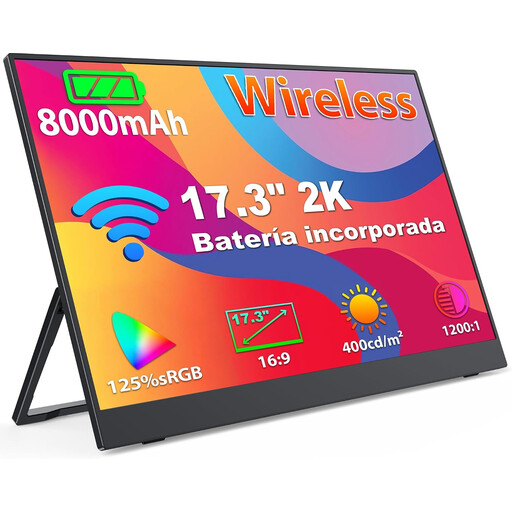
Portable wireless 17.3-inch 2K monitor with battery
The product title lists a built-in battery for an additional display without a permanent cable connection.
17.3 inches; 1440p IPS panel; 8000-mAh battery; AirPlay/Miracast support.
The title lists laptops, PCs and smartphones as compatible devices. Check that your device and writing environment support the connection you want to use.
View at Joybuy
 No image available
Blackview DCM5 14-inch IPS Monitor, 16:9
Described as a portable second monitor for an additional laptop display.
14 inches; IPS LCD; 16:9 aspect ratio. The product details list laptops from 13 to 17 inches as compatible.
Check your device’s video output and the connection you’ll need beforehand.
View at Joybuy
 No image available
Blackview TABLE 9 16-inch Monitor, 16:10
The 16:10 format could work well for viewing longer texts; check that the larger display will fit on your library table.
16 inches; 1920 × 1200; IPS. The product title mentions a telescopic, rotating magnetic stand.
The listed compatible devices are PCs, smartphones, tablets and MacBooks. Check the connection options on your specific device.
View at Joybuy
Frequently asked questions
Will any USB-C port on my laptop do?
No. Not every USB-C port outputs a compatible video signal. Check whether your specific port supports DisplayPort Alt Mode, for example, and whether its power supply is suitable for the monitor. The USB Implementers Forum describes Alternate Mode as a separate USB-C feature; manufacturers may also specify additional requirements for their models.
How do I set up a second screen for a script?
Position the monitor securely next to your laptop, then check the font size and orientation using a typical script page. LG describes the 16MR70 as suitable for portrait or landscape use; its automatic rotation feature requires the OnScreen Control software.
Will I need a socket for longer writing sessions?
That depends on the monitor, your laptop’s battery and how long you plan to work. LG describes the 16MR70 as running from the connected laptop’s battery; for longer use of the TD1655, ViewSonic recommends a power bank or mains socket. Test your specific combination of devices rather than assuming it will last as long as another tested set-up.
What are my rights when buying a monitor online in Germany?
When you buy from a business seller at a distance, you generally have a 14-day right to cancel from the date of delivery; exceptions and possible return costs should be taken into account. Separately, goods are generally covered by a statutory guarantee of at least two years against the seller. The European Union’s Your Europe explains these rules; a voluntary manufacturer’s warranty doesn’t replace your statutory rights.


