What should you look for when buying?
First compare the usable screen area and how the monitor can be positioned, then check video signal and power requirements for your particular device.
| What matters |
What to look for |
Who it matters most to |
| Manual page readability |
Compare the screen size, aspect ratio, native resolution, surface finish and portrait orientation available on the specific model. |
If I want to see text and diagrams as clearly as possible, I look at screen area, scaling and reflections; around 33 % of consumers rank readability as their top priority. |
| Portability and desk space |
Check the weight and dimensions of the device, as well as the stand and protective case for the exact variant. |
If I regularly take the monitor to a café, it needs to fit in my bag and on the table beside my laptop; around 27 % of consumers prioritise portability and desk space. |
| USB-C video and power |
Check that your laptop or tablet can output video over USB-C and provide enough power; if necessary, plan to use a suitable external power source. |
If I want to use as few cables as possible, I need a USB-C connection that supports video and provides enough power for my device; around 27 % of consumers pay particular attention to this connection type. |
| Alternative video connection |
Check for an HDMI output, the cable or adapter you’ll need, and a separate power supply for both devices. |
If my device can’t output a compatible video signal over USB-C, having another video input is important; around 13 % of consumers prioritise an HDMI connection. |
Portable monitors at Joybuy
This selection includes portable monitors listed as 14 or 15.6 inches, suitable for reading manuals at a café table. Depending on the model, USB-C and HDMI are listed; before choosing a connection, check video output and power compatibility with your laptop.
 No image available
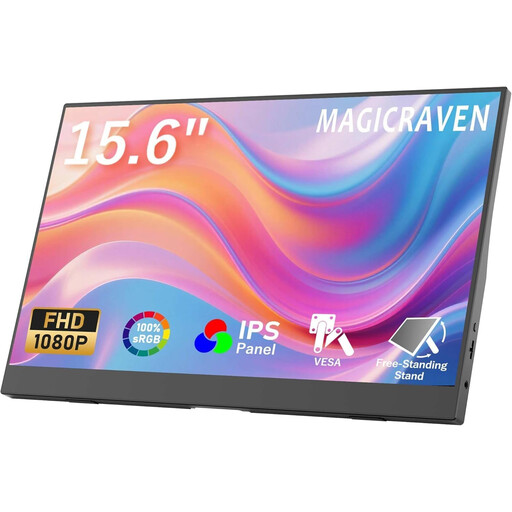
Portable 15.6-inch monitor with FHD IPS display
A separate 15.6-inch screen is worth considering if you have enough room on your café table.
Listed in the product name: FHD 1080p, 60 Hz, IPS, HDR, built-in speakers, HDMI and USB-C, plus a stand. Check which connection can output video from your device and how the monitor will be powered.
Joybuy
 No image available
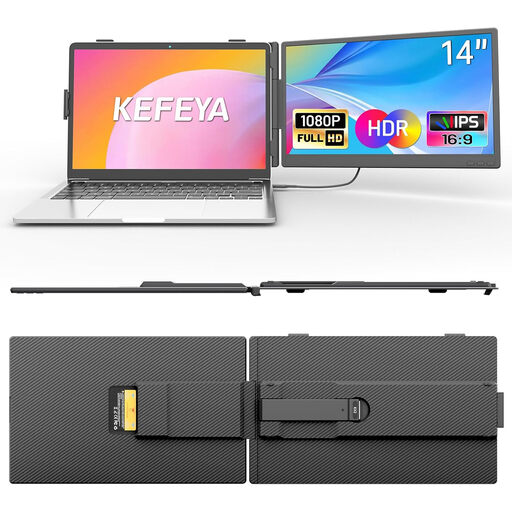
KEFEYA 14-inch laptop monitor, FHD 1080p IPS
Described as a laptop extension for devices from 13 to 17 inches; check in advance that the attachment is compatible with your laptop.
Listed in the product name: 14 inches, FHD 1080p, IPS, USB-C and HDMI. For an HDMI connection, the product description also specifies USB-A for power, so make sure you plan for a separate power connection.
Joybuy
 No image available
Portable 15.6-inch monitor with two stands
The two stands listed in the product name offer different positioning options; check which one works best on your café table.
Listed in the product name: 1920 × 1080 pixels, 60 Hz, FHD IPS display and built-in speakers. Check that the connections and power supply work with your laptop.
Joybuy
 No image available
PM14R, 14-inch monitor with 1920 × 1200 pixels
The 14-inch format may suit a small table; check that the screen is large enough for your manual pages.
Listed in the product name: 1920 × 1200 pixels, IPS, 16:10, Type-C and Mini HDMI. Check which input will work with your device and how to connect the power supply.
Joybuy
 No image available
Blackview DCM6 PRO, 14-inch Full HD laptop extension
The clamp mount is designed for laptops from 13 to 17.3 inches; before buying, check that your device falls within this range.
Listed in the product name: 14 inches and Full HD. Before choosing this design, check that your laptop supports video over USB-C and that the monitor can be fitted to it.
Joybuy
Frequently asked questions
Will any USB-C port on my laptop provide video and power?
No. ASUS explicitly requires the laptop port used with the MB16AHV to support display functionality; ViewSonic describes the VA1650’s USB-C video input as a DisplayPort Alt Mode connection. Also check the power requirements of both the specific monitor and the device sending the video signal.
How can I position a portrait-format manual in a café?
Check whether the stand on your chosen model can hold the monitor securely in portrait orientation on your table. ASUS describes this positioning for the MB16AHV; automatic rotation on that model requires the specified DisplayWidget Center software.
Who can help if my monitor develops a fault after purchase in Germany?
If you buy as a consumer, you’re entitled to the statutory two-year warranty against the seller, starting from the date you receive the goods. An additional manufacturer’s guarantee doesn’t replace this; keep your proof of purchase.
What should I look for on the label of a new monitor?
Monitors covered by EU harmonisation legislation requiring CE marking must carry the correct CE mark. The European Union explains which products are covered; for affected electrical and electronic products, Germany’s Federal Network Agency checks factors including labelling, traceability and manufacturer details. The CE mark alone isn’t an independent product endorsement.
Can I put an old monitor in my household rubbish?
No. The German Environment Agency advises that old electrical equipment must be collected separately. This includes local recycling centres and suitable take-back points at retailers.


