For a small workbench, a portable 14-inch monitor is a sensible starting point, but it isn’t a one-size-fits-all rule. What matters is the space taken up by the monitor and its stand when open, as well as room for your tools and source device. Try viewing your own instructions on screen, too, and check that the video connection and power supply are compatible. ASUS Support notes that USB-C doesn’t automatically carry a video signal.
Who can benefit from a portable monitor?
Anyone reading instructions at a cramped workbench
If you need to make room for instructions, a source device and your materials all at once, the space taken up by the monitor and its stand matters more than screen size alone. The DGUV’s guidance on work surfaces, along with dimensions from Lenovo Germany and Dell Germany, can help you plan your setup.
Anyone reading detailed diagrams
If you want to read labels and work steps from your usual viewing position, consider the aspect ratio and resolution alongside text size, display settings and placement. Lenovo Germany and Dell Germany both list a 16:10 aspect ratio for their respective 14-inch models.
Anyone using different source devices
If you switch between a laptop and other devices depending on the task, the device’s actual video output and the monitor’s power supply requirements need to be compatible. ASUS Support explains that the source device’s USB-C port must support video.
What should you look for when buying?
Compact 14-inch display
A good fit if: You need room for instructions, a source device and your work materials all at once. The Lenovo ThinkVision M14d and Dell P1425 are examples with a 16:10 aspect ratio.
Consider: The smaller screen needs to work with your instructions and your intended viewing distance.
Larger portable display
A good fit if: A larger image is more important and you have enough room on your workbench. The AOC 16T3EA is an example with a 15.6-inch screen.
Consider: A larger screen doesn’t remove the need to check the casing dimensions, stability and connections.
Use a display you already own
A good fit if: You can already read the instructions clearly on a device you own, or there’s no safe space for a second screen.
Consider: You won’t gain any extra screen space, but you also won’t have another device, stand, cables and power requirements to deal with.
| Buying consideration |
What to check |
Especially important for |
| Space and stability |
Compare the casing’s width and depth, including the stand when open, with the space available where you plan to set it up. |
If I need instructions, tools and a source device on the workbench at the same time, I want to measure the setup in advance. Around 31% of consumers put clear workbench space first. |
| Readability |
Try your own instructions at the intended scaling and orientation, and take your viewing position and reflections into account. |
If I want to read diagrams and work steps at a glance, I’ll check my own files instead of relying on resolution alone. Around 25% of consumers prioritise readable instructions. |
| Video connection |
Check the specific source device’s video output against the monitor input and a suitable cable. If using USB-C, make sure it supports video. |
If I switch between a laptop and other source devices, I want to know which connection actually outputs a picture. Around 25% of consumers prioritise a reliable video connection. |
| Power supply |
Check how both the monitor and source device will be powered, and whether you’ll need a mains socket or an additional power source. |
If my setup needs to run continuously at the workbench, I’ll plan the power supply and cable route at the same time. Around 19% of consumers prioritise the power supply. |
Common misconceptions
-
USB-C doesn’t automatically mean video
USB-C ports can support different functions. A matching plug alone doesn’t tell you whether the source device can output a video signal supported by the monitor.
Before choosing a connection, check the documented features of the specific ports on both devices and find out which cable you need.
-
Screen size isn’t the same as the space you need
On a small workbench, the casing and open stand also take up space that would otherwise be available for your source device and work materials.
Measure the planned setup, including the stand, where you intend to place it.
-
Power passthrough isn’t a built-in battery
Lenovo describes the ThinkVision M14d as supporting power passthrough; this doesn’t mean the monitor can run on battery power.
For each planned location, decide how you’ll power both the monitor and the source device.
Depending on your setup, you may also need an external power source.
Brands and models to consider
Lenovo
The ThinkVision M14d is a 14-inch, 16:10 option for viewing documents where space is limited.
- Lenovo lists a resolution of 2240 × 1400 pixels, two USB-C ports with DP Alt Mode and power passthrough for this model.
- Check that the stand and ports suit your workbench and source device. Power passthrough doesn’t mean it runs on battery power.
Dell
The Dell P1425 is a portable 14-inch option with a 16:10 aspect ratio.
- Dell lists a resolution of 1920 × 1200 pixels, an IPS panel and tilt adjustment for this model.
- Check text size, available space and power requirements as part of your planned setup.
AOC
The 16T3EA is a 15.6-inch alternative if you’re looking for more screen space.
- AOC lists Full HD, USB-C power and an integrated stand for this model.
- Check that the casing and stand leave enough room for your work materials and source device.
ASUS
The ZenScreen MB16AHG is a portable 15.6-inch option with different video connections.
- ASUS lists USB-C with DP Alt Mode, Mini HDMI and a fold-out stand.
- Check that your source device supports the monitor’s video inputs and power requirements.
HP
The German version of the Series 5 Pro 514pn is a portable option for viewing detailed documents.
- HP lists a resolution of 2560 × 1600 pixels at 14.36 inches for the B88JWAA#ABB version.
- Try viewing your own instructions and check that the device fits the space available on your workbench.
Portable 14-inch monitors at Joybuy
This selection includes portable 14-inch monitors for viewing instructions and connecting to a laptop. Check the space each one takes up and make sure you have a compatible video connection.
 No image available
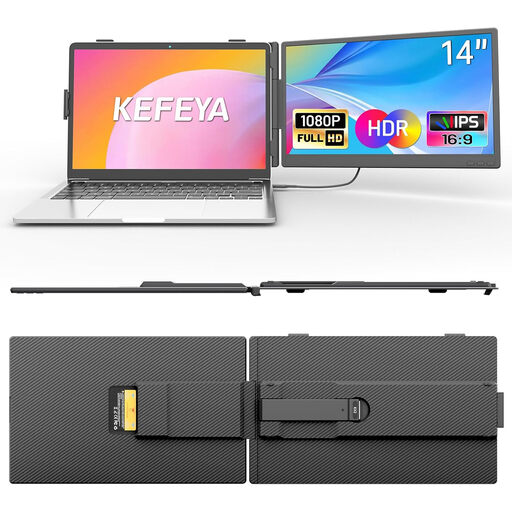
KEFEYA 14-inch FHD IPS monitor
A compact screen option for viewing workshop instructions alongside your laptop.
14-inch, FHD 1080p, IPS, USB-C and HDMI.
View at Joybuy
 No image available
Portable 14-inch FHD IPS monitor
Another 14-inch option if you’re looking for a portable screen to view instructions alongside your laptop.
FHD 1080p, 60 Hz, IPS, plus HDMI, USB-A and USB-C; includes a smart cover.
View at Joybuy
 No image available
Blackview DCM6 PRO, 14-inch
A portable 14-inch option for extending your laptop display to view workshop instructions.
Full HD; listed in the product name as suitable for laptops from 13 to 17.3 inches.
View at Joybuy
 No image available
Blackview SCM5, 14-inch
A compact option for viewing instructions on a portable screen, with an integrated stand for easy positioning.
FHD, IPS and adjustable stand; listed in the product name as suitable for laptops from 13 to 17.3 inches.
View at Joybuy
 No image available
Blackview SCM6, 14-inch
A portable screen for viewing instructions, with an integrated stand that may suit your planned setup.
FHD, IPS, integrated stand, 600 g and 4.5 mm; listed in the product name as suitable for laptops from 13 to 17 inches.
View at Joybuy
Frequently asked questions
Is my laptop’s USB-C port enough to transmit video?
No, the shape of the plug alone isn’t enough to tell you. ASUS Support distinguishes USB-C with DP Alt Mode from ports without video functionality. Check what your specific laptop port supports and what the monitor requires.
How should I plan for a monitor on a small workbench?
Allow space for the monitor and stand as well as your source device and work materials. The DGUV recommends a flexible work surface suited to the task and highlights the problem of distracting reflections. It doesn’t set a universal minimum size for every home workshop bench.
What are my rights if the monitor is faulty?
For consumer purchases within the EU, you generally have at least two years of legal rights against the seller for faulty goods, starting from the date you receive them. The European Union’s Your Europe website distinguishes these rights from an additional voluntary manufacturer’s guarantee.
What do the CE mark and disposal guidance mean for the monitor?
For products covered by relevant EU rules, the CE mark indicates that the manufacturer declares the product conforms to those requirements; it isn’t an independent performance test. The German Environment Agency advises that waste electrical equipment should be collected separately. Check the specific version on sale and the available return options.


