Storyboard reviewers with limited table space
If you want to place your laptop and an extra display side by side, the space available and a stable stand are key. Check whether the screen and stand will fit on your kitchen table.


For a storyboard review at the kitchen table, first check the space available, readability, and your device’s video connection and power requirements. Touch is only necessary if you want to work directly on the monitor. A compact display is more likely to fit on a small table, while a larger one takes up more room. Colour gamut figures alone aren’t enough to make definitive colour decisions.
If you want to place your laptop and an extra display side by side, the space available and a stable stand are key. Check whether the screen and stand will fit on your kitchen table.
If you compare drawing details or colours, consider resolution, screen area and colour reproduction specifications separately. A colour gamut figure alone doesn’t show how colours will look in your particular set-up.
If you want to make inputs on the extra display, check that the touchscreen works with your device, operating system and storyboard software.
First, work out how much space you have and how you’ll connect the monitor. Only make touch a buying priority if you’ll actually be interacting with the screen.
| Consideration | What to check before buying | Who should consider this? |
|---|---|---|
| Space and readability | Check the dimensions, stand, tilt adjustment and resolution against your table space and viewing distance. | If I want to read panels next to my laptop, both devices and their stands need to fit on the table. Around 25 % of consumers prioritise space and readability. |
| Video signal and power | Check the video output, monitor input, cables and power supply individually for your planned connection set-up. | I want to display the storyboard from my existing device and power the monitor during the review. For around 33 % of consumers, connectivity and power are the main concerns. |
| Colour and detail | Compare native resolution and scaling. For colour decisions, also check the model’s colour gamut and calibration specifications. | If I’m assessing drawing details or colours, I don’t want to confuse pixel count with colour specifications. Around 25 % of consumers prioritise colour and detail. |
| On-screen input | Check the touch or stylus type, operating system, software and video signal against your own device. | If I want to interact with or comment on the storyboard directly on the extra display, the input method I need must work with my workflow. Around 17 % of consumers prioritise direct input. |
According to ASUS, single-cable operation with the ASUS ProArt PA148CTV requires DisplayPort Alt Mode and at least 10 W of output power from the connected device.
Check the connection and power requirements for the specific monitor and your device before relying on a single-cable connection.
Depending on the connection, you may also need a compatible cable or a separate power supply.
Resolution and colour reproduction describe different things. A colour gamut coverage figure alone doesn’t show how a monitor will reproduce colours in your particular environment.
If colour decisions matter, check the model’s calibration specifications and your complete colour workflow, rather than looking at pixel count alone.
The input method you want will only work if your device, operating system and software are compatible.
First decide whether you’ll actually be annotating or interacting with the extra display. If you’ll only be viewing panels together, start by comparing screen area and set-up.
According to Verbatim, the 4K Touchscreen Monitor #32238 also requires a power adapter when connected via HDMI.
Plan for the video cable and power supply separately, and check the requirements for the specific model.
Options for this use include the ProArt PA148CTV for colour-conscious reviews and the larger ZenScreen MB16AHG with its IPS display.
The ThinkVision M14t Gen 2 is a compact option if you want to input directly on the extra display.
According to LG, the gram +view 16MR70 offers more screen space for panels and notes.
The Pro P1425 is a 14-inch second screen for reviews where touch input isn’t essential.
The PM-14 is a compact extra display. The separate 4K Touchscreen Monitor #32238 is a different model with higher resolution and touch.
This selection includes portable second screens for reviewing content alongside a laptop, from compact 14-inch models to larger displays.
 No image available
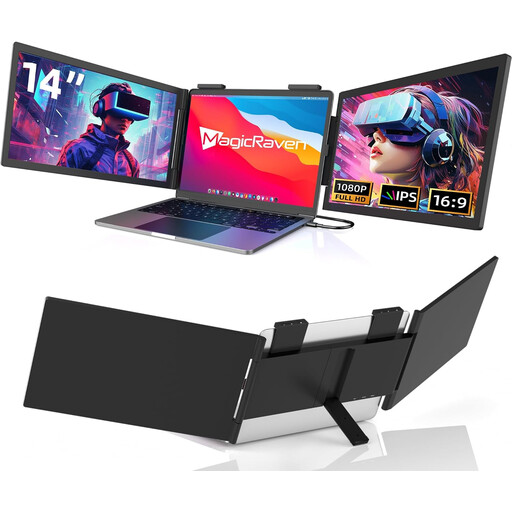
Designed as a compact second screen alongside a laptop. The title specifies USB-C and rules out HDMI.
14 inches, FHD with 1080p, 60 Hz and built-in speakers. The title says it’s suitable for laptops from 14 to 16 inches.
 No image available
A compact way to extend your laptop display, provided your laptop is within the stated size range.
The title specifies a Full HD display and compatibility with laptops from 13 to 17.3 inches.
 No image available
A compact option if you want an adjustable stand for setting it up on a table.
The title specifies an FHD IPS display, an adjustable stand and compatibility with laptops from 13 to 17.3 inches.
 No image available
A larger second screen if you have room on your table for a 16-inch display.
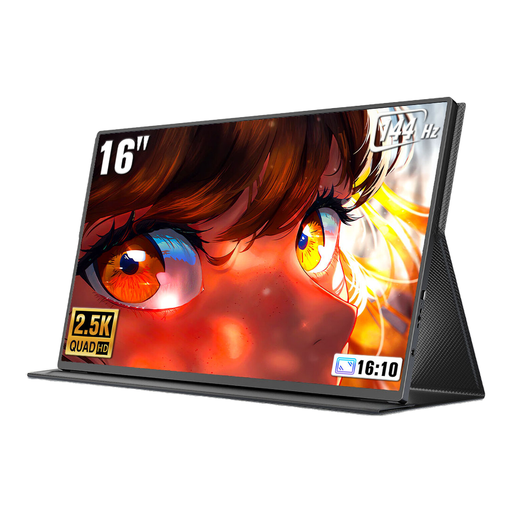
The title specifies a 16:10 aspect ratio and a pull-out, rotating magnetic stand.
 No image available
For reviewing content on a larger display if you want to use the specified resolution and 16:10 aspect ratio.
The title specifies 2560 × 1600 pixels, 16:10 and USB-C and Mini HDMI connections.
No, the connector type alone doesn’t guarantee this. According to ASUS, single-cable operation with the ASUS PA148CTV requires DisplayPort Alt Mode and at least 10 W of output power from the connected device. Check the requirements for your specific monitor and laptop.
It depends on the model. For the Verbatim 4K Touchscreen Monitor #32238, the manufacturer also requires a power adapter when connecting via HDMI.
No, you’ll need to check this for your specific device set-up. ASUS says that the PA148CTV’s touch function depends on the operating system. You should also check whether your software supports the input method you want to use.
For a standard distance purchase from a business seller, you generally have a 14-day right to cancel, starting from the date of delivery; exceptions and rules on return costs apply. EU law also provides for a minimum two-year legal guarantee for faulty goods. This is separate from any voluntary manufacturer’s warranty.
Relevant EU regulations may require electrical and electronic equipment to carry a CE marking. According to the European Union, it is the manufacturer’s declaration of conformity, not an individual approval from an EU authority. For products that require the marking, check that it is present and appears genuine.