Who is a portable monitor for?

Teams reviewing panels together

When several people are looking at storyboard panels and captions around a shared table, the screen area, viewing angles and positioning should suit the seating arrangement. Lenovo and AOC document display features on their respective models that may help you choose.

Design teams making colour decisions

If you want to discuss the intended colour effect as well as the sequence and content, documented display features are one factor to consider. ASUS lists features for the ZenScreen MB16QHG, while EIZO describes calibration as part of colour management.

Teams adding notes on screen

If you want to navigate or mark up content directly on the secondary display during a meeting, touch or pen input needs to work with the source device and software. Lenovo and ViewSonic document input features for the models mentioned here.

What should you look for when choosing one?

More screen space

A good fit if: several people need to view panels and captions at the same time.

The trade-off: A larger display takes up more table and carrying space. Check readability from the actual seating positions.

Colour and image detail

A good fit if: the meeting includes decisions about colour or detail.

The trade-off: A stated colour gamut does not prove colour accuracy at your specific workstation; calibration, software and lighting conditions still matter.

Direct input on the display

A good fit if: you want to navigate or add notes directly on the secondary display during a review.

The trade-off: Touch or pen input will only work for your intended workflow if the connection, operating system and storyboard software also support it.

Buying priority What to check before buying Who it matters most to
Readability for a group Show a typical storyboard page at the intended magnification, then check the viewing distance, angles, reflections and stand position on the table. When we review panels together, captions should remain readable from seats at the sides too. Around 26% of consumers put group readability first.
Colour and image detail Compare the resolution and colour gamut of the specific model with your content. For critical colour decisions, factor in calibration, software and lighting. When colour and image decisions are part of our meeting, the display needs to fit into the intended colour-management workflow. Around 21% of consumers consider colour reproduction their top priority.
Connection and power Check the video output, monitor input, cable and power supply together. For USB-C, the source device’s port must support a compatible video mode. When we use different devices around the table, the video and power setup should work with each one. Around 21% of consumers put a working connection first.
Direct input Check touch or pen functionality on the specific model, as well as support from the connection, operating system and storyboard software. When we want to navigate or mark up content on the secondary display, input needs to work in the software we plan to use. Around 16% of consumers put direct input first.
Portability and setup Check the table space, tilt range, stand, protection while carrying and planned cable routing against the specific model. When we set up and pack away the monitor regularly, it should be practical on the table and easy to carry. Around 16% of consumers prioritise portability and setup.

Common buying misconceptions

  • USB-C guarantees a one-cable connection

    The shape of the connector alone does not prove that the device outputs video through that port or supplies enough power for the monitor.

    Before buying, check that the source device’s output, the monitor input, cable and power supply all work together.

  • A stated colour gamut means colour accuracy has been tested

    A display specification does not tell you how colours will look across the entire workflow at your specific workstation.

    For colour approval, assess the complete workflow and lighting conditions rather than relying on a single percentage figure.

    Critical colour approval may require extra work to calibrate the display and manage colour.

  • Touchscreen input is all you need for storyboard notes

    Touch functionality does not prove that the operating system and software you use will support the input you need.

    Check touch connectivity on the specific model and test your planned annotation workflow with your device and software.

Key brands at a glance

Lenovo

The ThinkVision M16 and M14t Gen 2 cater for different display size and input requirements.

  • Lenovo lists a resolution of 1920 × 1200 pixels and two USB-C ports for the M16; the M14t Gen 2 is listed with 2240 × 1400 pixels, touch and an active pen.
  • These features belong to different models. Display specifications alone prove neither readability for every group nor annotation support in every software application.

ASUS

The ZenScreen MB16QHG is an option for buyers looking for a higher-resolution 16-inch display with a documented colour gamut and several setup options.

  • ASUS lists 2560 × 1600 pixels, 100% DCI-P3, USB-C, HDMI, a stand and a tripod socket.
  • The manufacturer’s colour gamut specification is not an independent measurement of colour accuracy and does not apply to all ZenScreen models.

ViewSonic

The TD1655 is designed for meetings where touch input and an adjustable stand are useful.

  • ViewSonic lists 10-point multi-touch and a single-cable USB-C solution for video, power and touch signals.
  • Check that your device and software will work with the features you plan to use.

AOC

The 16T20E2 is a 15.6-inch IPS option if you need HDMI as well as USB-C video.

  • AOC documents Full HD resolution and ports including USB-C with DisplayPort Alt Mode, as well as HDMI.
  • A choice of ports does not remove the need to check the power supply, and it does not prove that the monitor has touch functionality.

Verbatim

The PMT-15-4K is an option if you want to look at 4K, touch and HDMI in a portable model.

  • Verbatim lists 10-point touch, USB-C inputs with DisplayPort Alt Mode, HDMI and included cables.
  • For HDMI, check the power and touch connections separately for your planned setup; the 4K specification does not prove colour accuracy.

Portable monitors at Joybuy

The portable displays below may suit shared panel reviews and a range of connection and setup requirements. Before choosing one, check that video output and power work with your specific source device.

Portable 16-inch monitor with 2.5K resolution

Portable 16-inch monitor with 2.5K resolution

The stated 16-inch size and 1600p resolution may be useful for viewing panels together.

This model is described as having an IPS panel, a built-in 8000-mAh battery, AirPlay and Miracast, and a VESA mounting option. The description also lists 125% sRGB colour gamut coverage; this alone does not prove colour accuracy in your workspace.

View at Joybuy

UPERFECT 16-inch monitor with 2560 × 1600 pixels

UPERFECT 16" 2K 144Hz Portable Monitor

The 16-inch display, with 2560 × 1600 pixels and a 16:10 aspect ratio, could be a good option for viewing storyboard panels together.

The title lists a QLED display and 450 nits; USB-C, Mini-HDMI and VESA compatibility are also specified. Check that the video input and power supply suit your setup.

View at Joybuy

UPERFECT 18.5-inch monitor with Full HD resolution

UPERFECT 18.5" 120Hz Portable Monitor

The stated 18.5-inch screen size may work well for viewing together as a group; check that you have enough room on the table.

The model is listed with a resolution of 1920 × 1080 pixels and an IPS display. The listed ports are USB-C and Mini-HDMI.

View at Joybuy

ARZOPA Z1RC 2.5K portable monitor, 16 inches

ARZOPA Z1RC 2.5K Portable Monitor, 16 Zoll

The 16-inch IPS display, with 2560 × 1600 pixels and a 16:10 aspect ratio, is described as suitable for detailed panel reviews.

The model is listed with two USB-C ports, HDMI and a weight of 810 g. Check that the video connection you need is compatible with your source device.

View at Joybuy
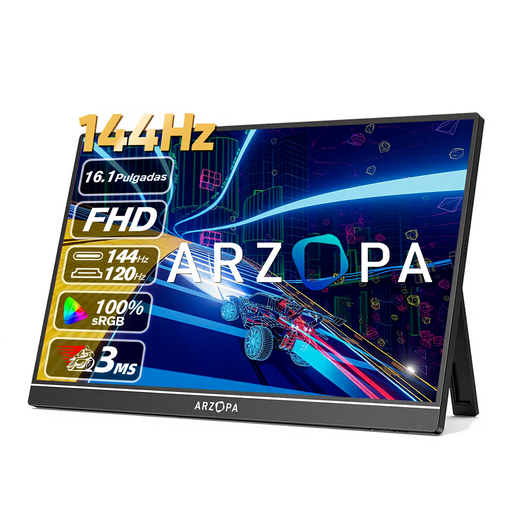
ARZOPA Z1FC 16.1-inch monitor with Full HD resolution

ARZOPA Z1FC 16.1" 144Hz Portable Monitor

The portable 16.1-inch IPS display, with 1920 × 1080 pixels, could be a good choice for viewing storyboard panels around a shared table.

The title lists a built-in stand and 106% sRGB; USB-C and Mini-HDMI are included in the product description. The colour gamut specification alone does not prove colour accuracy.

View at Joybuy

Frequently asked questions

Is a USB-C port on my laptop enough for video and power?

No. The connector shape alone is not enough to confirm this. Check that the specific port supports a compatible video mode and that the source device, cable and power source meet the requirements of your chosen monitor.

Can I add storyboard notes directly on a touchscreen monitor?

Only if the connection for input data, as well as the operating system and storyboard software, support your intended workflow. Lenovo and ViewSonic document touch functionality for the models mentioned, but do not claim compatibility with every application.

What should I do for critical colour approval?

Treat a colour gamut specification as a model feature, not proof that a display is suitable for colour approval. Make sure the display, calibration and the rest of your colour-management workflow work together, then check the image under the intended lighting conditions.

What are my rights if a product is faulty or I buy online in Germany?

For faulty goods, the seller is generally responsible for the statutory warranty; the Verbraucherzentrale states that it lasts for two years from delivery. Consumers who buy online generally have a 14-day right to cancel. These rights are separate from a voluntary manufacturer’s guarantee.

How can I return an old monitor in Germany?

Waste electrical equipment must be collected separately and must not go in household waste. The European Commission explains take-back schemes for waste electrical equipment. In Germany, options include local collection points and, depending on the retailer’s obligations, in-store take-back schemes.