When there’s little room beside your laptop, first check the monitor’s external dimensions and allow space for the stand and cables. A 14-inch model may fit a small desk better than a larger display. For fine details, resolution and scaling matter; for judging colours, check model-specific colour and calibration information; and for direct input, consider touch. In each case, make sure your source device, power supply and, where necessary, software are compatible. A manufacturer’s colour gamut figures alone don’t guarantee accurate colour reproduction at your own workstation.
Who is a portable monitor useful for?
Storyboard reviewers with limited desk space
If there’s hardly any room beside your laptop, the monitor’s external dimensions and how it’s positioned matter more than screen size alone. Dell lists the Pro P1425 as 14 inches; Verbatim also lists the PM14 as 14 inches.
Creatives working with detailed or colour-sensitive panels
If you’re assessing fine drawing details or colours, consider resolution, colour specifications and your own colour workflow separately. Lenovo lists the ThinkVision M14t Gen 2 at 2240 × 1400 pixels; ASUS publishes model-specific colour specifications for the ProArt PA148CTV.
Teams that mark up changes directly
If you want to tap or annotate directly on the second display during a meeting, check for touch support and compatibility with your device and app. ASUS notes that the PA148CTV’s touch function depends on the operating system.
What should you look for when buying?
First check that the monitor, stand and cables will fit on your desk. Then match the level of detail you need and the available connections to your workflow.
| Buying consideration |
What to check |
Who is it especially important for? |
| Desk space and positioning |
Compare the external dimensions, stand depth and cable outlet with the available desk space. |
If there’s little room left beside my laptop and input devices, I want to know whether the whole setup will fit. Around 28% of consumers say available desk space is their main consideration. |
| Details and labels |
Assess resolution and screen size together with the scaling in the intended application. |
If you’re reviewing small panels or labels, you need a display that remains legible in your own workflow. Around 22% of consumers prioritise viewing fine detail. |
| Video connection and power |
Check video output from the specific port, along with power requirements, the monitor input and the cable you need. |
If I want to use my existing laptop or another source device, the connection needs to provide both a picture and the required power. Around 22% of consumers say connections and power are their main considerations. |
| Colour reproduction |
Compare the model’s colour gamut and documented calibration with your project requirements. |
When approving colours, I want to know whether the monitor’s specifications suit my project and colour workflow. Around 17% of consumers prioritise colour assessment. |
| Direct interaction |
Check touch support and compatibility with your operating system and application. |
If I want to discuss panels together and mark them up directly, the input method I need must work with my device and software. Around 11% of consumers say direct input is their main consideration. |
Common buying misconceptions
-
USB-C guarantees video transmission
Having a compatible connector doesn’t necessarily mean the source device’s port can output a video signal. ASUS requires the laptop port used with the ZenScreen MB166C to support display output; LG also specifies DisplayPort Alt Mode and an output of more than 7.5 W for the 16MR70.
Check video output, power and cables with your specific source device before choosing how to connect it.
-
Comparing screen size alone
On a small desk, there also needs to be room for the stand, cables and laptop. A larger display may give you a better overview, but it takes up more space.
Compare the external dimensions and positioning with the free space on your desk, then decide what size of display you actually need.
-
Assuming colour gamut coverage means colour-accurate display
Colour gamut coverage, documented colour accuracy and how colours appear in your own workflow are different considerations. The specifications for the ProArt PA148CTV come from ASUS.
For colour approvals, set out your project requirements and check the colour gamut and calibration information for the exact model.
-
Assuming touch means you can annotate straight away
Touch will only work for your intended workflow if your source device, operating system and application also support the input you want to use. ASUS says the PA148CTV’s touch function depends on the operating system.
Before buying, check that your device and software support the controls you plan to use, including a stylus if needed.
Key brands and model differences
ASUS
The ProArt and ZenScreen ranges include a variety of portable monitors, with specifications that vary by model.
- ASUS lists 100% sRGB, 100% Rec. 709 and factory pre-calibration to Delta E < 2 for the ProArt PA148CTV.
- According to ASUS, the PA148CTV’s touch function depends on the operating system. The laptop’s USB-C port must support video output for the ZenScreen MB166C.
Lenovo
The ThinkVision M14t Gen 2 combines a compact 14-inch format with higher resolution and touch.
- Lenovo lists 2240 × 1400 pixels, 100% sRGB and touch for this model.
- The documented connection is USB-C with DisplayPort. Check that your source device and intended workflow support touch.
Dell
The Pro P1425 is a 14-inch second screen for reviewing work without the need for direct input.
- Dell lists an IPS display with 1920 × 1200 pixels and an included stand for the P1425.
- If touch or colour approval matters, check the specifications for the specific model and your workflow separately.
LG
The gram +view 16MR70 gives you a larger view of your storyboards, provided you have enough desk space.
- LG lists a 16-inch screen and 2560 × 1600 pixels for this model.
- According to LG, connected devices must support DisplayPort Alt Mode and provide an output of more than 7.5 W. The monitor draws power from the connected laptop unless you use an additional power supply.
Verbatim
The PM14 is a lightweight 14-inch second screen; the separate 15.6-inch 4K touch model is a different product.
- Verbatim lists Full HD and a weight of 540 g for the PM14. According to the manufacturer, a power supply is included for HDMI use.
- The features of the larger 4K touch model don’t apply to the PM14. Check the specifications and power requirements for the exact model.
Joybuy products for reviewing storyboards
This selection includes compact 14-inch monitors for a second view alongside your laptop, as well as a larger 17.3-inch touchscreen for a more expansive overview.
 No image available
14-inch FHD monitor for expanding your laptop display
The 14-inch format is worth considering for a compact second view on your desk; check that the connections are compatible with your source device.
14 inches, FHD with 1080p, 60 Hz and IPS; HDMI, USB-A and USB-C. According to the product name, compatible with 14- to 16.5-inch laptops, as well as Windows, Mac and Android.
View at Joybuy
 No image available
Blackview DCM6 PRO, 14 inches
The 14-inch format is designed to give you a compact second view alongside your laptop; check the stated laptop size range against your device.
14 inches, Full HD. According to the product name, designed for laptops from 13 to 17.3 inches.
View at Joybuy
 No image available
Blackview SCM5, 14 inches
This portable 14-inch monitor is a compact option; check that its positioning and stated laptop compatibility work with your desk and device.
Full HD, IPS, adjustable stand and 1.5 W speakers. According to the product name, designed for laptops from 13 to 17.3 inches.
View at Joybuy
 No image available
Blackview SCM6, 14 inches
The integrated stand may be useful for a second view when desk space is limited; still, check that the whole setup will fit on your desk.
Full HD, IPS, integrated stand, 600 g and 4.5 mm thick. According to the product name, designed for laptops from 13 to 17 inches.
View at Joybuy
 No image available
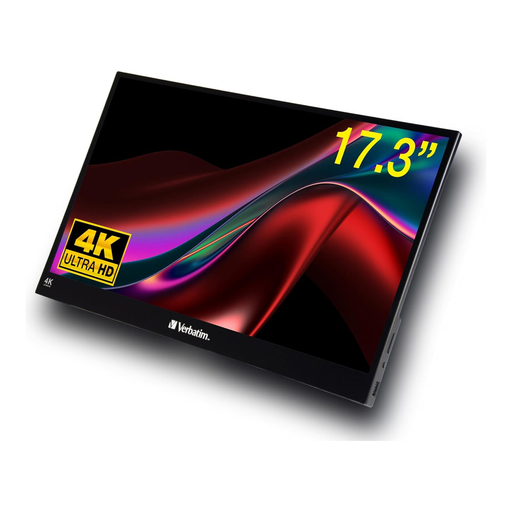
Verbatim portable touchscreen monitor, 17.3 inches, 4K
The larger display may be useful for viewing several storyboard panels at once; measure the space available on your desk before buying.
17.3 inches, 4K, HDR and touchscreen; USB-C and HDMI.
View at Joybuy
Frequently asked questions
Is a USB-C port on my laptop enough to provide video and power through one cable?
The connector shape alone doesn’t guarantee it. Check whether the specific port can output video and meet the monitor’s power requirements. ASUS requires a USB-C port with display support for the MB166C; LG specifies DisplayPort Alt Mode and an output of more than 7.5 W for the 16MR70.
Can I use HDMI if my device doesn’t output video over USB-C?
That depends on the inputs and power requirements of the specific monitor. Verbatim says a power supply is included for HDMI use with the PM14.
What should I consider when setting up a portable monitor?
Before buying, check that the monitor, stand, cables and laptop will all fit within your available desk space. Follow the instructions for the specific model when cleaning and storing it.
Is a manufacturer’s guarantee the same as your statutory rights?
No. In the EU, consumers buying goods from a trader are generally entitled to a minimum of two years’ legal protection from the seller. Your Europe, the European Union’s consumer portal, explains how these rights differ from an additional voluntary manufacturer’s guarantee.
Can I cancel an online monitor purchase in Germany?
For a standard online purchase from a trader, you generally have 14 days from delivery to cancel; exceptions and conditions relating to return postage apply. Your Europe, the European Union’s consumer portal, explains the right to cancel separately from claims relating to a faulty or misdescribed product.


