What should you consider when choosing one?
First, decide whether you need feedback on the layout or an accurate assessment of colour. Then make sure your device’s connectivity and power supply, as well as the space available at your seat, suit the setup you have in mind.
| What matters |
What to check before buying |
Who it matters to |
| Colour assessment |
Consider the advertised colour gamut, calibration and intended colour workflow separately. EIZO Germany points out that a monitor’s limitations can’t simply be calibrated away. |
If I need to assess colours accurately, I don’t want to rely on a colour gamut figure alone. For around 25% of consumers, colour assessment is the top priority. |
| Device connectivity |
For USB-C, check that the specific port supports video output; VESA / DisplayPort explains the DisplayPort Alternate Mode. If using HDMI, also check how your setup will be powered. |
If my laptop or tablet needs to output the picture, I want to be sure which port to use before I travel. For around 25% of consumers, connection compatibility is the main concern. |
| Space and portability |
Check the screen size, weight and stand against the luggage you’ll have and the space at your seat. Deutsche Bahn says many ICE seats have tables, but that doesn’t mean every seat can accommodate your setup. |
If I need to set up a screen and a device to play content in a small space, the setup should fit on the table and remain stable. Around 19% of consumers prioritise space and portability. |
| Power supply |
For a one-cable connection, check that the USB-C port supports both video output and power. Verbatim Europe says the Verbatim PMT-15-4K also needs a power adapter when used with HDMI. |
If I can’t count on having a spare socket while travelling, I want to know how the monitor and laptop will be powered in my chosen setup. For around 19% of consumers, power is the top priority. |
| Confidentiality |
Consider the content, viewing angles and where you’re sitting; for work-related information, check your organisation’s rules. Germany’s Federal Office for Information Security includes such rules as part of working securely on the move. |
If my design contains confidential information, I want to stop other people from reading what’s on screen. For around 12% of consumers, confidentiality is the main concern. |
Joybuy products for reviewing designs on the move
The portable monitors below offer different connection options, screen sizes and setup possibilities for reviewing designs on the move.
 No image available
Portable 15.6-inch FHD monitor with stand
If you want to use a stand at your seat and choose between USB-C and HDMI, this model could suit your planned setup.
The title lists a 15.6-inch screen, 1080p FHD resolution, 60 Hz, an IPS panel, HDR, built-in speakers, and HDMI and USB-C ports. Check that the USB-C port you plan to use supports video output, and confirm the power requirements for your connection.
View at Joybuy
 No image available
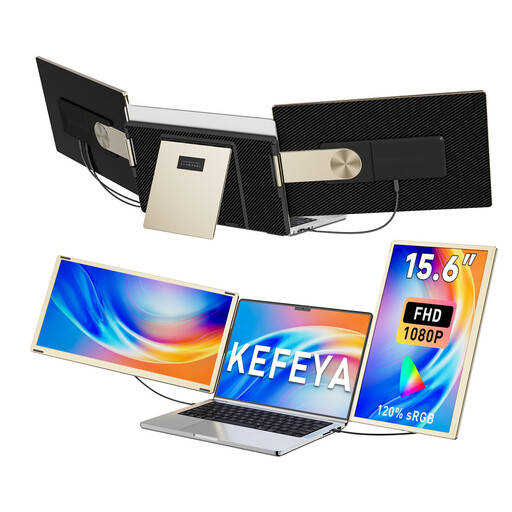
KEFEYA 15.6-inch FHD triple screen extender
If you want to angle the screen for a shared review, the product title describes a rotatable, detachable design.
The title lists a 15.6-inch screen, FHD, 120% sRGB, 235° rotation and compatibility with laptops from 13 to 17.3 inches. For USB-C video output, the device supplying the picture must support DisplayPort Alt Mode; HDMI is also listed as an alternative. The colour gamut figure alone doesn’t guarantee colour-accurate display.
View at Joybuy
 No image available
Portable 16-inch monitor with 2.5K resolution and built-in battery
If you want a larger screen and a built-in power source, as stated in the title, check that the wireless features work with your device.
The title lists a 16-inch screen, 2.5K or 1600p resolution, an 8000-mAh battery, an IPS panel, and AirPlay and Miracast. The stated 125% sRGB colour gamut coverage doesn’t by itself guarantee colour-accurate display.
View at Joybuy
 No image available
Blackview SCM6, 14-inch FHD IPS monitor
If you’re looking for a smaller second screen with a built-in stand, check the space available and whether your device can output video.
The title lists a 14-inch screen, FHD, an IPS display, a weight of 600 g, a thickness of 4.5 mm and a built-in stand. For the USB-C connection described, your device must support video output.
View at Joybuy
 No image available
UPERFECT portable monitor, 15.6 inches, 100% sRGB
If you want an adjustable stand and USB-C for presenting on the move, check that the connections match your specific device.
The product title lists a 15.6-inch screen, 100% sRGB, a built-in adjustable stand, speakers, VESA and USB-C. The sRGB figure alone doesn’t prove the display is calibrated for accurate colour.
View at Joybuy
Frequently asked questions
Can I use any USB-C port on my laptop with the monitor?
No. The connector shape alone doesn’t confirm that the port supports video output. Check video output on the port you plan to use and, for a one-cable connection, check the power supply too; ViewSonic lists these requirements for the TD1655.
How should I prepare the display before travelling by train?
Test your laptop, cable, display mode and power supply together, and check that both devices will stand securely at your seat. If you need to assess colours accurately, the display and colour workflow must also be set up and checked for that purpose.
Can I show a design on the train?
Whether you can show a particular design depends, among other things, on its content and the rules that apply to you. For work-related information, check your organisation’s rules for working on the move, and make sure unauthorised people can’t see your screen.
What are my rights when buying a monitor online?
For consumer distance sales in the EU, you generally have a 14-day right to cancel from the date of delivery, although exceptions may apply. This is separate from the legal guarantee for faulty goods, which EU Your Europe says lasts for at least two years from receipt. Before buying, also check whether your chosen connection requires an extra cable or power accessory.


