What should you look for when buying?
Compact monitor around 14 inches
A good fit if: you want to set up your laptop and second screen side by side on a limited train table.
Consider: the casing, stand and laptop all need to fit on the available surface; not every model has a touchscreen.
Larger display
A good fit if: you have enough space at your seat and want to read slides, your schedule or sources side by side for longer.
Consider: according to the manufacturer, the ASUS ZenScreen MB16ACV is 35.8 cm wide and weighs 0.9 kg, so remember to factor in setup space and carrying weight.
Touchscreen for direct input
A good fit if: you want to mark up documents on the second screen or use a stylus, and your laptop and software support the input method you need.
Consider: a touchscreen doesn’t remove the need to check video output, power and software compatibility.
The four priorities relate to consumers choosing a portable monitor for planning a seminar on the train; each row of the table matches them with the priority that matters most.
| Priority |
What to check before buying |
Who is this important to? |
| Space and portability |
Compare the casing dimensions and footprint with your laptop and seat; factor in the weight when packing. |
If I want to set up my laptop and monitor securely side by side on a small train table, I check the actual dimensions rather than just the screen size. Around 25% of consumers prioritise space and portability. |
| Compatible video connection |
Check that your laptop’s port outputs video and matches the monitor’s input; confirm which cable you need. |
If I want to use the monitor with my own laptop, I want to know in advance whether its port supports a video signal. Around 31% of consumers focus mainly on connection compatibility. |
| Power on the go |
Check your laptop’s port, power requirements, expected usage time and the power sources available at your seat. |
If I’m planning for a longer journey, I want to know how the monitor is powered and whether a suitable power source is available at my seat. Power is the main priority for around 25% of consumers. |
| Readability and input |
Compare screen size, aspect ratio, resolution and tilt; consider touch only if your software supports it. |
If I want to read several documents side by side or mark them up directly on screen, I look for a suitable display and input options. Around 19% of consumers prioritise readability or direct input. |
Joybuy products for planning a seminar on the train
The portable 14-inch monitors below are designed for compact use beside a laptop. Before buying, check the connections, compatibility and space available at your seat for each model.
 No image available
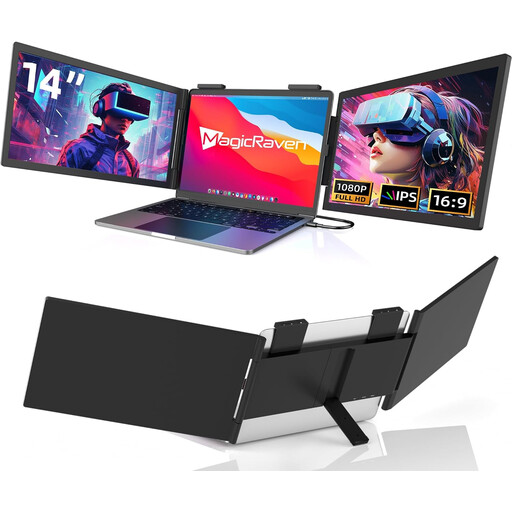
Portable 14-inch FHD monitor, USB-C
The 14-inch format is a compact option for viewing slides and your schedule alongside your laptop.
The product title specifies FHD 1080p, 60 Hz and USB-C, and explicitly states that there is no HDMI connection. It is listed as compatible with 14- to 16-inch laptops, as well as Mac, Windows and Chrome.
Joybuy
 No image available
Portable 14-inch FHD IPS monitor
A 14-inch monitor is an option for setting up a dual-screen workspace for slides and notes alongside your laptop.
The product title specifies FHD 1080p, 60 Hz, IPS, HDMI, USB-A and USB-C. It is listed as compatible with laptops from 14 to 16.5 inches, as well as Windows, Mac and Android.
Joybuy
 No image available
Blackview DCM6 PRO, portable 14-inch monitor
The portable 14-inch format is a compact way to view documents on an additional screen beside your laptop.
The product title specifies Full HD and compatibility with laptops from 13 to 17.3 inches.
Joybuy
 No image available
Blackview DCM5, portable 14-inch IPS monitor
This portable screen can serve as a second monitor for your schedule and slides alongside your laptop.
The product title specifies a 16:9 aspect ratio and compatibility with laptops from 13 to 17 inches.
Joybuy
 No image available
Blackview SCM6, portable 14-inch FHD IPS monitor
The built-in stand is worth noting if you plan to set the monitor up beside your laptop on a train table.
The product title specifies FHD, IPS, a weight of 600 g and compatibility with laptops from 13 to 17 inches.
Joybuy
Frequently asked questions
Is a USB-C port on my laptop enough for video and power?
No, the connector alone isn’t enough. Check the documented video output of your laptop’s port against the monitor input, and check the power requirements. For the ZenScreen MB16ACV, ASUS specifies USB-C with DisplayPort Alt Mode.
Can I count on having a table and a power socket on an ICE train?
Not at every seat. Deutsche Bahn says many ICE seats have fixed or folding tables. For second class, it generally specifies one power socket per pair of seats, and a socket per seat only on selected train models. Check the seat you plan to use, and don’t assume these details apply to other trains.
How should I prepare my second screen for the journey?
Before travelling, test the monitor with the laptop and cable you’ll actually use. Check that it receives a picture and how it is powered. Also practise setting it up with both devices. For the Verbatim LIGHT #49590, the manufacturer specifies an additional power supply via the mains adaptor when using HDMI.
What are my rights if a product is faulty or I want to return it after buying online?
When you buy from a business seller in the EU as a consumer, you’re generally entitled to a legal guarantee of at least two years from the date you receive the goods; this is separate from any voluntary manufacturer’s warranty. Online purchases generally come with a 14-day right to cancel from delivery, subject to legal exceptions. Return costs may apply in certain circumstances.
Can I work on confidential attendee information on screen while on the train?
Follow your organisation’s guidance and protect your screen from prying eyes. The Federal Office for Information Security points out that you can’t assume the same level of IT security when travelling as you have in the office.


