What should you look for when choosing one?
First check the space available and your laptop’s video output, then consider readability and how the monitor will be powered. Deutsche Bahn says many ICE seats have fixed or fold-down tables, but the facilities vary by seat.
| What matters |
What to check before buying |
Who should pay particular attention? |
| Space and portability |
Check the monitor’s casing and stand footprint against the table and your laptop. Remember to factor in the weight of any accessories you’ll need. |
If you have limited space on the train table, a stable stand and a compact design are important. Around 36% of consumers put space and portability first. |
| Video connection and setup |
Check your laptop’s video output, the monitor input, the cable and the power supply together. Verbatim says model #49590 also needs a power adapter when used with HDMI. |
If you want to connect your existing laptop without any extra steps, check that the specific USB-C port supports video. Around 29% of consumers prioritise connection compatibility. |
| Readability and input |
Compare screen size and resolution based on the font size you use. Only choose touch if your software and connected device support it. Dell lists the P1425 as a 14-inch model with 1920 × 1200 pixels; Lenovo lists the M14t Gen 2 as a touchscreen. |
If you want to read spreadsheet rows and receipts clearly, or tap entries directly on screen, display quality and compatible input are key. Around 21% of consumers prioritise readability or direct input. |
| Power on the move |
Check the monitor’s power requirements against the power output of your laptop. For a model with a battery, check its runtime and how it can be charged during your journey. RICOH says the 150BW has a built-in battery. |
If you don’t want to rely on a power socket or your laptop’s power supply, you’ll need a suitable independent power source. Around 14% of consumers prioritise power while travelling. |
Portable monitors at Joybuy
Here you’ll find portable 14-inch monitors that can be used as an extra screen for a laptop. Before using one on a train, check the space available, your device’s video output and its power supply.
 No image available
Portable 14-inch monitor, FHD, 60 Hz, IPS
This portable 14-inch model could work as an extra screen for your stock list and receipts. The product title lists FHD, IPS, 60 Hz, as well as HDMI, USB-A and USB-C.
The title says the model is designed for 14–16.5-inch laptops. Check your specific device’s video output and power setup.
View at Joybuy
 No image available
Blackview DCM6 PRO, 14-inch monitor
The DCM6 PRO is designed to provide an extra screen for a stock list; the title lists a 14-inch display and Full HD resolution.
The title says the model is designed for 13–17.3-inch laptops. The product description mentions a clamp mount; check that it can be attached securely to your laptop and that it will fit at your seat.
View at Joybuy
 No image available
Blackview DCM5, 14-inch IPS monitor, 16:9
For an extra laptop screen when checking lists, the product title describes a portable 14-inch IPS monitor in 16:9 format.
The title says the model is designed for 13–17-inch laptops. Check that your laptop’s video output matches the connection you need.
View at Joybuy
 No image available
Blackview SCM6, 14-inch FHD IPS monitor
The built-in stand is useful if you want to set it up as a second laptop screen; the title lists a 14-inch FHD IPS display.
The title lists a weight of 600 g and a thickness of 4.5 mm, and says the model is designed for 13–17-inch laptops. Check the space available at your seat.
View at Joybuy
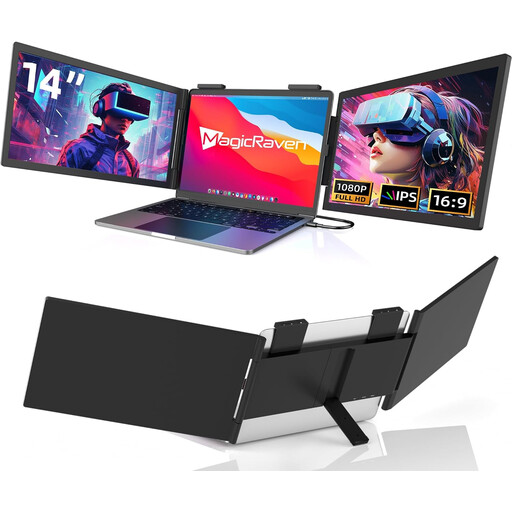 No image available
Portable 14-inch monitor, FHD, 60 Hz, USB-C
For an extra screen to view stock lists, the title describes a portable 14-inch FHD model with a 60 Hz refresh rate and built-in speakers.
The title lists USB-C as the connection and specifically says HDMI is not supported; it also says the model is designed for 14–16.5-inch laptops. Check that your laptop outputs video over USB-C and can provide enough power.
View at Joybuy
Frequently asked questions
Is one USB-C cable between my laptop and monitor enough?
Only if the ports in question support the video connection you need and provide enough power. ASUS distinguishes between USB-C ports with and without video functionality, so check the documentation for your laptop and monitor, along with the cable you need.
What should I check before setting up a monitor on a train?
Check how much table space is actually available, then set up your laptop and monitor so they’re stable. Deutsche Bahn says many ICE seats have fixed or fold-down tables, but the facilities vary by seat.
What if my monitor is faulty, and is a guarantee the same as a legal warranty?
For consumer purchases in the EU, you generally have a statutory right to a remedy from the seller for at least two years from receiving the goods. Your Europe distinguishes this right from a voluntary guarantee. If there’s a fault, contact the seller first and check any additional guarantee terms separately.
What product markings should I check on a monitor?
The German Federal Network Agency recommends checking, among other things, for the CE marking, product and manufacturer details, and instructions in German. The European Commission includes electronic displays such as monitors under energy labelling and ecodesign requirements; check the product information for the specific model.


