Writers who need a window for sources
If you want to keep PDFs, notes or reference-management software open alongside your dissertation as you write, check the usable display area and text scaling.


A portable second monitor can work well for writing your dissertation on the train, as long as you can set up your laptop and monitor securely in the space available, and their video connection and power requirements are compatible. A more compact display takes up less room, while a larger one can give you more space for documents—but it still needs room and suitable text scaling.
If you want to keep PDFs, notes or reference-management software open alongside your dissertation as you write, check the usable display area and text scaling.
If you work at different seats on the train, your laptop and portable monitor need to sit securely together. The dimensions of the casing and stand tell you more about this than screen size alone.
If you want to power the monitor on the go using your existing setup, check that its video signal and power requirements are compatible with your laptop’s ports and power supply.
A good fit if: you work at small or changing seats and your laptop supports the USB-C video output required by the monitor.
The trade-off: Its smaller design takes up less space, but also gives you a smaller physical display.
A good fit if: your seat on the train has enough space and you want to view sources alongside your writing window.
The trade-off: A 15.6-inch monitor such as the ASUS MB16ACV measures 35.8 × 22.5 cm, according to ASUS. Allow for these dimensions as well as your laptop and the stand.
A good fit if: there isn’t a safe place for two devices at your seat, or the connections aren’t compatible with the monitor you want.
The trade-off: You won’t have an extra device to set up or power, but you’ll need to manage your writing and sources on your laptop screen.
Deutsche Bahn says many ICE seats have fixed or fold-down tables, but this isn’t guaranteed at every seat. Check the space available and whether there’s a power socket before relying on a two-screen setup.
| What you need | What to check before buying | Who is this important for? |
|---|---|---|
| Space and a secure setup | Compare the casing dimensions and the space needed for the stand with your laptop and the seat you plan to use. | If I need to set up my laptop and monitor side by side securely at different seats on the train, I measure the total space they’ll occupy rather than just the screen diagonal. Around 29% of consumers put a secure, space-saving setup first. |
| Connection compatibility | Check the video capability of your laptop’s port, the monitor’s input and the cables required for both devices. | If I can’t rely on a USB-C port without knowing whether it supports video, I check the requirements of both devices before buying. Around 29% of consumers prioritise a compatible video connection. |
| Power on the go | Check the monitor’s power requirements and your laptop’s power supply; test your setup without access to a socket, too. | If I can’t be sure of finding a free socket when travelling, my setup still needs to work with the power I have available. Around 24% of consumers put power on the go first. |
| Readability of text and sources | Check a typical PDF page and your writing window at the scaling you plan to use; take the surface and your seating position into account. | If I want to read longer sources alongside my manuscript, I look at display size and text scaling rather than resolution alone. Around 18% of consumers prioritise the readability of text and sources. |
That isn’t always the case. ASUS specifies DisplayPort Alt Mode as a requirement on the host device for certain monitors.
Check the video capability of your specific laptop port and the requirements of the monitor you’ve chosen before relying on this connection.
What matters is the space your laptop and monitor take up together, not just the size of the visible image. According to ASUS, a 15.6-inch model such as the ASUS MB16ACV has a casing that is 35.8 cm wide.
Compare the actual dimensions and stand with the space at your seat, and make sure aisles and doors remain clear.
Lenovo describes the ThinkVision M14d as passing power through USB-C. This doesn’t provide a power source for the connected setup.
Check that the power supply and devices are compatible, and test your setup without a socket if you’ll need to rely on it while travelling.
The ThinkVision M14d is a 14-inch option with a 16:10 display and two USB-C ports.
ZenScreen models such as the MB16ACV and MB166C have different 15.6-inch configurations.
The TD1655 combines a 15.6-inch visible screen diagonal with touch input and several connection options.
The E14 G4 is a 14-inch Full HD monitor with USB-C and an anti-glare display.
The A1 is a 15.6-inch Full HD design with USB-C and Mini HDMI.
The options below include portable second monitors for laptops from 14 to 16 inches, including compact models and larger displays for documents. Check the space, video connection and power supply against the requirements of your specific seat on the train.
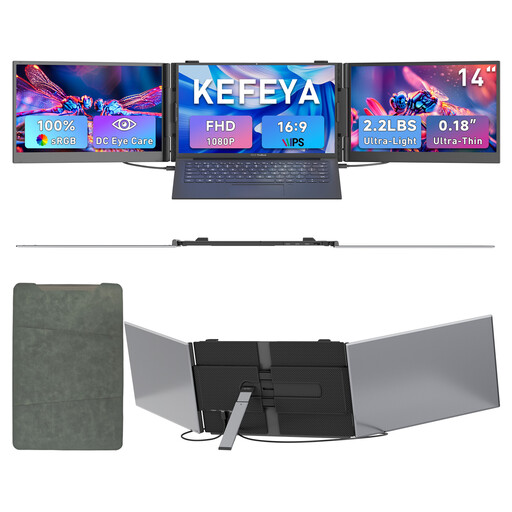 No image available
The compact 14-inch format may suit a laptop second screen at different seats on the train; check how much space both devices will take up.
FHD 1080p with an IPS panel; product details list a weight of 1 kg and a thickness of 4.5 mm. Designed for laptops from 13 to 17.3 inches and compatible with Windows and Mac.
 No image available
This 14-inch monitor is described as a second screen for a laptop; compare the space it takes up with what’s available.
FHD IPS display, adjustable stand and 1.5 W speakers. Designed for laptops from 13 to 17.3 inches; the product details list a thickness of 18.2 mm.
 No image available
The built-in stand may come in handy when setting up at your seat on the train; check that the monitor and laptop can both sit securely.
FHD IPS display, weighing 600 g and 4.5 mm thick according to the product name. The description lists a USB-C connection and compatibility with Mac, Windows and Android.
 No image available
The larger display may be useful for viewing documents and research alongside your writing window; measure the space it will take up alongside your laptop.
FHD 1080p, 60 Hz and an IPS panel; listed with HDR, built-in speakers, HDMI and USB-C ports. The product description says the stand supports portrait and landscape orientations.
 No image available
The built-in battery may be useful for a setup without a reliably available socket; before a longer journey, check that the connection and power supply will work with your devices.
16-inch IPS display with 2.5K resolution and a built-in 8000 mAh battery. The product description also lists AirPlay, Miracast and a VESA mounting option.
Not necessarily. Check whether your specific laptop port supports video and what the monitor requires; ASUS explicitly lists DisplayPort Alt Mode as a requirement for certain models.
Check the text scaling and the space available, and see whether portrait orientation works for your PDFs. ViewSonic lists support for portrait and landscape orientations for the TD1655; you can choose the orientation in the display settings of the connected device.
Don’t assume there will be one. Deutsche Bahn says there is one socket per pair of seats in second class, and one per seat in selected train series. Check whether a socket will be available and within reach at your specific seat for your journey.
No. Deutsche Bahn requires aisles, doors and safety equipment to be kept clear. Set up the monitor only within the space available to you and follow the instructions of the onboard staff.