On a small train table, a compact 14-inch monitor is usually easier to fit alongside your laptop. Models from 15.6 to 16 inches give you more screen space, but take up more room. Before you buy, check the specific video connection, power requirements and overall footprint, including the stand. Deutsche Bahn points out that tables aren’t available in the same way at every ICE seat, and Lenovo specifies particular USB-C requirements for the ThinkVision M14. If you’re working with confidential project documents, also consider the rules for mobile working and the possibility of other passengers seeing your screen. Germany’s Federal Office for Information Security recommends deciding which information may be handled while you’re on the move.
Who works on the train?
Writers with limited table space
You want to have your application and research open side by side, but need to fit your laptop and second monitor on a small train table. Deutsche Bahn points out that fixed or fold-down tables are available at many, but not all, ICE seats.
Writers without a guaranteed power socket
You’re factoring in power, because you can’t work out how long your device setup will last from the monitor’s specifications alone. USB-C monitors may draw power from your laptop.
Writers working on a confidential application
You want to work on project information without other passengers being able to read it easily. Germany’s Federal Office for Information Security recommends deciding which information may be handled outside your organisation when working remotely.
What to look for when buying
First, check that your monitor and laptop support a compatible video signal and power setup. Then consider the space available and how easy your documents are to read.
| What matters |
What to check before buying |
Who it matters to |
| Compatible video connection |
Check the video output and power capabilities of the specific laptop port against the monitor’s requirements. Lenovo requires DisplayPort Alternate Mode and USB Power Delivery for the ThinkVision M14. |
If you want to avoid ending up with a second monitor you can’t use because it lacks a compatible video signal, make sure it works with your laptop. Around 36 % of consumers put this compatibility first. |
| Space and portability |
Compare the overall width, including the stand or case, with the table surface and your bag. |
If your laptop, monitor and possibly some papers all need to fit on a small seat table, the space required is crucial. Around 29 % of consumers prioritise footprint and portability. |
| Power |
Check whether the monitor draws power from your laptop or needs a power adapter with your chosen connection. Test your specific setup before travelling. |
If you need to plan for a journey without a reliably available power socket, the specific laptop and monitor combination matters. Around 21 % of consumers consider power first. |
| Readability of your application and sources |
Check the aspect ratio, resolution, anti-glare finish and text scaling for your documents. If they contain confidential information, also consider who might see your screen from the side. |
If you want to read your application, sources and comments side by side, the extra document view should be easy for you to read. Around 14 % of consumers prioritise a clear view of text. |
Common misconceptions
-
USB-C automatically means video and power
For the Lenovo ThinkVision M14, your laptop’s USB-C port must support DisplayPort Alternate Mode and USB Power Delivery. The shape of the connector alone doesn’t confirm that it supports these features.
Compare the port specifications for your specific laptop with the requirements of the monitor you’re considering.
-
Screen size is all you need to plan for space
The stand, laptop and cables take up room too. What’s more, Deutsche Bahn says that tables aren’t the same at every ICE seat.
Compare the dimensions of your complete setup with the seat table you expect to use and the size of your bag.
-
HDMI provides video and power through one cable
For the Verbatim PM-14 LIGHT and PMT-15-4K models listed in the documentation, you’ll also need a power adapter for an HDMI connection.
Check the video connection and power supply separately, and test your setup before travelling.
For HDMI use, you’ll also need to plan for a suitable power adapter and a way to supply power.
-
A larger screen is always better, whatever you’re displaying
An extra monitor gives you another screen that other passengers may be able to see. Rules on mobile working may also apply to project information.
Before travelling, check which documents you’re allowed to work on while on the move, and position your screen with potential onlookers in mind.
Brands to consider
Lenovo
The ThinkVision M14 and M16 are portable second monitors with 14-inch and 16-inch screens respectively.
- Lenovo lists the M14 at 598 g and the M16 at 980 g.
- The M14 requires DisplayPort Alternate Mode and USB Power Delivery on your laptop. The M16 takes up more space than a 14-inch option.
ASUS
The ZenScreen MB16ACV is a 15.6-inch model with an anti-glare Full HD display.
- ASUS lists a resolution of 1920 × 1080 pixels, USB-C with DP Alt Mode, a net weight of 0.9 kg and power consumption of 6.64 W.
- According to ASUS, it doesn’t have height adjustment. Its power consumption alone doesn’t tell you how long your laptop battery will last.
Dell
The portable Dell Pro 14 Plus P1425 gives you a 14-inch document display in a 16:10 format.
- Dell lists a resolution of 1920 × 1200 pixels, an IPS panel and a tilting stand.
- Touch functionality isn’t listed for this model. The specifications don’t tell you whether it will work with every laptop port or fit on every seat table.
AOC
The AOC 16T3EA is a portable 15.6-inch Full HD monitor powered via USB-C.
- AOC lists an integrated stand and Auto-Pivot.
- According to the manufacturer, you need to enable the supplied i-Menu software for automatic orientation. This model takes up more space than a 14-inch option.
Verbatim
The PM-14 LIGHT is a compact 14-inch monitor with USB-C or HDMI connectivity. The PMT-15-4K is a separate touchscreen 4K model.
- Verbatim lists the PM-14 LIGHT at 540 g.
- The PM-14 LIGHT and PMT-15-4K both require a power adapter for HDMI. 4K and touch functionality on the PMT-15-4K aren’t automatically necessary for text-based work.
Joybuy product selection
This selection features portable second screens for laptops: mainly compact 14-inch models, plus one 15.6-inch option.
 No image available
PM14R portable monitor, 14-inch
A compact option if you want to add a second laptop display when table space is limited.
1920 × 1200 pixels, IPS, 16:10; connections: Type-C and Mini-HDMI.
View at Joybuy
 No image available
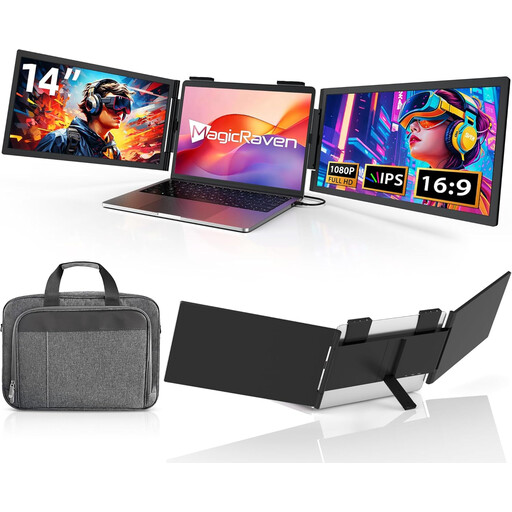
Portable dual-screen monitor, 14-inch
A 14-inch second-screen option if you want to use an extra monitor alongside your laptop.
Full HD, 1080p, 60 Hz and IPS; HDMI, USB-A and USB-C. The product name states that it’s for laptops from 14 to 16.5 inches.
View at Joybuy
 No image available
Portable laptop monitor, 14-inch
An extra 14-inch display for your laptop, if USB-C is the right connection for your setup.
Full HD, 1080p, 60 Hz; USB-C, explicitly with no HDMI. The product name states that integrated speakers and a carry case are included.
View at Joybuy
 No image available
Blackview DCM6 PRO, 14-inch
A portable second monitor for your laptop if you’re looking for an extra display in a compact 14-inch size.
Full HD. The product name states that it’s for laptops from 13 to 17.3 inches.
View at Joybuy
 No image available
Portable laptop monitor, 15.6-inch
A larger second screen if there’s enough space on your seat table for both the monitor and laptop.
Full HD, 1080p, 60 Hz and IPS; HDMI and USB-C. The product name states that it includes a stand, integrated speakers and HDR.
View at Joybuy
Frequently asked questions
Is a USB-C port on my laptop enough to connect a monitor?
No. The port also needs to support the required features. Lenovo specifically requires DisplayPort Alternate Mode and USB Power Delivery for the ThinkVision M14. Compare your laptop port’s specifications with those of the monitor you’re considering.
Can I power my monitor at every train seat?
You shouldn’t count on it. Equipment can vary by ICE seat and train model, and a monitor may draw power from your laptop. Test how long your specific setup lasts before travelling.
What should I consider when setting up and carrying my monitor?
Before travelling, check that the stand, laptop and cables will fit on the table you plan to use, without putting strain on the connections. Follow the instructions for your specific model when carrying and cleaning it. Verbatim lists a protective case as included with the PM-14 LIGHT.
Can I display confidential project information on a second monitor on the train?
That depends on the rules that apply to your project and organisation. Germany’s Federal Office for Information Security recommends deciding which information may be handled while working remotely and what safeguards are required. You should also consider the possibility of other passengers seeing your screen.
What rights do I have if an online purchase in Germany is faulty?
Your statutory rights against the seller are separate from any voluntary guarantee. If an item is faulty, the first step may be to request a repair or replacement. Online purchases also generally come with a 14-day right to cancel. When the period starts and which exceptions apply depend on the circumstances, as explained by the Verbraucherzentrale consumer advice centre.


