Commuters with limited table space
If you want to view slides and notes at the same time, check that your monitor and laptop will both fit on the seat table and can be set up securely.


If you want to work on slides and notes side by side on the train, first consider the stand, the available table space, and your laptop’s video output and power supply. A larger display gives you more room to work, but takes up more space; touch or a built-in monitor battery only matters if you’ll actually use those features. Before buying, check that the monitor will suit your specific seat and laptop connection.
If you want to view slides and notes at the same time, check that your monitor and laptop will both fit on the seat table and can be set up securely.
If you can’t count on having a power socket to yourself, plan for the monitor’s power requirements, your laptop’s capabilities and the available connections together.
If you want to work directly on the second display, check beforehand that touch works with your particular laptop and operating system.
Start by checking the space available and the stand, then look at video and power connections. Extra features such as touch are most useful when they suit the way you work.
| What to consider | What to check before buying | Who it matters most to |
|---|---|---|
| Space and stand | Compare the device and stand dimensions with the space available; consider the viewing angle and how securely it stands. | If my train table is small, I want to set up my laptop and monitor securely and carry the second screen easily. For around 33% of consumers, space and portability come first. |
| Video connection | Check your laptop specifications for USB-C video output; if using HDMI, confirm the additional power supply required and which cables you’ll need. | When I connect the monitor, I want to know that my laptop can actually output a video signal. Around 34% of consumers prioritise connection compatibility. |
| Power supply | Check the power requirements of the specific monitor and the capabilities of your laptop connection. Deutsche Bahn generally lists one power socket per pair of seats in 2nd class, and one per seat on selected train types. | If you don’t want to rely on having your own power socket while travelling, plan how to power your laptop and monitor together. Around 25% of consumers prioritise power independence. |
| Touch and display | Decide in advance whether you need to interact directly with the second display; check the exact model’s resolution and touch support against your operating system. | If I want to control slides directly on the second display or have more screen space, I check that my devices support the features. Around 8% of consumers prioritise these features. |
A USB-C port alone doesn’t confirm that your laptop can send a video signal to the monitor.
Check your laptop’s port specifications against the requirements of the specific monitor model.
The Dell Pro 14 Plus P1425 is a 14-inch option for a space-conscious second screen.
The ThinkVision M14t Gen 2 is designed for travellers looking for a 14-inch monitor with touch and a 16:10 display.
The ZenScreen models listed here cater to different needs: the MB16AHV offers USB-C and Mini-HDMI, while the MB16AMTR has touch and a built-in battery.
The AOC 16T20E2 is a 15.6-inch Full HD option with several video connections.
The Verbatim PM-14 is a compact 14-inch option with USB-C and HDMI.
The products below are portable second monitors for working on a laptop while travelling. Most are 14-inch models, with a 15.6-inch option for more screen space.
 No image available
A compact option for an extra laptop screen; according to the product listing, it’s designed for 14–16-inch laptops.
The product title lists USB-C and rules out HDMI. It has a listed FHD resolution (1080p) and a 60 Hz refresh rate.
 No image available
Designed as an extra screen for working on a laptop; the product listing says it’s compatible with laptops from 13 to 17.3 inches.
14-inch format and Full HD resolution.
 No image available
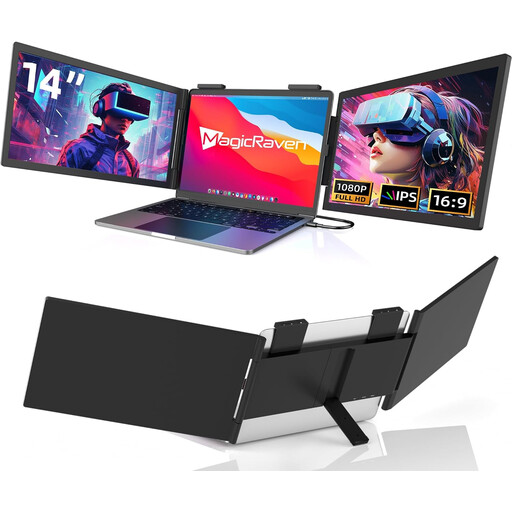
Described as a portable second screen for working on a laptop; the product listing also says it can be used with mobile devices.
14-inch IPS LCD monitor with a 16:9 aspect ratio. Check the listed devices and operating systems against your own setup before buying.
 No image available
A portable option for working on a laptop, with a built-in stand to help you set it up.
The product listing gives a weight of 600 g, a thickness of 4.5 mm and a built-in stand.
 No image available
For anyone who values more screen space over the most compact size; check that the larger monitor will fit on your train table.
The product listing gives a weight of 780 g, a stand, and USB-C and HDMI connections.
Not necessarily. Check your laptop specifications to see whether the port can output video and power the monitor. ASUS specifically advises checking that the laptop port supports display output for the MB16AHV.
No. Don’t assume there’ll be a power socket right at your seat without checking first. Deutsche Bahn generally lists one power socket per pair of seats in 2nd class, and one per seat on selected train types; table layouts can also vary.
First, connect a compatible video output and set up the monitor on its stand. If you want your slides and notes to appear on separate screens, select extended display mode in your laptop’s display settings and check the setup before you travel.
Check whether suitable cables and, if needed, a power adapter are included. The EU’s Your Europe information site distinguishes the general 14-day right to cancel online purchases from statutory consumer rights and voluntary guarantees. Conditions and exceptions depend on the specific purchase.
The European Commission generally includes computer monitors under the rules for electronic displays, with an efficiency scale from A to G; exceptions apply to the specific scope. For a particular model, check the relevant energy label or EPREL information rather than assuming that screen size alone tells you how much power it uses.