A portable second monitor is only useful for reviewing a report draft on the train if there’s enough secure space to set it up and your laptop can provide the right video signal and power. If space is limited, a compact model is the better choice. For long documents, compare the aspect ratio, resolution and portrait orientation too, but don’t treat manufacturers’ specifications as a substitute for testing readability yourself. A larger screen takes up more room and also makes more of your work visible to others. Deutsche Bahn says tables are available at many, but not all, ICE seats, while the German Federal Office for Information Security highlights the need to protect information when working on the move.
Who is a portable monitor on the train suitable for?
Travellers with limited table space
If you need to fit both a laptop and a second screen on a limited surface, the device dimensions and a stable stand matter. Deutsche Bahn notes that fixed or fold-down tables are available at many ICE seats, but not all of them.
People reviewing long documents
If you want to compare passages, versions and comments side by side, check the aspect ratio, resolution and orientation of the specific model. Lenovo and Dell list a 16:10 aspect ratio for their respective 14-inch models, while ViewSonic describes the TD1655 as supporting portrait orientation. These specifications are no substitute for testing readability yourself.
Travellers working on confidential drafts
If you’re working with sensitive content on the move, check whether fellow passengers can see your screen and what rules apply to your documents before setting it up. The German Federal Office for Information Security says information must be adequately protected when working on the move.
What should you consider when choosing one?
First, check whether the monitor and laptop can be set up securely at your seat, and whether your laptop model outputs the required video signal. Then compare text display and power requirements, and consider how visible your screen will be to others.
| Consideration |
What to check before buying |
Who will find this particularly important? |
| Space and stability |
Compare the dimensions, including the stand, with the seat you usually travel in; don’t assume there’s a table at every seat. |
If I need to fit both my laptop and monitor on a small table, I need a size that can be set up securely there. Around 25% of consumers prioritise limited desk space when choosing. |
| Laptop connection and video signal |
Check the laptop’s video output against the monitor’s input using the specifications for each device; if using Mini HDMI, check the power supply separately. |
If I’m not sure whether my laptop outputs the right video signal, I want to confirm the connection before buying. Around 25% of consumers prioritise connection compatibility. |
| Text display |
Compare the specific model’s resolution, aspect ratio and orientation with the way you view your documents; manufacturers’ specifications don’t tell you how readable it will be. |
When working with long report passages, I want the display to suit the way I work with text and notes. Around 20% of consumers prioritise text display. |
| Power on the move |
Check the monitor’s power requirements against the laptop’s power output; don’t assume a power socket will always be available on the train. |
If I’m working for a long time without reliable access to a socket, I need to find out how to power both the monitor and laptop. Around 15% of consumers make power on the move their top priority. |
| Keeping your draft private |
Before displaying confidential or personal information, check your organisation’s rules and who can see your screen from your seat. |
When working on a confidential draft, I want to know who can see my screen and what rules apply. Around 15% of consumers prioritise protecting confidential content. |
What buying mistakes should you avoid?
-
Assuming USB-C automatically means a single-cable setup
A USB-C port on a monitor doesn’t prove that your laptop can output the required video signal through it. Depending on the connection, video and power may need separate cables.
Before buying, check your laptop’s output, the monitor’s input, its power requirements and what’s included in the box.
With HDMI, you may need a separate power connection as well as the video cable, so you’ll need to take that with you on your journey.
-
Choosing the biggest screen without checking the space
A second monitor needs a sufficiently large, flat and stable surface at your seat. Deutsche Bahn says tables are available at many ICE seats, but not all of them.
Compare the dimensions of your laptop, monitor and stand with the space you usually have available.
-
Assuming a larger display means better privacy
An additional screen can make more of your work visible. The German Federal Office for Information Security says information must be adequately protected when working on the move.
If your drafts contain sensitive information, check the relevant rules and who can see your screen first. If necessary, don’t use a second screen.
Which brands are worth considering?
Lenovo
The ThinkVision M14t Gen 2 is a 14-inch option for working with documents in a compact setup.
- Lenovo lists a resolution of 2240 × 1400 pixels, a weight of 700 g and two USB-C ports for this model.
- Touch and Power Pass-Through are model-specific features. Check that they suit your laptop and the way you work.
Dell
The Dell Pro 14 Plus P1425 is a portable 14-inch monitor designed as a compact second screen for work.
- Dell lists a resolution of 1920 × 1200 pixels and a tilting stand for the P1425.
- The manufacturer’s specifications alone won’t tell you how easy the screen is to read at your particular seat on the train.
ASUS
The ZenScreen MB16AHG is a 15.6-inch option with USB-C and Mini HDMI.
- ASUS lists two USB-C inputs with DP Alt Mode, Mini HDMI and a weight of 0.92 kg.
- The 144 Hz specification doesn’t offer a particular advantage for reviewing static report text, and the larger size also needs more space.
ViewSonic
The TD1655 is a 15.6-inch touchscreen option with an adjustable stand.
- ViewSonic describes USB-C, Mini HDMI and portrait orientation.
- With Mini HDMI, video, touch and power don’t automatically work through a single cable. ViewSonic also notes that touch functionality is subject to device-specific limitations.
Portable monitors at Joybuy
This selection includes portable second screens for laptops that are suitable for reviewing documents, from compact 14-inch models to a 15.6-inch option.
 No image available
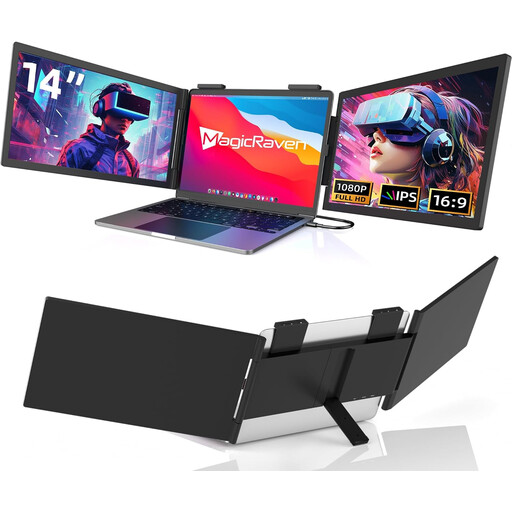
14-inch FHD monitor, 60 Hz, with USB-C
This could work as a compact second screen if the size and connection specifications suit your laptop.
The product title lists FHD at 1080p, 60 Hz, built-in speakers, USB-C without HDMI, and compatibility with 14- to 16-inch laptops.
View at Joybuy
 No image available
PM14R, 14 inches, 1920 × 1200, 16:10
The 16:10 aspect ratio may be useful for viewing longer documents, provided the connections are compatible with your laptop.
The product title lists an IPS display with a resolution of 1920 × 1200 pixels, as well as USB-C and Mini HDMI. A USB-C connection requires the connected device to support a compatible video signal.
View at Joybuy
 No image available
Blackview DCM6 PRO, 14 inches, FHD
The 14-inch size is a compact option for a second laptop screen, as long as it’s a good fit for your laptop.
The product title lists Full HD and compatibility with 13- to 17.3-inch laptops. According to the product description, a single-cable connection requires a device that supports video over USB-C.
View at Joybuy
 No image available
Blackview SCM6, 14 inches, FHD IPS
The listed dimensions and weight may appeal to travellers looking for a compact display to take with them.
The product title lists a weight of 600 g, a thickness of 4.5 mm, a built-in stand and compatibility with 13- to 17-inch laptops.
View at Joybuy
 No image available
ARZOPA A1, 15.6 inches, FHD IPS
The larger screen may be useful for viewing documents, but it needs more space at your seat on the train than a 14-inch model.
The product title lists a resolution of 1920 × 1080 pixels, USB-C, HDMI and a stand. Check in advance which video and power connections your laptop supports.
View at Joybuy
Frequently asked questions
Is my laptop’s USB-C port enough for both video and power?
Not just because it has a USB-C connector. Check your laptop port’s video and power output against the specific monitor’s requirements. ASUS explicitly lists DP Alt Mode for the USB-C video inputs on the ZenScreen MB16AHG.
How should I set up a second screen on the train?
Make sure both devices are stable and don’t get in the way of walkways or neighbouring seats. Deutsche Bahn says fixed or fold-down tables are available at many ICE seats, but not all of them. ViewSonic specifies that the TD1655 should be used on a flat, stable surface.
How do I look after a portable monitor when travelling?
Protect the screen and ports in transit, and follow the care instructions for your particular model. ViewSonic lists a protective case and cleaning cloth as included with the TD1655; other models don’t necessarily include these.
What are my rights if a monitor bought online is faulty?
If a product is faulty, your statutory consumer rights generally apply against the seller; a manufacturer’s guarantee is separate and voluntary. The Verbraucherzentrale also explains that online consumer contracts generally come with a 14-day right to cancel, subject to the applicable requirements and exceptions in each case.


