For working on a grant application on the train, a compact 14-inch monitor is an obvious choice if table space is limited. A larger 16:10 display gives you more vertical screen space for text, but takes up more room. First, check that your laptop can output a compatible video signal and that the monitor, including its stand, will fit at your usual seat. Then work out how you’ll power both the laptop and monitor during the journey.
Who might benefit from a portable monitor on the train
Writers with limited table space
If you want to keep the funding guidelines open alongside your application, you’ll need to consider the space available and whether your laptop has a suitable connection. Deutsche Bahn says that fixed or fold-down tables are available at many, but not all, ICE seats.
Readers working through detailed guidelines
If you want to compare lengthy requirements or tables with your own draft, a larger screen area may matter more to you than the smallest possible dimensions. The key question is whether the screen and laptop will both fit on the table.
Travellers without a reliable power socket
If you need to power both your monitor and laptop for the journey, check the connections, power consumption and available power sources together. Deutsche Bahn notes that sockets vary by class and train type.
What to consider when choosing one
First, check whether your laptop and monitor can exchange a compatible video signal. Then weigh up the space available, text display and power supply for your journey.
Deutsche Bahn says that fixed or fold-down tables are available at many ICE seats, but not all of them. So check that there’s room for your laptop, monitor and stand at the seat you usually choose.
| What matters |
What to check before buying |
Who should pay particular attention |
| Laptop and cable compatibility |
Check that your laptop’s video output and connection mode are compatible with the monitor’s connections; check the cable requirements too. |
If I want to have my application and the guidelines open side by side, the video signal needs to work with both devices. Around 33% of consumers put connection and cable compatibility first. |
| Space and stability |
Compare the monitor and stand dimensions with the table space available; make sure walkways and neighbouring seats remain clear. |
If there’s very little room at my usual train seat, I need the monitor to sit securely beside my laptop. Around 27% of consumers prioritise a small footprint. |
| Readable document space |
Consider screen size, aspect ratio and resolution together, and take into account the scaling you use on your laptop. |
If I need to read lengthy guidelines alongside my draft, having enough usable screen space for text is important to me. Around 20% of consumers put this need first. |
| Power during the journey |
Consider the monitor’s power consumption, your laptop battery and any available chargers or power banks for your journey. |
If I can’t count on having access to a power socket, I want to plan ahead for powering my laptop and monitor. Around 20% of consumers give this priority. |
Pitfalls to avoid when buying a portable monitor
-
Assuming a USB-C connector guarantees video output
The connector shape alone doesn’t tell you whether your laptop can output a video signal through that port. For the MB16ACV, ASUS specifically lists DisplayPort Alt Mode for the USB-C input.
Before buying, check the video mode supported by the specific port on your laptop and compare it with the monitor and cable requirements.
Depending on the connections available, you may need a suitable cable or adapter.
-
Considering only the screen size
Your laptop and the monitor stand also need to fit on the table at your train seat. Deutsche Bahn says that fixed or fold-down tables are available at many seats, but the space available depends on the specific seat.
Before buying, compare the dimensions of the monitor when set up with the table at your usual seat. Only choose a larger display if it can be positioned securely there.
If the monitor won’t fit comfortably at your seat, you may not be able to use it as planned while travelling.
-
Assuming power pass-through means there’s a built-in battery
On the ASUS MB16FC, power pass-through means charging via a connected power bank or power adapter. ASUS specifies additional adapter requirements for the maximum stated charging power.
Before buying, check the full power set-up for your monitor and laptop, including the power source available and the output required.
You may need an additional compatible power source or a suitable adapter for the way you plan to use it.
Key brands at a glance
Dell
The Dell Pro 14 Plus P1425 is a 14-inch example of a compact second monitor.
- Dell lists a 1920 × 1200-pixel resolution and a tilting stand for the P1425.
- Check that the monitor and stand will fit on your train table and that your laptop’s connection is compatible with the monitor.
HP
The HP Series 5 Pro 514pn combines a 14.36-inch screen with a 2560 × 1600-pixel resolution.
- HP lists a weight of 0.63 kg and typical power consumption of 7 W for the 514pn.
- These specifications alone don’t tell you how readable the screen will be with your scaling settings, or how long your laptop battery will last.
ASUS
The ASUS ZenScreen MB16FC is a 16-inch model with a 16:10 aspect ratio.
- ASUS lists two USB-C ports, Mini HDMI and power pass-through.
- The larger display needs more space. ASUS also specifies an adapter with sufficient power for the maximum stated charging output.
Lenovo
The ThinkVision M14t Gen 2 is a 14-inch model with touch and pen input.
- Lenovo lists a 2240 × 1400-pixel resolution, pen support and two USB-C ports.
- Touch and pen input don’t offer a proven extra benefit if you only write using the keyboard.
ViewSonic
The ViewSonic VG1655 is a portable 15.6-inch monitor with a 16:9 aspect ratio.
- The German product specification lists Full HD resolution at 1920 × 1080 pixels, an adjustable stand and several inputs.
- Having more connection options doesn’t automatically tell you how your monitor and laptop will be powered on a particular journey.
Joybuy options for working on the go
Compare these portable second screens for laptops to find the right option for working on the go, based on the space available, screen format and connections you need.
 No image available
Blackview SCM6, portable 14-inch FHD IPS monitor
The 14-inch format is a compact option if space is limited at your train seat; check that the stand will fit on the table too.
- 14 inches, FHD and IPS
- Built-in stand
- 600 g and 4.5 mm according to the product name
- Listed as suitable for laptops from 13 to 17 inches
View at Joybuy
 No image available
Blackview DCM8, portable 15.3-inch monitor
The 15.3-inch display could be useful for longer documents; weigh up the extra space it needs at your particular train seat.
- IPS, 16:10 and 1920 × 1200 pixels
- 60 Hz
- Listed as compatible with Windows, Mac, Chrome OS and mobile devices
View at Joybuy
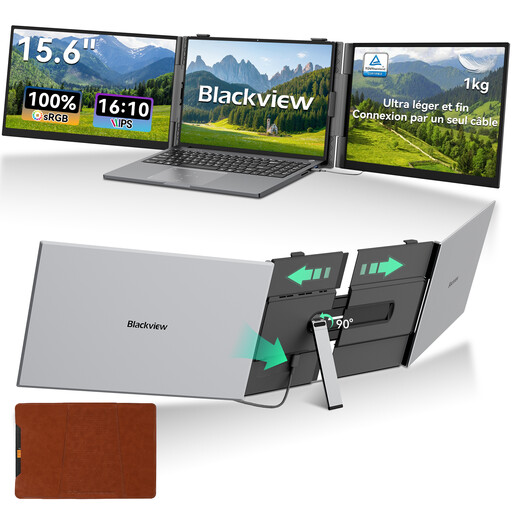 No image available
Blackview DCM8 Pro, portable 15.6-inch monitor
If you’re looking for a 16:10 display to view your application and the guidelines side by side, this larger format is worth considering; check that it will fit at your seat.
- 15.6 inches and 16:10
- 60 Hz
- Listed as suitable for laptops from 13 to 17 inches
View at Joybuy
 No image available
Blackview TABLE 9, portable 16-inch monitor
The 16-inch format gives you a larger screen, but takes up more table space than a compact display.
- 16 inches and 16:10
- Extendable, rotating magnetic stand
- Listed as compatible with PC, smartphone, tablet and MacBook
View at Joybuy
 No image available
Arzopa Z1RC 2.5K, portable 16-inch monitor
If you need a larger 16:10 display with USB-C and HDMI connections, this model is worth considering; take the space available at your train seat into account.
- 16 inches, 16:10 and 2560 × 1600 pixels
- USB-C and HDMI
- 60 Hz
View at Joybuy
Frequently asked questions
Is a USB-C port on my laptop enough to carry a video signal?
No, the connector shape alone isn’t enough to check. Compare the video mode supported by the specific port on your laptop with the monitor’s requirements. For the MB16ACV, ASUS specifically lists DisplayPort Alt Mode for its USB-C input.
Can I rely on having a table and power socket for my second monitor on an ICE train?
Not at every seat. Deutsche Bahn says that fixed or fold-down tables are available at many seats, and that power sockets vary by class and train type. Check the set-up at your specific seat and don’t plan to rely solely on having access to a power socket.
Will power pass-through charge my laptop without another power source?
No. For the ASUS MB16FC, the manufacturer describes pass-through charging with a suitable connected power bank or power adapter. ASUS specifies additional adapter requirements for the maximum stated charging power.
What should I know about returns or faults after buying online in Germany?
The Verbraucherzentrale says that online orders usually come with a 14-day right to cancel, starting from delivery. Your statutory rights if a product is faulty are separate; a guarantee is voluntary and is not the same as your statutory rights.
What should I check when it comes to a monitor’s labelling and disposal?
The Bundesnetzagentur lists CE marking, product identification, and German instructions and safety warnings among the points it checks as part of market surveillance. According to the Umweltbundesamt, a monitor that has reached the end of its life should be taken to a separate collection point for electrical waste, not put in household rubbish.


