Keep scenes and notes in view at the same time
If you’re writing dialogue and want to have a scene outline or research open alongside it, a clear second screen and a compatible laptop connection are key.


A compact second monitor can be a good option for working on a theatre script on the train, provided your laptop and display fit securely side by side on the table. First, check your laptop’s video output and how you’ll power your devices during the journey. A larger display may give you more screen space, but it will take up more room.
If you’re writing dialogue and want to have a scene outline or research open alongside it, a clear second screen and a compatible laptop connection are key.
If you’ll be setting up and packing away the monitor often, make sure your laptop, screen and stand will all fit on the limited surface together.
For longer working sessions on the go, it’s important to know how your laptop and monitor will be powered on your particular journey.
First, check that the complete setup will fit in the space available and that your laptop can output a video signal. Then consider text readability and how you’ll power the monitor during your journey.
| What matters when buying | What to look for | Who it matters to most |
|---|---|---|
| Space and a stable setup | Check the monitor and stand dimensions alongside your laptop and the usable table surface. | If I want to see my script and notes side by side on a small train table, the whole setup needs to fit securely. Around 29% of consumers put available space first. |
| The right video connection | Check that your laptop port’s video output, the monitor input and the cable you need are compatible. | I want to know before buying whether my specific laptop can output a picture through the connection I plan to use. Around 29% of consumers prioritise connection compatibility. |
| A clear view of scripts and notes | Try your preferred font size in the software you use, and consider the model’s resolution, aspect ratio, reflections and tilt. | If I want to read longer scenes and annotations on the extra display, I need the picture to be comfortable to view. Around 21% of consumers prioritise text readability. |
| Power on the go | Compare the specific monitor’s power requirements with the energy source available and how long you plan to work. | For a longer writing session, I don’t want to assume I’ll have a socket all to myself. Around 21% of consumers prioritise power. |
Deutsche Bahn says that ICE trains normally have one socket per pair of seats in second class, while selected train types have one socket per seat. So, plan how you’ll power your laptop and monitor on your particular journey.
Whether video can be sent over USB-C depends on the capabilities of your laptop’s port and the monitor’s requirements. ASUS lists a supported display function for the MB16AHV. For its one-cable USB-C setup with the TD1655, ViewSonic requires DisplayPort 1.2 Alt Mode and power from the host device.
Check the details for your specific laptop port against the requirements of the monitor you’re considering, and see whether you’ll need an extra cable or a separate power supply.
A larger display takes up more usable space alongside its stand and your laptop. Deutsche Bahn says that many ICE seats have tables, but doesn’t say that every seat does.
Allow for the monitor, stand and laptop together at the seat you’re likely to use.
ViewSonic’s battery-life examples for the TD1655 are based on specific host devices and display settings. And in second class on ICE trains, a socket for every passenger isn’t guaranteed as standard.
Check the details for your laptop and monitor against how long you plan to work, and consider which power source will actually be available on your journey.
The Dell Pro 14 Plus P1425 is a compact 14-inch option for viewing documents on a second screen.
The ThinkVision range includes the 16-inch M16 and the 14-inch M14t Gen 2, which has a touchscreen.
The ZenScreen range includes USB-C models as well as options such as the MB16AHV, which also has Mini HDMI.
The TD1655 is a touchscreen option for adding annotations directly on the second display.
The 14-inch PM14 is a compact non-touch option, while the PMT-15-4K range is for those looking for touch and 4K.
These portable 14-inch monitors are designed to give you an extra screen for scripts or notes. For each model, check that its connections, power requirements and footprint suit your laptop and seat.
 No image available
A compact second screen for scripts and notes. Check your laptop’s connection options first.
FHD IPS display; listed as suitable for laptops from 13–17 inches. USB-C and HDMI; according to the description, USB-C video and power require DisplayPort Alt Mode, while HDMI use also requires USB-A for power. Listed weight: 0.86 kg.
 No image available
The integrated Smart Cover stand gives you another option for setting up an extra screen alongside your laptop.
FHD 1080p IPS display with a 60 Hz refresh rate; listed as suitable for laptops from 14–16.5 inches. Ports: HDMI, USB-A and USB-C.
 No image available
The 16:10 aspect ratio is well suited to viewing documents on a compact second screen.
14-inch IPS display with a resolution of 1920 × 1200 pixels and a 16:10 aspect ratio. Ports: USB-C and Mini HDMI. Listed weight: 1.18 kg.
 No image available
A portable FHD second screen for your laptop. Check that the listed laptop size matches your device.
14-inch monitor with FHD resolution; listed as suitable for laptops from 13–17.3 inches.
 No image available
A compact IPS second screen for your laptop. Check that the listed laptop size suits your device.
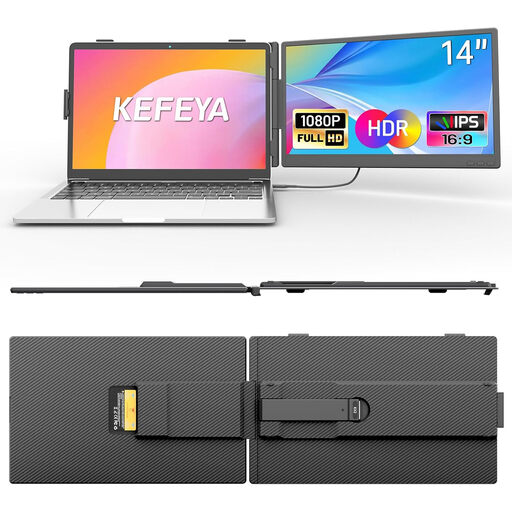
14-inch IPS LCD monitor in 16:9 format; listed as suitable for laptops from 13–17 inches.
No. The connector shape alone doesn’t tell you enough. ASUS requires the MB16AHV to have a supported USB-C display function, while ViewSonic specifies DisplayPort 1.2 Alt Mode and power from the host for the TD1655 connection described. Check the requirements for the particular monitor against your laptop’s specifications.
Before setting it up, check that the monitor, stand and laptop will fit securely on the table surface you can actually use. Deutsche Bahn says there are tables at many ICE seats. When storing your equipment on its trains, keep aisles, doors and safety equipment clear.
Plan your power supply based on the specific details for your laptop and monitor, as well as how long you intend to work. A socket all to yourself isn’t guaranteed as standard in second class on ICE trains. ViewSonic’s battery-life examples for the TD1655 apply only to the host devices and settings described in each example.
For a qualifying sale of consumer goods by a business seller in the EU, the statutory guarantee lasts for at least two years from the date you receive the goods. This is separate from any voluntary manufacturer’s warranty. For a qualifying online distance purchase, you generally have a 14-day right to cancel from the date of delivery. Legal exceptions apply; also check the information about return postage costs.