People reading transcripts and notes
If you want to view interview text and notes at the same time, check the font size, window layout and scaling in your editing software.


For working on interview transcripts in the library, a 14-inch monitor is a good option when desk space is limited. A 15.6-inch model gives you more screen area but takes up more room. Dell lists the P1425 as a 14-inch model, while ASUS lists the ZenScreen MB16AHV as 15.6 inches. Check that your specific laptop supports video output and power through the connection you plan to use. If you’re working with confidential text, also consider who might be able to see the extra screen.
If you want to view interview text and notes at the same time, check the font size, window layout and scaling in your editing software.
If you often take your setup with you, make sure the monitor, stand and laptop will all fit on the desk available to you.
If your content may include personal data, consider sightlines from your seat and any rules that apply to your documents. The BfDI notes that mobile working should be assessed in light of the data and the context in which it is used.
First decide how much screen space will fit on your desk, then check the video connection and power supply you’ll need for your planned session.
| What matters | What to check | Who it matters most to |
|---|---|---|
| Text display | Try different font sizes and window layouts in the software you use. Compare the screen size, aspect ratio and resolution of the specific models you’re considering. | If I want to read a transcript and notes side by side, the text needs to be clear and easy for me to read; around 24% of consumers would put text display first. |
| Video connection | Check that your laptop port’s video output is compatible with the monitor input and cable. If you want touch functionality, check the data connection you’ll need too. | If I want to use the monitor with my existing laptop, I need a compatible video connection; around 24% of consumers would prioritise connection compatibility. |
| Portability and desk space | Consider the monitor’s dimensions and weight, where the stand will sit, and how much room the complete setup will take up. | On a small library desk, I want to fit the monitor, stand and laptop together; around 19% of consumers would therefore prioritise desk space and portability. |
| Power supply | Check whether a socket will be available and whether your laptop or a separate power source can power the monitor for the planned session. | If I’m working without an available socket, the monitor needs to stay powered throughout my session; around 19% of consumers would prioritise power supply. |
| Confidential content | Check sightlines from your seat and, if you’re handling client or employee data, confirm the requirements set by the responsible organisation. | If my interview documents are confidential, I want to control who can see the screen; around 14% of consumers would prioritise confidentiality. |
For the one-cable setup described for the ViewSonic TD1655, the USB-C port on the source device must support DisplayPort 1.2 Alt Mode and power delivery. ASUS also recommends checking that your laptop port supports display output for the MB16AHV.
Check your specific laptop’s documentation and make sure the video output, monitor input and cable you plan to use are compatible before ordering.
Depending on your setup, you may need a different video connection or a separate power source.
ASUS quotes up to four hours for the MB16AHP in DP Alt Mode at 100% brightness. This figure doesn’t automatically reflect battery life with every device combination and setting.
Compare the test conditions with your planned session and try the complete setup for as long as you’ll need it.
Longer sessions may require extra charging or a separate power supply.
On the ViewSonic TD1655, Mini-HDMI carries the video signal. Touch control also requires a USB connection to the source device.
Choose a touch model only if you’ll actually use the feature, and check the connection and compatibility with your software.
Your setup may need extra cables and more room for the connections.
A second screen creates another surface that other people may be able to see. According to the BfDI, whether mobile working is appropriate depends on the data and the context in which it is used.
If you’re working with sensitive documents, check the rules that apply and whether anyone else at the library could see your screen.
ZenScreen models offer a range of connection and power options.
The range includes the 15.6-inch FHD L15 monitor and the 14-inch ThinkVision M14t Gen 2 with touch.
The TD1655 is a portable 15.6-inch touchscreen monitor with an adjustable stand.
The Pro P1425 is a compact 14-inch alternative.
The E14 G4 is a portable 14-inch Full HD monitor with an anti-glare screen.
The Joybuy options below include portable 14-inch secondary monitors, as well as larger 15.3- or 15.6-inch models for working with text on the go.
 No image available
Described as a compact secondary monitor for transcripts and notes. The product name lists a 14-inch screen, 1080p FHD resolution, IPS and 60 Hz.
The product name lists HDMI, USB-A and USB-C connections. Check which port on your laptop supports video output.
 No image available
A compact secondary screen for longer stretches of text. The product name lists a 14-inch screen, 1920 × 1200 pixels, IPS and a 16:10 aspect ratio.
Connections are listed as Type-C and Mini-HDMI. Check which video connection is compatible with your laptop.
 No image available
Described as offering a larger secondary screen. The product name lists a 15.3-inch screen and FHD resolution.
The product name lists one-cable USB-C operation and a weight of 1.2 kg. Check that your source device supports the video and power features you need.
 No image available
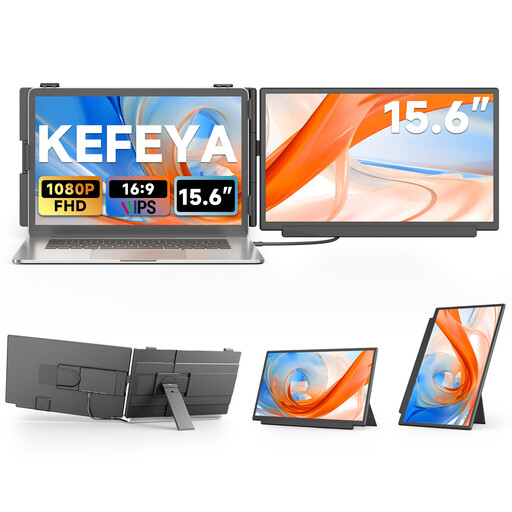
Described as a larger portable secondary monitor for work and travel. The product name lists a 15.6-inch screen and 1080p FHD resolution.
USB-C and HDMI are listed as connections. Check that the video connection you choose matches your laptop’s outputs.
 No image available
A larger secondary screen option for laptops and mobile working. The product name lists a 15.6-inch screen and 1080p resolution.
USB-C and HDMI are listed, and the product name also mentions a built-in adjustable stand. Check that your laptop supports video output through the connection you plan to use.
No. The port must support the video output you need and, where applicable, power delivery. For the one-cable setup described for the TD1655, ViewSonic requires DisplayPort 1.2 Alt Mode and power delivery. ASUS also recommends checking that your laptop port supports display output for the MB16AHV.
On the ViewSonic TD1655, Mini-HDMI carries the video signal. For touch, the manufacturer’s instructions also specify a USB Type-A to Type-C cable connected to the source device. Check that touch input works with your software too.
Test your laptop, video connection and monitor together for the length of your planned session. ViewSonic recommends a power bank or socket for longer use of the TD1655. ASUS’s quoted battery life of up to four hours for the MB16AHP applies in DP Alt Mode at 100% brightness; it isn’t a general estimate for every device combination.
There’s no blanket answer based on the monitor alone. The BfDI explains that data protection rules don’t rule out mobile working altogether, but whether it’s appropriate depends on the data being processed and the context in which it’s used. If you’re handling client or employee data, check the requirements set by the responsible organisation and prevent unauthorised access.
For a qualifying distance sale, consumers generally have 14 days from delivery to cancel the contract without giving a reason. This is separate from your statutory rights if the product is faulty. Before buying, check the seller’s information about any return postage costs.