A larger display can make it easier for everyone to follow along, as long as there’s enough room on the hotel desk. A more compact model is easier to fit in, but offers less screen space. Touch is useful mainly if you want to interact with guides directly on the display and your source device and software support touch input. Before you buy, also check the video output, monitor input, cables and power supply as part of the complete set-up.
Who is a portable monitor for?
Workshop leaders with participants following along
You demonstrate steps at a table, so check the text size, viewing angle and positioning from the seats you expect people to use. ASUS describes the MB16AHV as having an anti-glare display, while ViewSonic says the TD1655 has a foldable stand.
Leaders using different source devices
If you’ll be using a different laptop or device for each session, its video output and power supply need to work with the monitor. ASUS notes that USB-C video requires the source device to support video output.
Leaders who want to interact directly with the screen
You want to select or mark individual steps on the additional display. ViewSonic lists 10-point multitouch for the TD1655; whether input works in your planned set-up also depends on the source device and software.
What should you look for when buying?
First, check that the guides are easy to read from the seats you expect people to use. Then make sure the connections, power supply and space requirements suit your specific hotel-room set-up.
| Buying consideration |
What to check |
Who is it most important for? |
| Readability from the seats |
Check a typical guide page at your planned text size and viewing distance; consider the screen size and stand angle. |
If several people need to follow along, the text must be readable from their seats too. Around 31% of consumers put readability first. |
| The right video connection |
Match the source device’s video output to the monitor input; if using USB-C, check that the port supports video. |
If I switch between different source devices, I want to know before the workshop that the picture will display. Around 31% of consumers prioritise connection compatibility. |
| Positioning, transport and power |
Check the space needed for the monitor and cables, as well as its transport dimensions; find out whether the source device powers the monitor or a separate power source is needed. |
If desk space and luggage capacity are limited, I need a set-up that takes both into account and keeps everything powered throughout the workshop. Around 23% of consumers put a portable set-up first. |
| Direct interaction with the screen |
Only prioritise touch if you actually need to interact with the screen; check that your device, operating system and workshop software support input. |
If I want to select or edit steps directly on the additional display, input needs to work with my planned set-up. Around 15% of consumers prioritise direct interaction. |
Common buying pitfalls
-
Assuming USB-C guarantees video output
A USB-C connector doesn’t tell you whether the source device’s port also outputs video signals.
Check that your device’s video output is compatible with the monitor input. If necessary, plan to use a different connection or a separate power supply.
-
Assuming a high pixel count means everyone will find the screen easy to read
Resolution alone doesn’t tell you whether a workshop guide will be easy to read from the seats you expect people to use.
Check a typical page using your planned scaling and screen position.
-
Assuming touch or a single-cable set-up will work without checking
Touch doesn’t replace compatible video output or a suitable power supply. For the USB-C connection described for the TD1655, ViewSonic lists requirements for the source device.
Before buying, check that touch input works with your device and software, and that your planned connection also supplies power.
Key brands at a glance
ASUS
The ZenScreen MB16AHV and MB166C differ in their connections and features.
- ASUS lists a 15.6-inch anti-glare display, two USB-C ports and Mini HDMI for the MB16AHV. The MB166C is a USB-C alternative.
- The connections listed apply to the specific models. USB-C video requires the source device to support video output.
Lenovo
The ThinkVision M14d is a compact 14-inch second screen; the M14t Gen 2 is designed for users who need touch and active pen input.
- Lenovo lists a resolution of 2240 × 1400 pixels, a weight of 600 g and USB-C with DP Alt Mode for the M14d.
- These specifications apply to the M14d and don’t automatically apply to the touch model. The source device and power supply need to be compatible with the model you choose.
ViewSonic
The TD1655 is a touch option for workshops where you want to interact with steps directly on the portable display.
- ViewSonic lists 10-point touch and a foldable stand for the TD1655.
- For the USB-C connection described, the source device’s video output and power supply need to be compatible.
Dell
The Pro 14 Plus P1425 is a 14-inch alternative for a portable laptop workstation.
- Dell lists a resolution of 1920 × 1200 pixels for the P1425.
- According to Dell, this is a portable IPS monitor without touch functionality. If several people need to follow along, weigh the smaller screen against the benefits of a portable set-up.
Joybuy products
The following portable monitors could work well for displaying workshop guides on a second screen. Choose according to your preferred screen size, how you want to interact with the display and the connections you need. For monitors covered by harmonised EU rules that require CE marking, check the details for the specific product. The European Union makes clear that CE marking is not an independent quality seal.
 No image available
Portable 15.6-inch monitor, 1080p FHD
For workshop guides on a larger second screen.
The product name lists an IPS panel, HDR, built-in speakers, 60 Hz, HDMI and USB-C ports; a stand is also listed.
View at Joybuy
 No image available
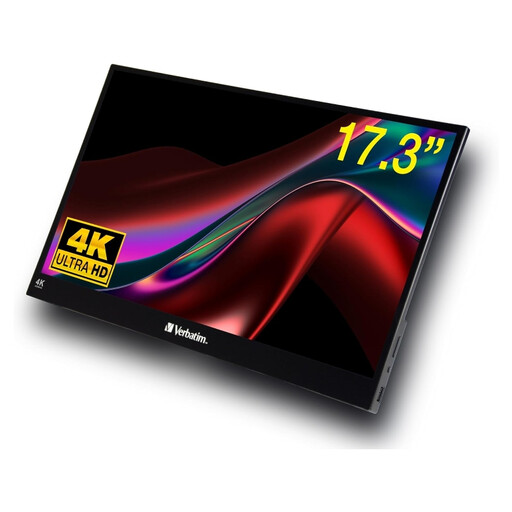
Verbatim PMT-17
For workshops where you want to interact with content directly on the second screen.
The product name lists a 17.3-inch Full HD touchscreen, plus USB-A, USB-C and HDMI ports.
View at Joybuy
 No image available
ARZOPA A1, 15.6 inches
For displaying workshop guides on a portable second screen.
The product name lists 1920 × 1080 pixels, FHD, an IPS panel, USB-C and HDMI.
View at Joybuy
 No image available
UPERFECT, 15.6 inches, 1080p
For workshop guides on a portable second screen with a USB-C port.
The product name lists an IPS panel, HDR and a resolution of 1920 × 1080 pixels.
For the USB-C video connection described, the source device must be able to output video over USB-C. An external 5-V power supply is listed as an option.
View at Joybuy
 No image available
UPERFECT, 15.6 inches, 100% sRGB
For workshop guides on a portable second screen.
The product name lists USB-C, a built-in adjustable stand and VESA compatibility.
View at Joybuy
Frequently asked questions
Is a USB-C port on my laptop enough to send a picture to the monitor?
No. The specific USB-C port must support video output that’s compatible with the monitor. ASUS distinguishes between portable monitors that use USB-C with DisplayPort Alt Mode and USB video solutions that may require a driver.
How should I set up a portable monitor in a hotel room?
Place it on a suitable, flat surface and adjust the stand angle to suit the seats you expect people to use. Before the workshop, check with a typical guide page that there’s room for the monitor, laptop and cables, and that the text is easy to read from the seats.
Can the monitor run just from the source device throughout a longer workshop?
That depends on the specific device and set-up. ViewSonic recommends using a power bank or mains socket for extended use of the TD1655; this doesn’t guarantee how long other devices or set-ups will run for.
Do I need touch for workshop guides?
You don’t need touch just to display the guides; it’s mainly useful if you want to interact with steps directly on the second screen. Check that your source device, operating system and workshop software support input through the connection you plan to use.
Which markings are relevant when buying a monitor in Germany?
Electronic devices must comply with the relevant EU product rules; CE marking is only required where the applicable rules say it is. The European Union explains that manufacturers use CE marking to declare conformity; it is not an independent quality seal. Check the details for the specific product.


