When working on accounts and receipts in a café, choose a monitor based on how clearly you can read your own files at your usual scaling, and how much room the monitor and its stand will take up. Dell lists the P1425 at 14 inches, Lenovo the L15 at 15.6 inches and ARZOPA the A1M at 17.3 inches. A larger screen is only suitable if your table and bag can accommodate it. Before buying, check your laptop’s video output and power supply. If you’re viewing confidential account details, position the screen to make it as difficult as possible for others to see.
Who could benefit from a portable monitor
People who compare accounts and receipts
If you want to view spreadsheets and receipts at the same time, test your own file at your usual text scaling. Dell lists the P1425 at 14 inches and 1920 × 1200 pixels; Lenovo specifies a 15.6-inch display for the L15. These specifications alone don’t determine whether your file will be easy to read.
People who work on the go with a laptop
For a café visit, your specific laptop needs to provide a compatible video signal and enough power for the monitor. VESA describes DisplayPort over USB-C with Alternate Mode, so check the documentation for your laptop’s port and the monitor’s requirements.
People who check confidential account details
If you access financial information while out and about, your screen’s position and your network connection should both factor into your choice and how you use it. Germany’s Federal Office for Information Security (BSI) advises against accessing confidential data over public Wi-Fi where possible.
What to look for when buying
First check how clearly you can read your own accounts, then make sure your laptop can provide the video signal and power, and finally check that the complete setup will fit on a café table.
| What matters |
What to check when buying |
Who this matters most to |
| Readability of accounts |
Test your own file at your usual scaling; compare screen size, aspect ratio and resolution. |
When I check spreadsheets and receipts side by side, I want to be able to see the details at my usual scaling. Readability is a top priority for around 31% of consumers. |
| Video signal and power |
Check that the laptop port, monitor input and power supply requirements match. |
If I want the monitor to work with my existing laptop, I check its specific video output and power supply rather than relying on the USB-C connector shape alone. Connection and power are key priorities for around 25% of consumers. |
| Privacy when viewing account details |
Consider your seating position and sightlines; plan for device locking and your network connection in advance. |
When I view confidential account details in a café, I want to avoid prying eyes and unsafe network use. Privacy comes first for around 25% of consumers. |
| Portability and space |
Check the dimensions of the casing and the space needed when the stand is set up; make sure you check the specific model. |
If I need to fit my laptop, receipts and monitor on the table and in my bag, the complete setup matters. Portability and space are the top priority for around 19% of consumers. |
Avoiding buying pitfalls
-
Assuming a USB-C port guarantees a monitor connection
For video over USB-C, the signal path needs to support the right Alternate Mode; the connector shape alone doesn’t confirm this.
Compare the documentation for your laptop’s port with the monitor’s requirements, and check the power supply too.
Depending on the connection, you may need a different cable or a separate power supply.
-
Comparing only the screen size with the table space
The stand, laptop, receipts and cables all need room too. So a larger screen won’t necessarily fit on a café table.
Measure the complete setup and choose a larger display only if the extra screen space will be useful for your files.
-
Confusing more screen space with greater privacy
A larger screen, or one that’s easier to see from other angles, could also make it easier for others to view your screen in a public place.
Consider the screen’s position and lock your device. The BSI advises against accessing confidential data over public Wi-Fi where possible.
Brands and models to consider
Dell
The P1425 is a documented 14-inch option for a compact second screen.
- Dell lists a resolution of 1920 × 1200 pixels, IPS and a tilting stand.
- These specifications don’t confirm how clearly you’ll be able to read your specific accounts, or whether the laptop port is compatible.
Lenovo
The L15 is a documented 15.6-inch option; the ThinkVision M14t Gen 2 is a smaller touchscreen model.
- Lenovo lists an adjustable stand and USB-C ports for the L15. The ThinkVision M14t Gen 2 is specified as having touch controls.
- The manufacturer’s weight specifications for the L15 differ. A reliable weight comparison therefore requires clarification of the exact version and measurement basis; the touchscreen specification doesn’t apply to the L15.
ASUS
The ZenScreen MB16ACV is a 15.6-inch model with Full HD resolution.
- ASUS lists an anti-glare surface and a typical brightness of 250 cd/m².
- The manufacturer’s specification doesn’t replace checking for reflections from where you plan to sit.
Verbatim
The PMT-14 combines a 14-inch display with touchscreen and HDMI connectivity.
- Verbatim lists USB-C, HDMI and a built-in stand.
- According to the manufacturer, an additional power supply is required for an HDMI connection. Whether touch works depends on the source device and application.
ARZOPA
The A1M is a 17.3-inch Full HD model for setups with enough table space.
- The manufacturer specifies the size and resolution.
- These specifications don’t show that it’s an advantage on small café tables, or that it offers greater privacy when displaying confidential information.
Joybuy product suggestions
These portable laptop second screens could suit compact or larger setups on the go. For each model, check that the listed connections, dimensions and compatibility requirements are right for your laptop and the space available on your café table.
 No image available
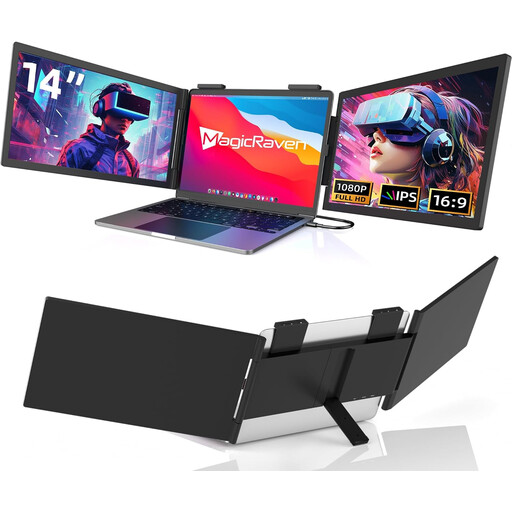
14-inch laptop screen extender, FHD 1080p, 60 Hz
A compact second-screen option, provided it fits on the table and your laptop supports the specified connection.
14 inches; FHD 1080p; 60 Hz; USB-C, no HDMI; the product title lists compatibility with 14–16-inch laptops, as well as Mac, Windows and Chrome.
View at Joybuy
 No image available
KEFEYA 16-inch laptop monitor, FHD 1200P
A larger screen could be an option if your table and bag have enough room for the complete setup.
16 inches; FHD 1200P; 360° rotating magnetic stand; Plug-and-Play according to the product title.
View at Joybuy
 No image available
14-inch laptop monitor, FHD 1080p, IPS, 60 Hz
The range of listed connection types could be useful if you check your laptop’s signal path in advance.
14 inches; FHD 1080p; IPS; 60 Hz; HDMI, USB-A and USB-C; the product title lists compatibility with 14–16.5-inch laptops, as well as Windows, Mac and Android.
View at Joybuy
 No image available
Blackview DCM6 PRO, 14-inch screen extender
Described as a portable addition to a laptop setup; check whether the listed laptop size is right for your device.
14 inches; Full HD; the product title lists compatibility with 13–17.3-inch laptops.
View at Joybuy
 No image available
Blackview SCM5, 14-inch FHD IPS monitor
You can take the adjustable stand into account when planning your complete table setup.
14 inches; FHD; IPS; 18.2 mm; adjustable stand; 1.5 W speaker; the product title lists compatibility with 13–17.3-inch laptops.
View at Joybuy
Frequently asked questions
Is a USB-C port on my laptop enough for video and power?
The connector shape alone doesn’t tell you. Check whether the specific port supports a suitable video signal path and whether it can supply enough power for your chosen monitor. DisplayPort over USB-C uses an Alternate Mode.
What should I pack if I’m using HDMI instead of USB-C?
It depends on the model. According to the manufacturer, the Verbatim PMT-14 needs an additional power supply for an HDMI connection; this doesn’t necessarily apply to all HDMI monitors.
How can I check household accounts more safely in a café?
Position your screens so that others are less able to see what’s on them, and lock your device if you’re interrupted. The BSI advises against accessing confidential data over public Wi-Fi where possible; if you have no alternative, it recommends using a secure connection or a VPN.
What are my rights when buying a monitor online in Germany?
For a typical online purchase from a trader, you generally have a 14-day right to cancel from the date of delivery. The European Commission’s information on Your Europe lists exceptions and possible return costs. If the goods are faulty, you have a statutory guarantee from the seller for at least two years; this is separate from a voluntary warranty.


