When comparing membership records, choose a portable monitor with a clear display and video and power connections that match the library computer. If you move the display between workstations, weight, stand and power supply also matter; touch is only useful if the computer and management software support it. For membership data, the library must put appropriate safeguards in place that are proportionate to the risk: a wide viewing angle is not a privacy screen.
Who is a portable monitor suitable for?
Staff who compare lots of records
If you want to read membership records alongside another window, consider the usable screen area, how the monitor is positioned and whether the display suits your application. ASUS, Dell and Verbatim offer models with different screen sizes and features.
Staff at public lending desks
If you handle membership data within sight of other people, factor in the display’s position and sightlines at the desk when planning your library’s safeguards. The European Data Protection Board sets out the standard for appropriate measures that are proportionate to the risk.
Staff who move between workstations
If the screen is moved regularly, its weight, stand, and video and power connections will affect how easy it is to carry and set up. Lenovo, Verbatim and AOC list different connection and stand features for their respective models.
What should you look for when buying?
Compact USB-C second screen
A good fit if: you move the monitor often and the library computer provides the required video output and enough power over USB-C.
Worth noting: a USB-C connector alone does not guarantee video transmission. Lenovo specifies DisplayPort 1.2 Alternate Mode and USB Power Delivery 2.0 as requirements for the ThinkVision M14.
More screen space with USB-C or HDMI
A good fit if: you want to see several fields at once and have enough desk space. According to ASUS, the ZenScreen MB16AHV has a 15.6-inch visible diagonal and offers USB-C and Mini-HDMI.
Worth noting: with HDMI, check video transmission and power supply separately. Verbatim says the PM-14 needs an additional power adapter when using HDMI.
Touchscreen second monitor
A good fit if: your approved management software and connected computer genuinely support touch input. Lenovo describes the ThinkVision M14t Gen 2 as a 14-inch touchscreen with 2240 × 1400 pixels.
Worth noting: touch does not replace checking that the software supports it, or checking connections and privacy at the chosen location.
| Buying consideration |
What to check |
Who is it important to? |
| Readability when comparing records |
Check the screen area and text scaling with the forms you actually use; larger displays need more space. |
If I need to read records and other windows side by side, I want a display that works well with the forms I use. Around 33% of consumers put readability first. |
| Privacy at the workstation |
Check sightlines, viewing direction and the setup at the specific desk; don’t confuse a wide viewing angle with privacy protection. |
If visitors could see the screen from the lending desk, I want to limit the view of membership data and agree safeguards with the library. Around 27% of consumers put protecting visible data first. |
| Video connection and power |
Compare the computer’s video output and power supply with the requirements of the exact monitor model; with HDMI, check both connections separately. |
If I need to connect the monitor to an existing library computer, I want to know before buying whether the video signal and power supply are compatible. For around 27% of consumers, connectivity is their top concern. |
| Transport and set-up |
Consider the weight, stand and space needed for the screen, computer and cables at each workstation. |
If I move between workstations, I want to carry the screen with me and set it up securely without a complicated installation. Mobility comes first for around 13% of consumers. |
Avoid common misconceptions
-
A USB-C connector doesn’t automatically mean you can use a single cable
The computer must provide the video signal required by the specific monitor; depending on the model, you may also need to consider the power supply.
Check the connections and requirements of both devices, as well as the cable and power source, against the exact models.
-
A wide viewing angle won’t protect membership data
At a public desk, good visibility from the side could also make it easier for unauthorised people to read the screen. The level of risk depends on the set-up.
Check the sightlines on site and agree any necessary technical and organisational measures with the responsible library.
-
Touch and high resolution aren’t automatically useful
Manufacturer claims about screen features don’t prove that they will work well with the membership management software you use.
Before buying, check that the computer and approved software support your preferred input method, and that text scaling and usability suit your workflow.
A guide to relevant brands
Lenovo
The ThinkVision M14 is a compact USB-C second screen; choose the M14t Gen 2 if you genuinely need touch on your existing system.
- Lenovo specifies the notebook connection requirements for the ThinkVision M14: DisplayPort 1.2 Alternate Mode and USB Power Delivery 2.0.
- The M14t Gen 2’s touch and resolution specifications do not automatically apply to the M14.
ASUS
The ZenScreen MB16AHV has a 15.6-inch visible screen area, USB-C and Mini-HDMI.
- ASUS specifies an anti-glare surface and portrait or landscape positioning.
- Connections alone do not prove that a monitor will work with a particular library computer or provide privacy protection.
Dell
The Pro P1425 is a 14-inch option with a 16:10 aspect ratio for working with multiple windows.
- Dell specifies a resolution of 1920 × 1200 pixels and a tilting stand.
- Check at the workstation that the size and scaling work well with the membership forms you use.
Verbatim
The PM-14 is a lightweight 14-inch option with USB-C and HDMI connections.
- Verbatim specifies a weight of 540 g, with cables and a power adapter included.
- According to Verbatim, HDMI use requires a separate power supply. Check the accessories and connections for the exact product version.
AOC
The 16T3EA is a portable 15.6-inch Full HD monitor with USB-C power and an integrated stand.
- AOC describes an integrated stand and USB-C power supply.
- According to AOC, the Auto-Pivot function requires the i-Menu software to be activated.
Joybuy products at a glance
The following Joybuy offers include portable second screens for laptops. For each model, check that the screen size, video connection and power supply are suitable for your library computer and workstation.
 No image available
KEFEYA 16-inch FHD 1200P portable monitor
A mobile second screen for when USB-C is a suitable way to connect to your computer.
16 inches, FHD 1200P, 60 Hz and USB-C. No HDMI is listed in the product name; specified for laptops from 14 to 16 inches. A carry case is mentioned.
Joybuy
 No image available
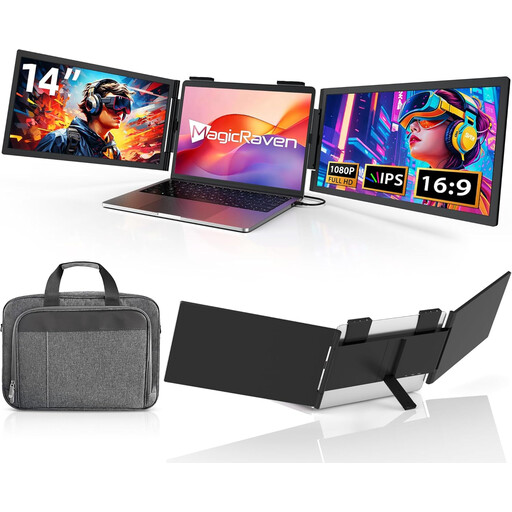
14-inch dual-screen extension, FHD IPS
For a compatible laptop set-up if you’re looking for a portable dual-screen extension.
FHD 1080p, 60 Hz and IPS; HDMI, USB-A and USB-C according to the product name. Specified for laptops from 14 to 16.5 inches and described as compatible with Windows, Mac and Android.
Joybuy
 No image available
14-inch laptop monitor, FHD, USB-C, no HDMI
For a laptop set-up where a portable second screen with USB-C could be a good fit.
FHD 1080p and 60 Hz; no HDMI according to the product name. Specified for laptops from 14 to 16 inches. A carry case and integrated speakers are mentioned.
Joybuy
 No image available
Blackview SCM5, 14-inch FHD IPS
A compact second screen if an adjustable stand is important for your set-up.
The product title lists USB-C, a thickness of 18.2 mm, a 1.5 W speaker and compatibility with laptops from 13 to 17.3 inches.
Joybuy
 No image available
Blackview DCM5, 14-inch 16:9 IPS LCD
For a laptop set-up where a portable 14-inch second monitor could be a good fit.
The product title lists a 16:9 IPS LCD display and compatibility with laptops from 13 to 17 inches, as well as Windows, Mac and mobile devices.
Joybuy
Frequently asked questions
Is a USB-C port on the library computer enough?
No. Also check the computer’s video output and power supply, along with the requirements of the specific monitor. Lenovo explicitly requires DisplayPort 1.2 Alternate Mode and USB Power Delivery 2.0 for the ThinkVision M14.
What should I bear in mind when using HDMI?
Check the video cable and power supply separately. For the Verbatim PM-14, the manufacturer specifies an additional power adapter for HDMI; don’t assume this applies to other models without checking.
Is a particular privacy filter compulsory for membership data?
The data protection principles described here do not impose a blanket requirement to use a specific filter. Under the principles set out by the European Data Protection Board, the responsible library must choose measures that are appropriate and proportionate to the risk, and check whether data could be viewed without authorisation at the specific workstation.
When is a touchscreen worthwhile for membership management?
A touchscreen may be suitable if the computer and approved management software support touch input and it is useful in your workflow. Check usability and how text is displayed before making touch a priority when choosing a monitor.


