When choosing a portable monitor for event notes, start by considering the viewing distance, available desk space and the video output on your source device. For longer events, make sure the power supply suits your set-up too. If people will be sitting further away, check readability on site using real notes rather than judging it by screen size alone.
Who is a portable monitor suitable for?
Library team with a small event table
If you’re showing an agenda or bullet points at close range, a display that’s easy to position and text that’s easy to read are key. ASUS Germany, Lenovo Germany and Arzopa offer different screen and stand features; check the display at the intended viewing position.
Team using different source devices
If you switch between a library laptop and other devices, check the video output, cables and power supply for each combination. Lenovo Germany, AOC, ViewSonic and the Video Electronics Standards Association explain different connection requirements; a USB-C connector alone doesn’t guarantee video compatibility.
Mobile events team
If you use different tables and transport the monitor frequently, weight, a protective case, the stand and available power sources all matter more. Product information from ASUS Germany, Lenovo Germany and Arzopa describes different stand options and device configurations.
What should you look for when buying?
Check whether notes are readable from the intended seat, and whether the monitor can connect to your existing source device and run for the planned length of time.
| Concern |
What to check when buying |
Who is it important to? |
| Readability from your seat |
Test real notes at the venue and from the intended seating positions; consider the screen finish and orientation too. |
If I want the notes to be visible from the intended seats, I check the text and contrast at the actual location. Around 31% of consumers cite readability as their main concern. |
| Source device compatibility |
Check the video output, USB-C video support, cables and any required software on the specific library computer. |
If I want to use the monitor with several existing devices, I check each one’s video outputs and the connection needed. Around 31% of consumers cite device compatibility as their main concern. |
| Set-up and transport |
Check the stand, desk space, tilt adjustment and device weight for repeated set-ups. |
If I regularly set up the screen at different tables, I need a suitable stand and want to be able to carry the device comfortably. Around 25% of consumers cite a flexible set-up as their main concern. |
| Power supply and usage time |
Test the power source, cables and how they work with the source device for the full event. |
If an event lasts longer, I plan the power supply for the monitor and source device together. Around 13% of consumers prioritise power supply and usage time. |
Common planning mistakes
-
Assuming a USB-C connector guarantees a video signal
Whether a picture can be transmitted depends on the capabilities of the source device and the monitor’s requirements. AOC also describes a USB DisplayLink alternative for the I1601P.
Check the video output. If you’re using a managed library computer, confirm in advance whether you’re allowed to use the required software.
If the planned connection doesn’t work, you may need to use a different source device or spend extra time setting things up.
-
Planning to use a desk display across the whole room without checking viewing distance
Screen size or brightness figures alone don’t show whether event notes will be readable from every seat.
Display real notes at the intended location and check them from the furthest relevant seats.
-
Confusing power pass-through with a built-in battery
Power pass-through on the Lenovo ThinkVision M14 and the ViewSonic TD1655’s power supply depend on the respective set-up; neither means the monitor has its own battery.
Test the planned combination of source device, monitor and power source for the full event. ViewSonic recommends using a power bank or mains socket for longer use of the TD1655.
If necessary, arrange a suitable external power source at the venue.
Brands to consider
ASUS
The ZenScreen MB16ACV is a 15.6-inch anti-glare option for a planned desk set-up.
- ASUS Germany lists Full HD, typical brightness of 250 cd/m², USB-C with DP Alt Mode, an integrated tilt range and a tripod socket.
- The brightness figure isn’t an independent readability test, and the listed specifications don’t include an HDMI input.
Lenovo
The ThinkVision M14 is a compact 14-inch option for frequent transport; the M14t Gen 2 is a separate touchscreen model.
- For the M14, Lenovo Germany lists a weight of 598 g, two USB-C ports and power pass-through.
- For the notebook connection described, Lenovo requires USB-C with DisplayPort 1.2 Alt Mode and USB Power Delivery 2.0. Touchscreen specifications for the M14t Gen 2 don’t apply to the M14.
Arzopa
The A1 is a 15.6-inch Full HD option with USB-C and HDMI for different connection set-ups.
- Arzopa lists USB-C and HDMI ports, as well as a built-in stand.
- The weight figures from Arzopa and Joybuy differ. Check the figure for the specific configuration before buying.
AOC
The I1601P may suit set-ups where a laptop doesn’t support USB-C video via DP Alt Mode.
- For this model, AOC describes a USB connection via DisplayLink as an alternative.
- Check whether the required software can be installed and used on the managed library computer.
ViewSonic
The TD1655 is a portable touchscreen option if your team wants to interact with notes directly on the display.
- ViewSonic lists 10-point touch and a foldable stand.
- A suitable connection is required to access the full range of USB-C functions. Touch hasn’t been shown to offer any extra benefit for displaying text without interaction.
Portable monitors at Joybuy
This selection at Joybuy includes portable monitors in different sizes, with the connection and stand options specified for each model, for displaying event notes on a table. Before buying, check the details for the specific model against the viewing distance, source device and power supply at the venue.
 No image available
15.6-inch FHD IPS monitor with HDMI, USB-C and stand
Could be suitable for notes on a table if the stated screen size works for your viewing distance.
Listed in the product name: 1080p FHD, 60 Hz, IPS, HDR, built-in speakers, HDMI and USB-C. The title also mentions a stand and portrait and landscape orientations.
Joybuy
 No image available
UPERFECT 16" 2K monitor, 16:10, QLED
An option if the resolution and connection types listed in the title suit your notes and source device.
Listed in the product name: 2560 × 1600, 16:10, 144 Hz, QLED, 450 Nits, Mini-HDMI and USB-C. VESA compatibility is also specified.
Joybuy
 No image available
UPERFECT 18.5-inch FHD monitor with matte IPS screen
The larger stated screen size may suit your set-up, but be sure to check readability from the actual seating positions.
Listed in the product name: 1920 × 1080, 120 Hz, matte IPS screen, USB-C and Mini-HDMI. VESA compatibility is also specified.
Joybuy
 No image available
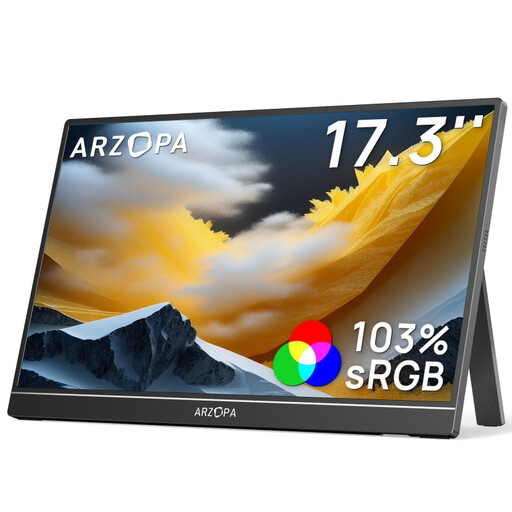
ARZOPA A1M 17.3-inch FHD monitor with kickstand
The built-in kickstand may be useful for a flexible set-up on a flat surface; check that the screen size fits the space available.
Listed in the product name: 1080p FHD, IPS, 103% sRGB, USB-C and HDMI.
Joybuy
 No image available
ARZOPA A1 15.6-inch FHD IPS monitor
Could be suitable for event notes on a table if the screen size and stand work for the location.
Listed in the product name and description: 1920 × 1080, IPS, USB-C, HDMI and an adjustable stand.
Joybuy
Frequently asked questions
Is a USB-C port on the library laptop enough to send a video signal?
No. The connector shape alone doesn’t confirm that video can be transmitted. Check whether the laptop supports DisplayPort Alt Mode and compare this with the monitor’s requirements. For the notebook connection described for the ThinkVision M14, Lenovo also specifies USB Power Delivery 2.0.
How can I check whether notes are readable around the room?
Display the actual event notes at the intended location and check them from the relevant seats. Screen size or a typical brightness figure alone doesn’t prove that text will be readable in the room.
How should I plan the power supply for a longer event?
Test the complete combination of source device, monitor, cable and power source before the event. ViewSonic recommends a power bank or mains socket for longer use of the TD1655; published examples of battery life depend on the test settings given in each case.
What should I do if a monitor is faulty or an online purchase isn’t suitable?
If a product is faulty, your statutory rights against the seller are separate from any voluntary guarantee. The Verbraucherzentrale explains that many online purchases in Germany are generally covered by a 14-day right to cancel; exceptions and the terms of the specific purchase should be checked.
How should I dispose of an old monitor in Germany?
Electrical waste must not go in household rubbish. The Federal Environment Agency lists local recycling centres and suitable take-back options at retailers, among other alternatives.


