Start by checking the device you’ll be bringing with you. A USB-C port alone doesn’t guarantee video output, so make sure video and power requirements are compatible with the monitor you choose. A compact 14-inch model can be easier to carry, while a larger display gives you more screen space. Touch is most useful if you want to interact with documents directly on the second screen. Dell, ASUS, HP and Lenovo specify different ports and requirements, so check that the monitor, device and cable all work together before you buy.
Who can benefit from a portable monitor?
Manual readers travelling light
If you regularly take your laptop and monitor to the library, a compact design and a practical way to set it up on the desk are important things to consider. Dell lists the P1425 as a 14-inch model with a tilting stand.
Readers of complex PDF plans
If you zoom in on circuit diagrams or keep a manual open alongside your work, consider screen size, resolution and text scaling together. Dell, HP and Lenovo list different resolutions and screen sizes for their models.
Users unsure about their connections
If you’re not sure whether your laptop, tablet or mobile phone can output a compatible video signal, check the connection and power requirements first. These vary depending on the device and monitor model.
What should you look for when buying?
First, check your device’s video output and power requirements. Then compare how a typical manual page looks on screen with the monitor’s size, set-up and any need for touch functionality.
| Buying criterion |
What to look for |
Who it matters most to |
| Device connection and power |
Check the source device’s video output, the monitor’s requirements, the cable and the power it needs. For the HP 514pn’s native resolution, HP specifies USB-C with DisplayPort Alt Mode and DisplayPort 1.2. |
If I want to connect the monitor to my particular laptop, I need to know it can support the video signal and power requirements. Around 31% of consumers put having the right connection first. |
| Reading pages and diagrams |
View a typical PDF page using your intended text scaling, and compare the size, resolution and screen finish of the specific model. |
If I want to read manual pages and technical details clearly, screen size, resolution and scaling all matter. Around 31% of consumers prioritise readability. |
| Portability and set-up |
Consider the model’s dimensions and weight, any accessories you’ll need and the space available on your library desk. |
If I take the monitor with me often and have limited desk space, a portable design is important. Around 23% of consumers put portability and space requirements first. |
| Direct interaction |
Check whether it has a touchscreen and whether it works with your intended device and operating system. |
If I want to interact with documents directly on the second screen, touch is essential for me; I don’t necessarily need it just for reading. Around 15% of consumers prioritise direct interaction. |
Common misconceptions
-
USB-C guarantees video output
The shape of the connector alone doesn’t tell you whether a device can output video through that port. For the HP 514pn’s native resolution, HP specifies particular video output requirements.
Before ordering, check the video output, cable and power requirements against the information for your device and the exact monitor model.
Depending on your device, you may need a different connection or an additional compatible device.
-
More pixels automatically make text easier to read
Screen size, aspect ratio and text scaling also affect how a manual page appears. A high resolution alone doesn’t tell you whether the text will be the right size for your needs.
Check a typical page at your preferred scaling, and take the available desk space into account.
Key brands to consider
Dell
The Pro 14 Plus P1425 is a compact 16:10 second screen with a stand.
- Dell lists a 14-inch screen, 1920 × 1200 pixels, an anti-glare finish and a tilt range of 10° to 90°.
- Dell says this model doesn’t have a touchscreen; you’ll need to check separately whether your connected device is suitable.
ASUS
The ZenScreen MB16ACV has a 15.6-inch display, giving you more screen space on your desk.
- According to ASUS, this model has an anti-glare IPS display with 1920 × 1080 pixels and a USB-C port with DisplayPort Alt Mode.
- The specifications list a USB-C video input and no built-in speakers. ASUS notes that specifications and accessories may vary by region.
HP
The Series 5 Pro 514pn is aimed at users who need plenty of pixels for detailed views in a compact design.
- HP lists the B88JWAA#ABB model as 14.36 inches with 2560 × 1600 pixels; HP Support gives its weight as 0.63 kg.
- For native resolution, HP requires a suitable graphics output via USB-C with DisplayPort Alt Mode and DisplayPort 1.2.
Lenovo
The ThinkVision M14t Gen 2 is worth considering if touch input is part of your workflow.
- For product number 63FDUAT6WL, Lenovo lists a 14-inch display, 2240 × 1400 pixels, 10-point touch, a weight of 700 g and two USB-C ports with power pass-through.
- These features don’t guarantee that touch will work as expected with every connected device, so check that your set-up is compatible.
Portable monitors at Joybuy
These models are designed as portable second screens for viewing manuals and PDF pages. The selection includes compact and larger sizes, as well as different resolutions and features. Check the connection and compatibility for your device against the details of each specific model.
 No image available
Blackview DCM6 PRO, 14 inches, Full HD
Described as a compact 14-inch Full HD laptop extension; the product name lists laptops from 13 to 17.3 inches as compatible sizes.
View at Joybuy
 No image available
Blackview DCM8, 15.3 inches, 16:10
The 16:10 display may be a good fit for portrait PDF pages. The product name lists IPS, 1920 × 1200 pixels, 60 Hz, and Windows, Mac, Chrome OS and mobile devices as compatible systems.
View at Joybuy
 No image available
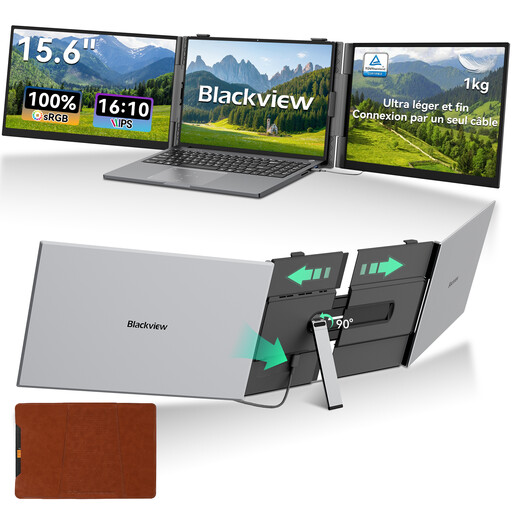
Blackview DCM8 Pro, 15.6 inches, 16:10
This model is described as a 15.6-inch IPS monitor with a 16:10 aspect ratio. Before buying, check the native resolution of the specific version and whether it’s compatible with your device.
View at Joybuy
 No image available
Blackview TABLE 9, 16 inches, 16:10
For viewing manual pages, the product name specifies a 16-inch display with a 16:10 aspect ratio and 1920 × 1200 pixels. It also lists a retractable, rotating magnetic stand and compatibility with PCs, mobile phones, tablets and MacBooks.
View at Joybuy
 No image available
UPERFECT 16-inch 2K 144Hz
For small labels and detailed views, the product name lists a 16-inch screen, 16:10 aspect ratio and 2560 × 1600 pixels. Connections include Mini-HDMI and Type-C; the product name also lists VESA compatibility.
View at Joybuy
Frequently asked questions
Is a USB-C port on my laptop enough to display an image on a portable monitor?
No. The connector shape alone isn’t enough to confirm compatibility. Compare your specific device’s video output with the monitor’s requirements. For the 514pn’s native resolution, HP requires USB-C with DisplayPort Alt Mode and DisplayPort 1.2; ASUS lists a USB-C input with DisplayPort Alt Mode for the MB16ACV.
How should I set up the monitor for reading at a library desk?
Consider the space available and the rules of the library you’re visiting, and position the display to keep distracting reflections out of your line of sight as much as possible. Dell lists a tilt range of 10° to 90° for the P1425; this doesn’t tell you what the rules are at any particular library.
What should I bear in mind when cleaning and carrying it?
Protect the display when carrying it, and follow the instructions for your model when cleaning it and handling its cables. HP lists a hard screen cover as included with the 514pn; check which accessories come with other models and offers.
What are my rights if a monitor is faulty or I buy online in Germany?
Your statutory rights for faulty goods apply against the seller and are separate from any voluntary guarantee. The Verbraucherzentrale explains that new goods generally have a two-year statutory warranty period, and that many online purchases usually come with a 14-day right to cancel from the date you receive the goods. It also states that for sales contracts made from 31 July 2026, the statutory warranty period can be extended once by 12 months if you choose repair for a fault; the conditions for each case apply.
What does the EU energy label tell me about a monitor?
The European Commission rates electronic displays, including computer monitors, on an energy efficiency scale from A to G. The label relates to energy efficiency; it doesn’t tell you whether a monitor is compatible with your device or suitable for your manuals.


