Sorting photo archives
If you want to view photos, file names and metadata side by side, a second screen can mean less switching between windows. Screen space, positioning and portability are all important factors when choosing one.


A portable second monitor can be a good choice for organising a photo archive, provided its screen size suits your library desk and the way you plan to set it up. For colour-critical decisions, you’ll also need to consider colour gamut, calibration and lighting. Before buying, check that your laptop can output video through the connection you intend to use and can supply enough power to the monitor.
If you want to view photos, file names and metadata side by side, a second screen can mean less switching between windows. Screen space, positioning and portability are all important factors when choosing one.
If you also assess colours or edit images while organising your archive, consider the colour gamut and calibration. EIZO points out that calibration cannot fix limitations such as a monitor’s narrow colour gamut.
If there’s no power socket available at your library desk, your planned laptop connection needs to provide both video output and power. A monitor powered by your laptop can also put extra strain on its battery.
First, check that the screen size and setup will fit your desk. Then make sure the connection and power requirements are compatible with your laptop. If you’ll be assessing colours, also consider your complete colour-management and lighting workflow.
| What matters | What to check before buying | Who should consider this? |
|---|---|---|
| Keeping track while sorting | Check the screen size and aspect ratio against the desk space available. Make sure previews and file management can sit comfortably side by side in your archive software. | If you want to see photos and file lists at the same time, a clear, easy-to-use workspace is important. Around 33% of consumers put an overview for sorting first. |
| Assessing colours | Check the colour gamut and factory calibration of the specific model. If you need colour-accurate results, also consider calibration and lighting. | If you assess colours or edit images while organising your archive, high resolution alone isn’t enough. Around 25% of consumers prioritise colour assessment. |
| Video and power | Check the video output and power available from your laptop’s port in the device specifications. If you’re using HDMI, find out whether a separate power supply is needed. | If you want your setup to work reliably with your existing laptop, the connection and power supply need to be compatible. Around 25% of consumers first look for a reliable connection. |
| Portability and setup | Consider the weight, including any accessories you’ll need, and the space available on your library desk. Check the library’s rules. | If you’ll be carrying the monitor regularly and setting it up at a library desk, weight and a suitable setup matter. Around 17% of consumers put portability and setup first. |
The requirements for video and power vary between laptops and monitors. A USB-C connector that fits doesn’t necessarily mean that it supports both functions.
Check the documentation for your laptop and the specific monitor. If you want to use HDMI, check the power requirements too: according to the manufacturer, the Verbatim PMT-15-4K needs a power supply for an HDMI connection.
An additional power connection can mean extra cables and a power supply on your library desk.
Resolution and colour gamut specifications alone don’t prove that you’ll be able to assess colours accurately in your own workspace.
Consider sharp photo previews separately from whether you need to make colour-accurate decisions. For the latter, take into account the specifications of the particular model, as well as calibration and lighting conditions.
If you need to assess colours precisely, setting up a suitable colour-management system may take extra time and effort.
A larger display needs enough space in your particular workspace. The stand, cables and any power supply all form part of the setup.
Compare the weight and setup of the complete device, and check the rules at the library you plan to visit before using it.
You’ll need to allow space for the stand, cables and, if required, a power supply, as well as the monitor itself.
The ProArt PA148CTV, ZenScreen Fold OLED MQ17QH and ZenScreen OLED MQ16FC differ in panel, screen space and portability.
According to the manufacturer, the PMT-15-4K combines a 15.6-inch 4K IPS display with touch functionality, USB-C and HDMI.
The ThinkVision M14t Gen 2 and ThinkVision M16 offer different screen sizes for lists, previews and working on the go.
The gram +view 16MQ70 is a 16-inch display that, according to LG, can be used in portrait or landscape orientation.
The VG1655 is a portable Full HD second monitor with two USB-C ports, Mini HDMI and an adjustable stand.
This selection includes portable second monitors that give you extra screen space for viewing and organising photos. Before buying, check that the connection and setup are right for your laptop and workspace.
 No image available
The extra screen space can be useful for viewing photos and managing files side by side.
Specifications in the product title: 16 inches, FHD/1200P and a 360° rotating magnetic stand. According to the product description, the connected device must support video output to send video over Type-C.
 No image available
The 16:10 aspect ratio is one specification to consider when checking compatibility with your archive software and the space available on your desk.
Specifications in the product title: 16 inches and a 16:10 aspect ratio. The title also mentions a pull-out, rotating magnetic stand.
 No image available
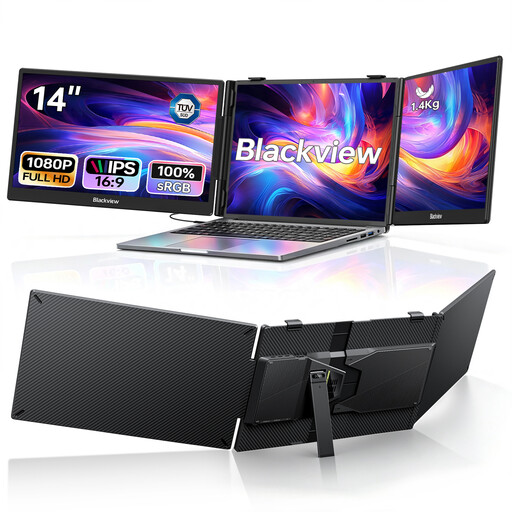
Two additional screens can give you several visible work areas for viewing files and previews.
Specifications in the product title: two 14-inch FHD IPS screens with 1080p resolution, in a foldable design for laptops from 13 to 17.3 inches.
 No image available
The 15.6-inch screen is an option if you’re looking for a portable second display for photos and file management.
Specifications in the product title: FHD 1080p, IPS, USB-C, HDMI and a smart-cover stand.
 No image available
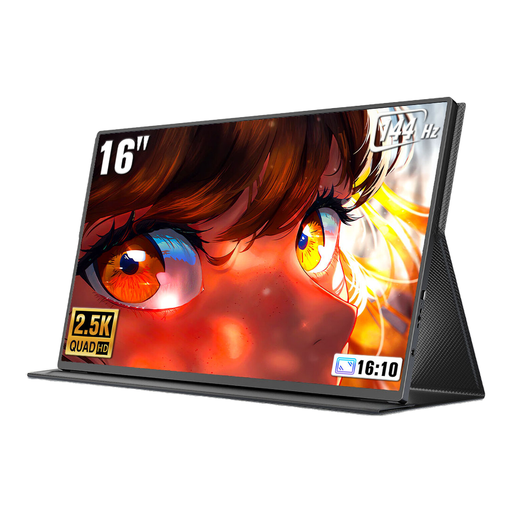
Compare the resolution stated in the title with the requirements of your archive software and the display you’re looking for.
Specifications in the product title: 16 inches, 2560 × 1600 pixels, 16:10 aspect ratio, QLED, 144 Hz, Mini HDMI and Type-C.
No, the shape of the connector alone doesn’t tell you enough. Check the video and power capabilities of the specific port on your laptop against the monitor’s requirements. For example, LG requires DisplayPort Alt Mode and more than 7.5 W (5 V/1.5 A) of USB-PD output power for the 16MQ70.
Connect a compatible laptop and use its display settings to select an extended desktop rather than mirroring the screen. Position the monitor and file-management window so that previews and metadata are visible at the same time. Also check the stand angle and the connections required by the specific model.
No, that specification alone isn’t enough. It describes a colour gamut feature of the particular model. For colour-accurate work, suitable settings or calibration and the lighting conditions in your workspace are also important.
There’s no general answer that applies to every library desk; the rules of the individual library determine what’s allowed. According to its rules, the Bavarian State Library requires mobile electronic devices to be used silently. This doesn’t establish a general rule allowing an additional monitor at other libraries.
For consumer purchases in the EU, the seller is generally responsible for a legal guarantee of at least two years from the date you receive the goods. This is separate from any voluntary manufacturer’s warranty. For a typical online distance purchase, you generally have 14 days from delivery to withdraw from the contract, subject to legal exceptions and the specific circumstances of the contract.