Who is a portable monitor suitable for?

Storyboard reviewers using a laptop

You want to view panels or references alongside your working file. The main thing to check is whether your laptop can provide video and power over the connection you plan to use. Verbatim and LG specify USB-C requirements that vary by model.

Detail-focused reviewers

You check small labels or drawing details and weigh up higher resolution against space and power requirements. LG and Lenovo offer different 16-inch options, each with its own resolution and connection requirements.

Reviewers who work on the move

You often set up your monitor in different places or want to work with the storyboard directly on the display. Portability, the stand and, where applicable, the extra connection needed for touch are important factors to consider. Verbatim lists different requirements for its models.

What should you look for when buying?

Consideration What to check before buying Who is this important to?
Video connection and compatibility Check your laptop’s video output and power supply alongside the monitor’s input and the cables required. If I want to connect my laptop using USB-C only, I need to know that the port can output video and power the monitor. Around 29% of consumers put connection compatibility first.
Panel readability Check the screen size, native resolution, aspect ratio and usable scaling. If I’m checking small drawing details or labels, I need them to be easy to read at the scaling settings I use in my software. Around 23% of consumers prioritise detail.
Portability and desk space Allow for the weight with the case and cables, as well as the dimensions of the casing and the space needed for the stand. If I carry the monitor around often and set it up on a small library desk, a manageable size matters to me. Around 18% of consumers prioritise portability and desk space.
Power supply Check the power requirements of the specific model, your device’s output and whether a socket is available. If I can’t be sure there’ll be a socket where I’m working, I need to know whether my laptop can power the monitor or if I’ll need another power source. Around 18% of consumers prioritise power planning.
Direct control Check that touch or stylus input is supported by your device, operating system, connection and storyboarding app. If I want to control panels on the second display by tapping or swiping, that input needs to work with my software. Around 12% of consumers prioritise direct control of the display.

Common buying and connection mistakes

  • Choosing USB-C based on the connector shape alone

    A USB-C port on its own doesn’t tell you whether a laptop can transmit video or provide enough power for the monitor. For the LG 16MR70, for example, LG specifies DisplayPort Alt Mode and USB-PD output power of more than 7.5 W.

    Check the specifications of your laptop, the specific monitor and the cable you plan to use.

    Depending on your setup, you may need an extra cable, an adapter or another power source.

  • Assuming HDMI alone will enable touch

    With the Verbatim PMT-15-4K, video and touch are separate functions when using HDMI. Verbatim says you’ll also need a USB cable for touch, and the monitor needs a power supply when connected via HDMI.

    Check which cables you need for your connection and whether your storyboarding software supports touch.

  • Taking manufacturer claims as proof of measured colour accuracy

    Resolution or an advertised colour gamut doesn’t, on its own, prove measured colour accuracy. LG and AOC’s specifications are no substitute for measurements of the specific model.

    If accurate colour decisions are essential, look for independent measurements and a suitable calibration option for the exact model. For simply reviewing a sequence of images, readability and connectivity are the first things to consider.

An overview of relevant brands

Verbatim

The range includes compact secondary displays and higher-resolution touch models.

  • Verbatim lists a weight of 540 g and a stand for the 14-inch LIGHT.
  • Verbatim says the PMT-15-4K needs a power supply when connected via HDMI, and an extra USB cable for touch. These details don’t automatically apply to the LIGHT.

LG

The gram +view 16MR70 is a 16-inch additional display with a 16:10 aspect ratio and higher resolution.

  • LG lists a resolution of 2560 × 1600 pixels and a cover that can be used as a stand.
  • According to LG, the connected device must support DisplayPort Alt Mode and USB-PD output power of more than 7.5 W.

Lenovo

The ThinkVision M16 is a 16:10 secondary monitor, while the M14t Gen 2 is a smaller touch model.

  • Lenovo lists a resolution of 1920 × 1200 pixels and USB-C with DP Alt Mode for the M16. For the M14t Gen 2, Lenovo lists touch and a resolution of 2240 × 1400 pixels.
  • These specifications relate to different models and shouldn’t be treated as interchangeable.

ASUS

The ZenScreen MB16AHV is a 15.6-inch Full HD option with USB-C and Mini-HDMI.

  • ASUS lists an anti-glare surface, two USB-C inputs with DP Alt Mode and a Mini-HDMI input.
  • According to the ASUS datasheet, this model has no speakers. Features may vary by country.

AOC

The 16T20E2 is a 15.6-inch Full HD option with USB-C and Mini-HDMI.

  • AOC lists a magnetic cover that doubles as a stand, along with USB-C and HDMI cables in the box.
  • The manufacturer’s specifications don’t prove independently measured colour accuracy.

Portable monitors at Joybuy

The selection below includes portable secondary displays in a range of sizes, resolutions and connection types, including touch models. Compare your device’s requirements with the space available on your library desk.

UPERFECT 16-inch monitor with 2560 × 1600 resolution and 16:10 aspect ratio

UPERFECT 16-inch monitor, 2560 × 1600, 16:10

The high-resolution 16-inch screen may be worth considering if you need to check fine storyboard details.

Listed in the product name: 2560 × 1600 pixels, 16:10, 144 Hz, Mini-HDMI and Type-C.

View at Joybuy
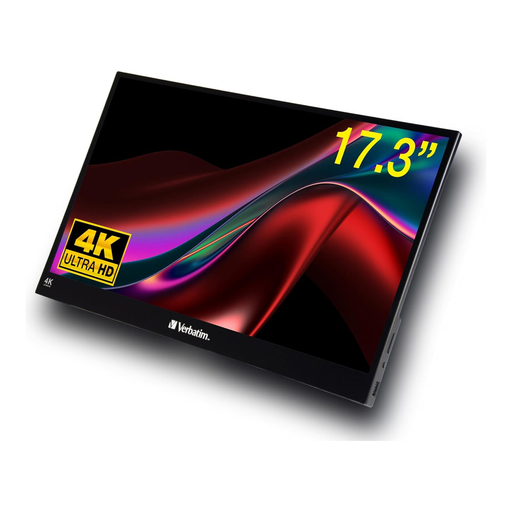
Verbatim 17.3-inch 4K touchscreen monitor

Verbatim 17.3-inch touchscreen monitor, 4K

The large touchscreen may suit you if you want to work directly on the secondary display and have enough desk space.

Listed in the product name: 17.3 inches, 4K, HDR, USB-C and HDMI.

The screen takes up space, so check the dimensions of your intended workspace and the touch compatibility of your devices and software before buying.

View at Joybuy
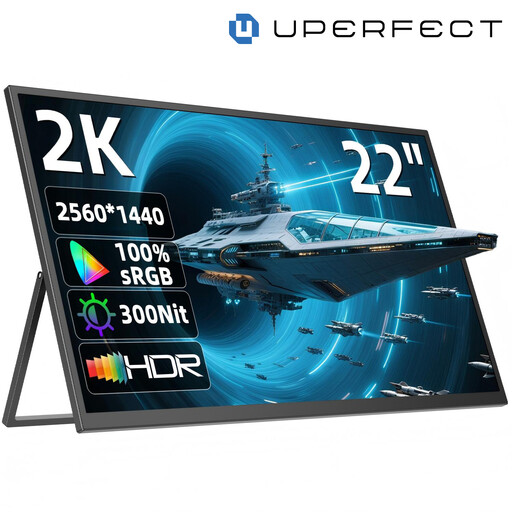
UPERFECT 22-inch monitor with 2560 × 1440 resolution

UPERFECT 22-inch monitor, 2560 × 1440

The larger screen may be useful for viewing several panels or larger images, but it will need plenty of space on a library desk.

Listed in the product name: 22 inches, 2560 × 1440 pixels, IPS, USB-C, Mini-HDMI and a stand adjustable through 180°.

View at Joybuy

Blackview SCM6 with a 14-inch Full HD display

Blackview SCM6, 14 inches, Full HD

The compact size may suit frequent travel and a limited workspace.

Listed in the product name: 14 inches, 1920 × 1080 pixels, 600 g, 4.5 mm and an integrated stand.

Described as a laptop screen extender for 13–17-inch laptops. Check that your device falls within this range and supports the connection.

View at Joybuy

UPERFECT 15.6-inch monitor with Full HD resolution

UPERFECT 15.6-inch monitor, Full HD

A 15.6-inch screen with an adjustable stand may work well for reviewing content alongside a laptop, provided Full HD is detailed enough for your needs.

Listed in the product name: 15.6 inches, 1920 × 1080 pixels, 100% sRGB, USB-C and Mini-HDMI.

Check your device’s connection options and make sure the monitor will fit on the desk space available.

View at Joybuy

Frequently asked questions

Will a USB-C port on my laptop provide both video and power?

Not necessarily. Check the video and power output of your specific laptop. For its single-cable USB-C setup, Verbatim requires DisplayPort Alt Mode and sufficient power; for the 16MR70, LG also specifies USB-PD output power of more than 7.5 W.

Can I use touch over HDMI?

According to Verbatim, the PMT-15-4K needs an additional USB cable for touch alongside HDMI. The monitor also needs a power supply when using HDMI. Other models may have different connection requirements.

How can I use a monitor considerately in a library?

Set it up securely, leaving enough room for the cables, and follow the rules of the study area you’re in. For example, the KIT Library has areas for conversation, quiet study and silent study; devices should be set to silent in silent areas. This isn’t a rule that applies to libraries across Germany. Follow the instructions for your specific model when cleaning it.

What happens if an item bought online develops a fault in Germany?

Online consumer contracts generally come with a 14-day right to cancel, as explained by the Verbraucherzentrale. If an item is faulty, statutory rights against the seller are separate from any voluntary guarantee. The first step may be to have it repaired or replaced.

Can I put an old portable monitor in the general waste bin?

No. The Federal Ministry for the Environment explains that old electrical equipment must be handed in at an authorised collection point, such as a local recycling centre or a retailer that is required to accept it. The return options available depend on the collection point.