For family history research on the train, a compact 14-inch monitor is a good choice when you need to fit your laptop and screen on a small table. For long document pages and notes, a 16:10 display with a higher resolution can give you more screen space. Before choosing, check that your laptop can provide a video signal and enough power through the connection you want to use. More pixels don’t automatically make documents easier to read: text size and scaling matter too.
Who is a portable monitor right for?
Readers of digitised sources
If you want to read parish registers or other digitised documents alongside your own notes, look for adjustable text size and enough room to view the document. The German Digital Library lists digitised sources for family history research.
Travellers with limited table space
If you want to set up your laptop and a second screen at your seat, the case, stand and cables matter as well as the screen size. Deutsche Bahn notes that many ICE seats have fixed or fold-down tables.
Laptop users unsure about connections
If you’re not sure whether your laptop’s USB-C port can output video or whether you’ll need HDMI, check the connection and power requirements before buying. The shape of the plug alone doesn’t confirm that it supports video output.
What should you look for when choosing one?
First, check whether your laptop can supply a video signal and power to the monitor. Then consider the space available, how you want to view documents and your preferred power source to find the right format for your journey.
| Criteria |
What should you look for? |
Who is it most relevant to? |
| Reading documents alongside notes |
Check the screen size, aspect ratio and resolution together; also consider text size and how you arrange windows on your laptop. |
I want to read digitised records alongside my notes and need a suitable text size. Document readability is the top priority for around 29% of consumers. |
| Finding the right video connection |
Check your laptop’s specifications for supported video output; if using HDMI, make sure the monitor has the right input too. |
If I’m not sure whether USB-C outputs a video signal, I want to check the connection in advance. Connectivity is the top priority for around 29% of consumers. |
| Setting up in a confined space |
Allow for the laptop, case, stand and cables together, and consider the space available at your specific seat. |
I want to use a second screen on the go without taking up too much room with my laptop and monitor. A compact travel set-up is a priority for around 24% of consumers. |
| Planning for power |
Check the monitor’s power requirements against the power output of your laptop; if using HDMI, check whether a separate power supply may be needed. |
If I want to work without a separate power socket where possible, the power supply needs to suit both my laptop and monitor. Power is the top priority for around 18% of consumers. |
Common buying misconceptions
-
USB-C automatically means video output
For the one-cable connections described here, both the laptop and the monitor must support the required video and power functions.
Check the specific monitor’s requirements against your laptop’s specifications. If you’re using HDMI, you should also check what power supply is needed.
-
Screen size alone tells you whether everything will fit on the table
Your laptop, monitor, stand and cables all need space. Deutsche Bahn lists tables at many ICE seats, but not every seat is set up in the same way.
Compare the dimensions of your complete set-up and take the seating arrangements on your specific journey into account.
-
A higher resolution automatically makes handwriting easier to read
The pixel count tells you about the display, not the quality of a historical scan or the text size that works for you.
Check how the document looks with your preferred scaling and window layout. Compare resolution and aspect ratio together.
-
Train Wi-Fi will give you access to every source you need
Deutsche Bahn notes that Wi-Fi speed depends on the connection to mobile networks and the number of other passengers. According to the Federal Archives, you can only view a file online if a digital copy is available.
Before travelling, check whether the sources you need are available digitally, and have any documents you’re permitted to use locally ready.
Brands and model ranges to consider
Verbatim
The PM-14 LIGHT and PMT-15-4K models offer different sizes and features.
- Verbatim says the PM-14 LIGHT weighs 540 g and offers USB-C and HDMI.
- One-cable operation requires suitable video and power output; according to the manufacturer, HDMI requires a power supply.
Lenovo
The ThinkVision M14d and M16 are different-sized 16:10 models for documents and multiple windows.
- Lenovo lists the M14d at 2240 × 1400 pixels and 600 g, and the M16 at 1920 × 1200 pixels and 980 g.
- In these specifications, the larger M16 has fewer pixels than the M14d; this doesn’t tell you how easy either one is to read on the train.
ASUS
The ZenScreen MB16AHV offers USB-C and Mini-HDMI connections, while the ZenScreen OLED MQ16FC is an OLED model.
- ASUS describes the MB16AHV’s screen as anti-glare.
- ASUS describes the MQ16FC’s screen as glossy. This doesn’t tell you how much glare you’ll get from the display at a particular train seat.
LG
The gram +view 16MR70 is a 16-inch display with a 16:10 aspect ratio.
- LG lists two USB-C ports and a cover that also serves as a stand.
- LG requires DisplayPort Alt Mode and USB-PD output of more than 7.5 W from the connected device. So don’t check the plug shape alone.
AOC
The 16T3EA is a portable 15.6-inch FHD IPS monitor.
- AOC lists a resolution of 1920 × 1080 pixels, a 60 Hz refresh rate, USB-C power and a built-in stand.
- According to AOC, automatic orientation requires the supplied i-Menu software to be enabled.
Joybuy products for working with documents on the go
This selection of portable monitors includes 14- to 16-inch models, including 16:10 options for documents and notes. Before buying, check the connections and power requirements listed for the specific model.
 No image available
PM14R, 14-inch monitor
The 14-inch format is an option if you want to take a second screen with you for documents and notes.
IPS, 16:10 and 1920 × 1200 pixels; connections: Type-C and Mini-HDMI.
View at Joybuy
 No image available
Blackview DCM8, 15.3 inches
A portable second-screen option if you want to view documents and notes separately.
IPS, 16:10, 1920 × 1200 pixels and 60 Hz; stated weight: 1.2 kg.
View at Joybuy
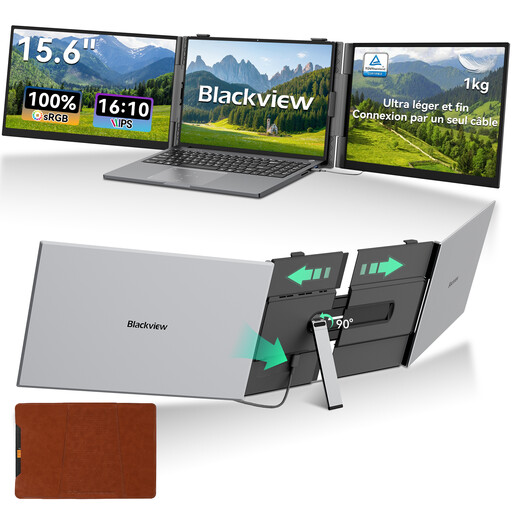 No image available
Blackview DCM8 Pro, 15.6 inches
This model is described as a portable monitor for laptops and could be a good option for viewing documents separately.
IPS, 16:10, 1920 × 1200 pixels and 60 Hz; according to the product details, it’s suitable for laptops from 13 to 17 inches.
View at Joybuy
 No image available
Blackview TABLE 9, 16 inches
The larger screen could suit you if you have enough room at your seat for both the monitor and laptop.
IPS, 16:10 and 1920 × 1200 pixels; stated weight: 1.27 kg. According to the product description, the magnetic stand is adjustable and extendable.
Connections: two USB-C ports and Mini-HDMI.
View at Joybuy
 No image available
Arzopa Z1RC 2.5K, 16 inches
A 16-inch option for viewing documents separately, provided you have enough space at your train seat.
IPS, 16:10 and 2560 × 1600 pixels; stated weight: 810 g.
Connections: USB-C and HDMI.
View at Joybuy
Frequently asked questions
Is one USB-C port on my laptop enough for video and power?
No, the shape of the plug alone doesn’t confirm that it can transmit video and power. Check your laptop’s video output and available power against the requirements of the specific monitor. Verbatim lists DisplayPort Alt Mode and a suitable power supply for the PM-14 LIGHT; LG also requires USB-PD output of more than 7.5 W for the 16MR70.
How can I prepare for research when train internet is unreliable?
A portable monitor doesn’t provide an internet connection. Deutsche Bahn notes that Wi-Fi speed depends on the mobile network connection and the number of other passengers. Before travelling, check which sources you need are available digitally and which documents you’re permitted to keep locally; according to the Federal Archives, you can only view a file online if a digital copy is available.
Will a portable monitor fit at every seat on the train?
You can’t assume it will fit at every seat. Deutsche Bahn lists fixed or fold-down tables at many ICE seats; check the available space for your journey and allow for your laptop, monitor, stand and cables together. Test the video signal and power supply in advance too.
What are my rights in Germany if a product is faulty or I cancel an online purchase?
Your statutory rights if a product is faulty are separate from a manufacturer’s voluntary guarantee. The Verbraucherzentrale explains that the statutory warranty period is generally two years and that online purchases usually come with a 14-day right to cancel from the date you receive the goods; exceptions and the terms of your specific contract should be taken into account.


