What should you look for when buying?
For locally stored lessons, first check that your files play correctly. Then choose image clarity, power options and sound to suit where you’ll be learning.
| What matters |
What to check before buying |
Who this matters most to |
| Local files and subtitles |
Use your own test file to check the USB reader and player, file system, and video, audio and subtitle formats; alternatively, plan to use HDMI and a suitable playback device. |
If I want to play lessons directly from storage without an internet connection, I need the whole file to work, including its audio and subtitles. Around 33% of consumers prioritise direct offline playback. |
| Reading on-screen text |
Consider native rather than merely supported input resolution, focus at your chosen setup location, subtitle size and room lighting. |
If on-screen text is important for my lessons, I check that it’s easy to read from where I plan to sit. Around 27% of consumers prioritise easy-to-read subtitles for learning. |
| Learning away from a mains socket |
Check for a built-in battery and the conditions attached to the stated battery life. Also consider mains power and any accessories you may need. |
If I’m learning in a room without a readily available socket, battery life and portability are key for me. Around 20% of consumers prioritise being able to learn away from mains power. |
| Hearing dialogue clearly |
Check the speakers and audio outputs, then listen to a typical dialogue scene from where you plan to sit. |
If I want to understand spoken lessons clearly from my study space, I check the sound from the built-in speakers and the options for connecting external audio. Around 20% of consumers prioritise clear dialogue playback. |
An overview of relevant projector brands
The features listed relate to the models and product ranges mentioned. A brand name alone doesn’t confirm that your files are compatible or that a projector is suitable for every study space.
BenQ
The GV50 is one option to consider for direct file playback and flexible positioning.
- For the GV50, BenQ lists native 1080p, 500 ANSI lumens, HDMI, a USB reader and pre-installed VLC player.
- These features don’t confirm that your video and subtitle files will work. The manufacturer lists the device weight as 2.1 kg.
Nebula
Nebula’s portable models differ in design and playback options.
- The Mars 3 Air manual describes USB and HDMI playback. Nebula lists the Capsule 3 Laser as weighing 900 g, with native 1080p resolution and 300 ANSI lumens.
- For certain Android projectors, Nebula describes playing USB videos from a FAT32-formatted drive using an installed player. This doesn’t confirm that every file or subtitle will play.
XGIMI
The MoGo 4 and MoGo 4 Laser are portable models with a built-in battery and rotating stand.
- XGIMI states that the MoGo 4 Laser offers 550 ISO lumens and up to 2.5 hours of battery life.
- ISO lumens and ANSI lumens are different measurements. COMPUTER BILD found that the MoGo 4 Laser was considerably darker when running on battery. Check separately whether it supports your local files and subtitles.
LG
The CineBeam Q PU600U is a compact alternative for learners who can plan their setup and power supply separately.
- LG lists 4K UHD resolution and 600 ANSI lumens in the brightest mode for the PU600U.
- LG notes that performance may vary depending on the environment. There’s no confirmation that the PU600U has a built-in battery or can play the subtitle files you need.
Joybuy projectors for German lessons
This selection from Joybuy includes portable projectors with features for text-heavy lessons, flexible positioning or playback from an external device. For locally stored videos, check file compatibility on the specific model.
 No image available
XGIMI Vibe One Match Night Collection
The stated FHD 1080P resolution may be useful for text-heavy lessons; check how easy your own subtitles are to read.
The product name lists Google TV, 250 ISO lumens, JBL audio, a built-in battery, and a projector screen with stand.
Joybuy
 No image available
2026 projector with built-in apps and Play Store
If you want to play locally stored lessons from a USB drive or an external device, test playback on the projector using your own file.
The product name lists USB drive and HDMI compatibility, automatic image correction, digital zoom and 180° rotation. The stated image size is 50–200 inches.
Joybuy
 No image available
XGIMI Vibe One
The stated 1080p resolution may be useful for text-heavy lessons; test the focus and subtitle size where you plan to study.
The product name lists JBL sound, a built-in 160° stand, autofocus, keystone correction and 250 ISO lumens.
Joybuy
 No image available
XGIMI Elfin Flip Laser 1080P
For lessons with on-screen text, test the stated 1080P resolution and focus using one of your own lessons in your study space.
The product name lists 1600 ISO lumens, autofocus and a foldable design.
Joybuy
 No image available
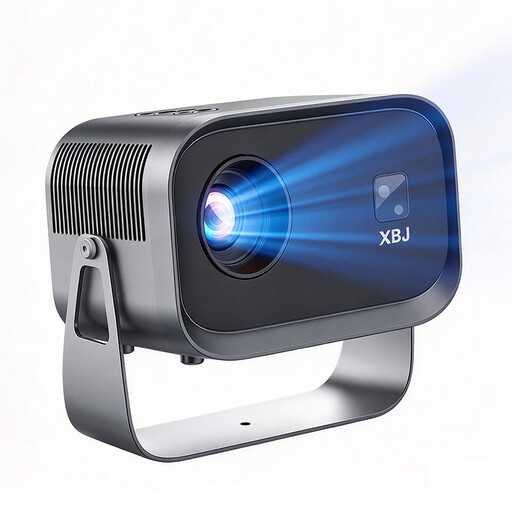
XBJ K6
If you want to play locally stored lessons from a USB drive, use your own video and subtitle files to check that they work on the projector.
The product name lists Full HD 1080p, USB drive compatibility, 180° rotation and 490 ANSI lumens.
Joybuy
Frequently asked questions
Will every projector with a USB port play my lessons and separate subtitle files?
No, you can’t tell from the USB port alone. BenQ specifically lists a USB reader and VLC for the GV50; for certain Android projectors, Nebula describes using a FAT32-formatted drive with an installed player. Test video, audio and subtitles with a representative file of your own on the specific model.
How should I set up a projector for text-heavy lessons?
Plan the projection distance, image size and seating position together, then adjust the focus using an actual lesson. Also keep the ventilation openings clear: the Nebula Mars 3 Air manual warns against blocking them or placing the device in a confined space.
Who should I contact if a product develops a fault after purchase in Germany?
For a consumer purchase, the seller is generally responsible under statutory consumer rights. The Verbraucherzentrale states that the statutory limitation period is two years; this is separate from a voluntary manufacturer’s guarantee. Keep your proof of purchase and the seller’s details in case you need to make a claim.
What should I know about product safety when buying an electric projector in Germany?
Goods sold in the EU must comply with the applicable product safety rules. EU consumer information lists electrical and electronic equipment among the product groups that may require CE marking. Check the specific device’s marking, supplier information and any warnings; a CE mark is not an independent quality certification.
Can I copy any language-learning video file I find onto a personal USB drive?
No. The fact that a file can be played doesn’t mean you have the right to use it. Section 53 of the German Copyright Act (UrhG) allows individual private copies only under the conditions set out there, and excludes, among other things, source material that is obviously illegal or has been made publicly available unlawfully. Whether you may copy a particular file depends on where it came from and how you intend to use it.


