If you’re sitting to one side while the projector points straight at the screen, you don’t need keystone correction just because of where you’re sitting. What matters is the screen’s viewing angle and whether you can read the subtitles from your seat. If the projector itself is positioned at an angle, horizontal correction can straighten the image; BenQ notes that digital keystone correction can affect image quality. For small on-screen text, consider image size and viewing distance together: Epson suggests sitting no more than four times the image height away when viewing detailed content.
Who is a portable projector suitable for?
Learners sitting to one side
If you’re sitting at the edge of a sofa or table, check how subtitles look from that exact spot. Stewart Filmscreen describes the half-gain angle as a measure of how brightness falls off away from the screen’s central axis. Sitting to one side is not the same as positioning the projector to one side.
Learners who rely on on-screen text
If you use subtitles, vocabulary or grammar charts, test the smallest text at your intended image size and viewing distance. Epson suggests sitting no more than four times the image height away when viewing detailed content.
Learners in different locations
If you often move your projector or study somewhere without a nearby power socket, positioning, power supply and lighting become important. Manufacturers’ claims about battery life and automatic image alignment apply to specific models.
Which buying criteria matter most?
First, distinguish between sitting to one side and positioning the projector at an angle. Then check subtitles at your planned image size and viewing distance, and in your usual lighting conditions. Only then can you decide how important battery power or mains operation is for your study space.
| Consideration |
What to look for when buying |
Who will find this especially important? |
| Viewing from the side |
Check the viewing angle of the screen you plan to use; view subtitles from your actual seat. |
If I’m sitting to one side of the centre of the image, I want to be able to read subtitles without having to rearrange everything. Around 36% of consumers put visibility from a seat at the edge first. |
| Text and sharpness |
Consider native resolution, image height and viewing distance; avoid excessive digital correction. |
For vocabulary and grammar charts, it matters to me that even small text stays readable. Around 29% of consumers prioritise text sharpness. |
| Room lighting |
Consider ambient light alongside your desired image size; only compare brightness figures that use the same unit. |
If I’m studying in a room that isn’t completely dark, I want to be able to read the text despite the ambient light. Around 21% of consumers make visibility in a lit room their top priority. |
| Moving between locations and power |
Check battery life in the relevant picture mode and the connections you need; listen to the sound from your intended seat. |
If I use the projector in different places without a nearby power socket, suitable battery operation matters to me. Around 14% of consumers put portability first. |
Which buying mistakes should you avoid?
-
Confusing sitting to one side with positioning the projector to one side
Keystone correction straightens an image projected at an angle; it doesn’t widen the screen’s viewing angle.
Check separately where you’re sitting and where the projector is pointing. Assess the subtitles from your actual seat.
-
Assuming the maximum screen size means text will be easy to read
For small text, image size, viewing distance and available brightness all need to work together. Strong digital correction can also affect image detail.
Test a typical German lesson at your planned image size and in your usual lighting conditions.
-
Assuming similarly named projectors are the same model
According to Anker, the Capsule 3 Laser and Capsule 3 differ in their light source and stated brightness.
Check the full model name and variant before choosing an offer.
-
Assuming ‘portable’ automatically means battery-powered and suitable for daylight
A portable projector doesn’t have to include a built-in battery; mini projectors may produce less light when running on battery power.
Check the power supply and picture mode separately, and assess image size and ambient light in your study space.
Notable brands and models
BenQ
The GV50 is designed for flexible positioning, with a battery and stated horizontal image correction.
- For the GV50, BenQ lists Full HD, a battery and automatic horizontal correction of up to ±30°, subject to the distance condition given in its support FAQ.
- These specifications don’t guarantee sharp subtitles in every position. The GV31 is a different model and is subject to a battery safety recall.
XGIMI
The MoGo 4 Laser is a battery-powered option, while the Elfin Flip 4K is designed for compact positioning with mains power.
- For the MoGo 4 Laser, XGIMI lists a battery, a rotating stand and automatic image alignment.
- The PowerBase stand is sold separately. ISO lumens and ANSI lumens can’t be compared directly without a common measurement basis. The Elfin Flip 4K is not listed as having a built-in battery.
Epson
The Lifestudio Pop EF-61G is a portable Full HD option for study spaces with mains power.
- For the EF-61G, Epson lists 700 lumens and automatic picture setup.
- These specifications confirm neither a built-in battery nor readability at every image size and ambient light level. Check the exact EF-61 variant against the offer.
soundcore Nebula
The Capsule 3 and Capsule 3 Laser are compact battery-powered projectors, but they are different models.
- Anker lists 300 ANSI lumens and a laser light source for the Capsule 3 Laser, and 200 ANSI lumens and RGB LED for the Capsule 3. Both models sold in Germany are listed as Full HD.
- The stated 2.5-hour battery life applies to Eco mode.
ViewSonic
According to the manufacturer, the M1 Max combines a battery and adjustable stand with automatic horizontal and vertical correction.
- ViewSonic lists Full HD, autofocus, a battery and USB-C input.
- These features don’t tell you how bright a particular lesson will look from a seat to one side, or how easy the text will be to read from there.
Joybuy products for flexible study spaces
This selection includes portable models and projectors that can be positioned flexibly. When choosing, consider whether the battery, connections, image size and correction options suit your study space.
 No image available
Aurzen Tri-Fold DLP mini projector with 5000mAh battery
An option for short study sessions in different locations when there’s no nearby power socket.
The title states up to 1.5 hours of battery life, 4K support and ToF autofocus.
View on Joybuy
 No image available
XGIMI MoGo 4, Match Night EU Edition
For study spaces where you need a portable projector with a built-in battery. Check text readability at your chosen image size and in your room lighting.
Full HD 1080p; 450 ISO lumens; stated battery life of 2.5 hours. This variant includes an EA SPORTS FC 26 Game Code.
View on Joybuy
 No image available
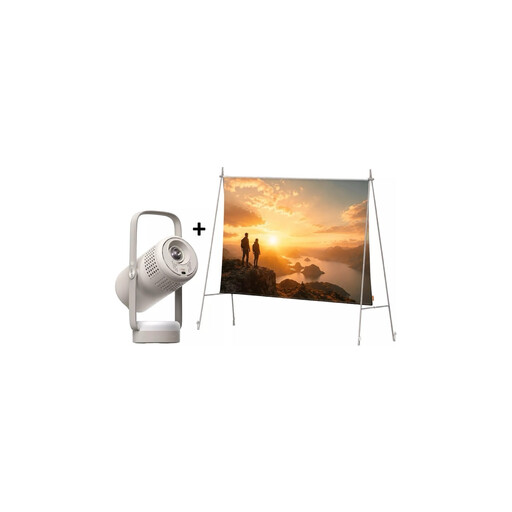
XGIMI Vibe One Match Night Collection with screen and stand
This set is designed for flexible setups where the projector, screen and stand need to work together.
Full HD 1080p; 250 ISO lumens; stated battery-powered video playback of up to 1.2 hours in Eco mode.
View on Joybuy
 No image available
2026 projector with built-in apps and Play Store
A possible choice if automatic image correction and flexible positioning are important for your setup.
The title states an image size of 50–200 inches, 50–100% digital zoom, 180° rotation and HDMI compatibility.
View on Joybuy
 No image available
XGIMI Vibe One with built-in 160° stand
For flexible setups where autofocus and keystone correction can help with positioning.
Full HD 1080p; 250 ISO lumens; built-in 160° stand; autofocus and keystone correction.
View on Joybuy
Frequently asked questions
Do I need keystone correction because I’m sitting to one side?
No, not just because of where you’re sitting. Keystone correction straightens an image projected at an angle onto the screen; when you’re sitting to one side, the screen’s viewing angle and brightness distribution are the first things to consider. If the projector is also positioned to one side, check specifically for horizontal correction and test the result with real lesson text.
How should I set up subtitles for a study session?
Position the projector as squarely as possible to the screen, then check the smallest on-screen text at your planned image size and viewing distance. Epson suggests sitting no more than four times the image height away when viewing detailed content. Avoid unnecessary digital correction.
Can I rely on the stated battery life?
Check which picture mode the battery life applies to. Anker lists 2.5 hours in Eco mode for both the Capsule 3 and Capsule 3 Laser. Test battery life and readability together, rather than comparing the number of hours alone.
Can I continue using a second-hand BenQ GV31?
No. BenQ has issued a safety recall for the GV31 because of a potential battery overheating risk. It asks owners to stop using the projector immediately and contact BenQ about the designated service or replacement process. The recall applies to the GV31 and should not be assumed to apply to the GV50.


