What should you look for when buying?
First, check how your specific files will play. Then make sure the picture, power supply and setup are right for the room you’ll be using.
The most important buying priorities for a portable projector used for training demonstrations will depend on how you plan to use it.
| What you need |
What to check before buying |
Who it matters most to |
| Play local files |
Check the media reader function and file formats on the specific model. BenQ Germany lists a USB-A reader for the GV50, while Epson lists two HDMI inputs for the EB-W55. |
If I need to present my own files without an internet connection, I want to test playback using those exact files. Around 36% of consumers prioritise reliable playback of local files. |
| See the picture clearly in the room |
Consider the ambient light, planned image size and projection distance together; assess brightness figures in light of the measurement method used. |
When presenting to a group with some ambient light, I want details to be clear on the planned screen area. Around 29% of consumers put visibility in the training room first. |
| Work without a reliable power socket |
Compare the weight and battery life in the mode you plan to use with the duration of the entire presentation. |
If I’m moving between different rooms without reliable mains power, portable use that suits the planned presentation time matters to me. Around 21% of consumers prioritise being able to work in different locations. |
| Plan the setup and accessories |
Check the projection distance and space available, and plan for any cables, adapters and mounting aids you’ll need. |
If I have to set up and pack away frequently, I want to keep accessories to a manageable minimum and be able to position the projector appropriately. Around 14% of consumers prioritise a simple setup and predictable accessory requirements. |
Joybuy products for training demonstrations
This selection includes projectors that take an HDMI feed from a laptop and one model whose product description mentions video file decoding. If you want to play files directly, test them in their specific formats.
 No image available
XGIMI Vibe One Match Night Collection
For prepared HDMI playback at different venues; stated battery life for video playback is up to 1.2 hours in Eco mode.
FHD 1080P; 250 ISO lumens; HDMI; bundle includes a projection screen with stand.
View at Joybuy
 No image available
XBJ Football-Shaped Mini Projector, 4K support, 1080P
For laptop playback via HDMI, provided the output and connection are compatible; check the connection you’ll need before your presentation.
1080P; 800 ANSI lumens; HDMI and USB.
View at Joybuy
 No image available
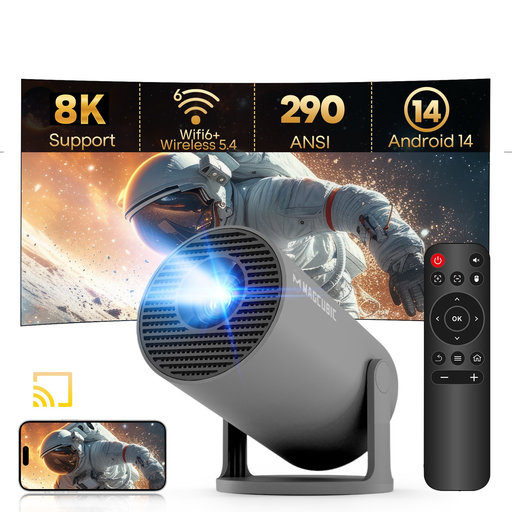
MAGCUBIC HY300Pro Grey
Consider it for playing local files directly if you’ve tested your specific video and audio files beforehand.
The product description mentions video file decoding, as well as USB and HDMI. The title lists 1080P support and 290 ANSI lumens.
View at Joybuy
 No image available
MAGCUBIC HY350Max
For laptop playback via HDMI, provided the connections on your playback device are compatible.
Native 1080P Full HD; 900 ANSI lumens; HDMI and USB; 180° rotation.
View at Joybuy
 No image available
XBJ 360° Portable Smart Projector, Full HD 1080P
For laptop playback via HDMI; check that your laptop’s picture and sound output are set up for the presentation.
Full HD 1080P; 500 lumens; 360° rotation.
View at Joybuy
Frequently asked questions
Is a USB port enough to play demonstration videos from a USB stick?
No, the port label alone doesn’t tell you that. BenQ Germany also identifies USB-A on the GV50 as a reader, while ViewSonic describes USB-A on the M1X as providing power to an external streaming device, among other uses. Check the media reader function and supported formats for your specific model, and test your files first.
How should I prepare if it’s unclear whether files will play directly?
Try playing the original file on the laptop you plan to use, then test the connection to the projector’s HDMI input, including any adapter you might need and the audio output. Epson lists two HDMI inputs on the EB-W55; the BenQ GV50 has one HDMI input.
How much battery life should I allow for a demonstration?
Compare the duration of the entire event with the battery life in the picture mode you’ll actually use. XGIMI lists up to 2.5 hours of video playback for the MoGo 4 in Eco mode; COMPUTER BILD described a significantly darker picture when the different MoGo 4 Laser model was running on battery. Only plan to use mains power as an alternative if it’s available at the venue.
What costs and rights should I consider after buying?
Check whether you’ll need adapters, cables and mounting aids, and consider any future lamp replacement costs for a lamp-based projector. Under EU rules, if you buy as a consumer, the seller must repair or replace faulty goods, or goods that don’t work as described, free of charge; Your Europe explains these consumer rights. A voluntary manufacturer’s guarantee is separate. If you’re buying on behalf of a training provider, don’t assume consumer rights apply without checking.
Can I simply show other people’s videos during vocational training in Germany?
No, not just because the file is stored locally. Section 60a of the German Copyright Act (UrhG) covers vocational training establishments and allows limited use under certain conditions to illustrate non-commercial teaching. The scope and exceptions are set out in law; whether showing a particular full video is permitted depends, among other things, on the work, the event and any applicable licence. The relevant source is the text of the law published by the Federal Ministry of Justice and the Federal Office of Justice.


