Clubs with rows of seats to the sides
If your guests won’t all be looking straight at the screen, consider the projection surface, image size and view from the furthest seats together.


For anniversary films with rows of seats to the sides, first check the screen surface, viewing angle and image size. A projector’s keystone correction won’t change the viewing angle for your guests. If the projector also needs to be positioned to one side, horizontal lens shift and digital keystone correction are two different solutions. Digital correction can affect image sharpness and size. If there’s ambient light, you’ll also need to check whether the brightness is sufficient for the room in question – manufacturer claims are no substitute for testing it on site.
If your guests won’t all be looking straight at the screen, consider the projection surface, image size and view from the furthest seats together.
When using different club rooms, you’ll need to adjust the projector position, power supply and projection distance to suit each space.
If you can’t fully darken the room during the film, image quality and screen choice should take priority over keeping the equipment as compact as possible.
Seats to the side and a projector positioned to one side are two different requirements. BenQ Germany points out that light-enhancing screen coatings can restrict the viewing angle and encourage hotspots.
| Consideration | What to check before buying | Who it matters most to |
|---|---|---|
| Viewing from the side | Check the screen material and stated viewing angle; view the image from the furthest seats too. | If I’m planning rows of seats to the sides, the image should still be easy to see from the seats at the edges. Around 36% of consumers put side-on viewing first for this reason. |
| Image in ambient light | Plan the room lighting, image size and projection distance together. Epson Germany lists room dimensions, distance from the projection surface and image content as important factors in determining image size. | If the room can’t be fully darkened, I want to assess the image size and brightness for that specific space. Around 27% of consumers prioritise an image that remains visible in ambient light. |
| Projector positioned to one side | Measure the required offset and distance; check for horizontal lens shift or the correction range on the specific model version. BenQ Europe points out that digital keystone correction can affect image quality, sharpness and size. | If the projector can’t be placed centrally, I need a suitable way to align the image. Around 19% of consumers prioritise being able to position the projector to one side. |
| Transport and playback | Compare the screening length with the battery life in the intended operating mode; test the power supply and HDMI playback in advance. | If I’m moving between club rooms or can’t be sure a power socket will be available, the transport, power supply and film player all need to work together. Around 18% of consumers focus above all on a portable setup and reliable playback. |
Horizontal image correction compensates for an awkward projector position, but it doesn’t change the screen’s viewing angle for guests sitting to the side.
First check the view from the furthest seats, then establish separately whether the projector also needs to be positioned to one side.
More extensive digital correction can affect image sharpness, edges and size.
Position the projector as accurately as possible. If a large side-on offset is unavoidable, check the documented optical adjustment range for the specific model.
The stated battery life may apply to a particular operating mode; a brightness figure alone doesn’t tell you how the image will look in your club room.
Compare the film length with the battery life in the intended operating mode, and test the image size and lighting at the planned setup location.
The mains-powered EB-FH54 is an option if you’re looking for a portable projector for a room that may have some ambient light.
The portable GV50 combines a battery with documented horizontal keystone correction, while the LU935ST shows a different, optical lens-shift solution in a short-throw installation projector.
The HORIZON S Pro is positioned as a 4K home cinema model with a rotating stand.
The Mars 3 is a portable battery-powered projector for setups where a power socket may not be available.
This selection includes portable projectors for mobile film playback. For each model, check that the battery life, image alignment and connections will suit your club room.
 No image available
For mobile film playback when a built-in battery and flexible positioning are important.
The product title lists up to 1.5 hours of battery life, ToF autofocus, Wi-Fi, Bluetooth and USB-C.
4K support according to the product description; stated battery life is up to 1.5 hours.
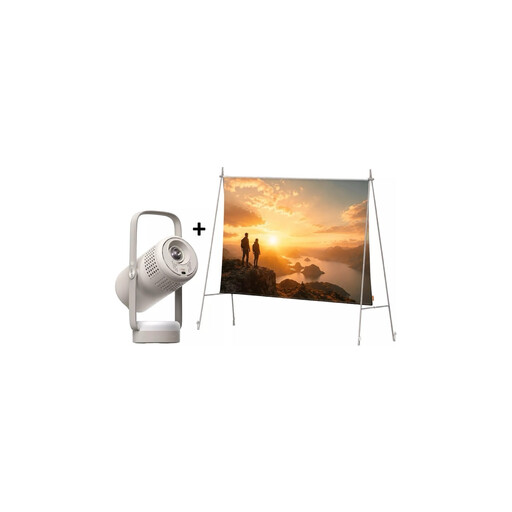 No image available
A portable projection setup for when you want a battery and a screen with a stand included.
The product title lists FHD 1080P, Google TV, 250 ISO lumens and JBL audio.
Stated video playback time is up to 1.2 hours in Eco mode.
 No image available
For HDMI playback when being able to rotate the projector is useful for your setup.
The product title lists automatic image correction, HDMI compatibility and a stated image size range of 50–200 inches.
It also lists digital zoom and 180° rotation.
 No image available
For mobile film playback when a built-in stand and image correction suit your setup.
The product title lists 1080p, 250 ISO lumens, a built-in stand with 160° positioning, autofocus and keystone correction.
The title also mentions Sound by JBL, Bluetooth and Wi-Fi.
 No image available
For mobile film projection when the light output stated in the product title is an important consideration.
The product title lists 1080P, 1600 ISO lumens, an RGB triple-laser light source and autofocus.
The design is described as foldable for indoor and outdoor use.
No. It corrects an awkward projector position, not the viewing angle for your guests. If you can place the projector centrally, first check the screen material and the view from the seats at the edges when planning rows of seats to the sides.
Mark out the screen, the furthest seats and the possible projector position. Check the image size and projection distance for the specific model, then test the film and sound from the seats at the edges under the planned room lighting.
It depends on the model and operating mode. BenQ Germany states up to 2.5 hours for the GV50; Anker Germany states up to five hours for the Mars 3 and specifies that this battery life is for Eco mode. Compare the full screening time with the figure for the mode you plan to use.
Check whether you’ll need a screen, suitable cables and, if necessary, external speakers for your setup. For the specific offer, also check the warranty terms, repair process and returns policy. A manufacturer’s warranty is not the same as your statutory rights.
There’s no one-size-fits-all answer. Under Sections 15 and 19 of the UrhG, it depends, among other things, on whether the screening is public and which protected works are used; the Federal Ministry of Justice explains the relevant rights in the Copyright Act. For music from the GEMA repertoire, GEMA sets out a separate tariff for individual screenings of films with sound. Check the licences required for the specific film and music being used.