Who might need a portable projector for side viewing?

Families with people sitting to the side

If several people will be sitting at the edges of the seating area, check how the wall or screen looks from those seats. BenQ Germany and Epson Germany explain that viewing angles and the conditions in which a projector is used can affect where it should be positioned.

Hosts who need to position the projector off-centre

If furniture or walkways mean the projector has to sit off to one side, compare the required horizontal correction angle with the model’s specifications and the available throw distance. BenQ Germany gives a horizontal correction range for the GV50, subject to a specific distance condition.

Families who want to show their own videos

If you’re bringing your own recordings, check in advance how you’ll play them from your phone, laptop or storage device, and test a sample file. If you’re considering a battery-powered projector, also think about how long you’ll need it to run and which picture mode you plan to use.

Which buying considerations should you prioritise?

Buying consideration What to check Who it matters most to
Viewing from the side Check the intended wall or screen from the seats at the edges. Image correction can’t replace a clear view of the screen. If I’m sitting at the edge, I want to be able to see the video clearly without confusing my viewing angle with the projector’s angle. Around 25% of consumers put visibility from side seats first.
Off-centre projector position Compare the required horizontal correction angle and positioning distance with the model’s specifications. BenQ Germany states that the GV50 offers horizontal correction of ±30° when used within the specified 2-metre distance condition. If furniture prevents me from placing the projector in the centre, I want to know whether the model can correct the actual angle. Around 20% of consumers prioritise flexible projector positioning.
Room lighting Check how much you can darken the room. Only compare brightness figures when they use the same measurement standard. If the room can’t be fully darkened while everyone is together, I want to assess how visible the picture will be in the planned set-up. Around 20% of consumers put visibility in ambient light first.
Your own family videos Check how you’ll play videos from your device, and whether the connections and file format are compatible. A USB port alone doesn’t guarantee that every video file will play. If I want to show my own recordings, I want to test the file before everyone gets together, rather than looking for a way to play it once we’re all seated. Around 20% of consumers prioritise playing their own videos.
Portability and power supply Check whether there’s a power socket at the viewing location and how long the projector needs to run in the mode you plan to use. ViewSonic states that the M1XE offers up to four hours of battery life; actual battery life isn’t guaranteed for every mode or video file. If the projector will be used in different places without a reliable power socket, I want the battery to last for the planned viewing time. Around 15% of consumers put portability without a power socket first.

Common misconceptions when buying a projector

  • Side seating means the projector has to be off to one side

    These are two different things. Keystone correction straightens an image projected at an angle, but it doesn’t change the viewers’ viewing angle.

    Plan the projector position and seating separately, and check the screen from every seat you intend to use.

  • You can use the strongest keystone correction without any drawbacks

    BenQ Germany points out that stronger digital correction can affect image edges, sharpness and picture size, among other things.

    First choose a position as close to straight-on as possible, then check that the correction range you need is supported by the specific model.

  • A portable projector will automatically work without a power socket

    ‘Portable’ alone doesn’t tell you whether a projector has a built-in battery. The Aurzen BOOM mini needs mains power; the battery base for Samsung’s The Freestyle 2nd Gen. is sold separately.

    Check the power supply, what’s included and how long you plan to use the projector before choosing a model.

Projector brands to consider

BenQ

According to BenQ Germany, the portable GV50 combines a built-in battery with horizontal and vertical image correction.

  • BenQ states that automatic horizontal correction offers ±30° under a specified distance condition.
  • BenQ notes that stronger digital correction can affect image edges, sharpness and picture size.

ViewSonic

The M1XE is a portable model with a battery and a swivelling stand.

  • ViewSonic lists side projection with horizontal and vertical correction, as well as four-corner adjustment.
  • The stated battery life of up to four hours isn’t guaranteed for every brightness setting or video file.

Epson

The Lifestudio Pop EF-61W is a portable Full HD projector that runs on mains power.

  • Epson lists 700 lumens and a projection app, whose benefits are promoted by the manufacturer.
  • When choosing a model, check that mains power will be available at your planned location.

Samsung

The Freestyle 2nd Gen. is a compact projector with a flexible stand and automatic picture adjustment.

  • The flexible stand and automatic alignment are features Samsung lists for this model.
  • The battery base is sold separately; Samsung says a Samsung account is required for set-up.

Aurzen

The BOOM mini is a projector that runs on mains power and connects to external devices.

  • Aurzen lists native 1920 × 1080 pixels, along with HDMI and USB connections.
  • This model needs a power socket, so check that its connections are suitable for your playback device.

Portable projectors at Joybuy

These portable projectors may suit family videos played from an external device or set-ups where flexible image positioning is useful. For each model, check the exact connections, power supply and correction angle you’ll need.
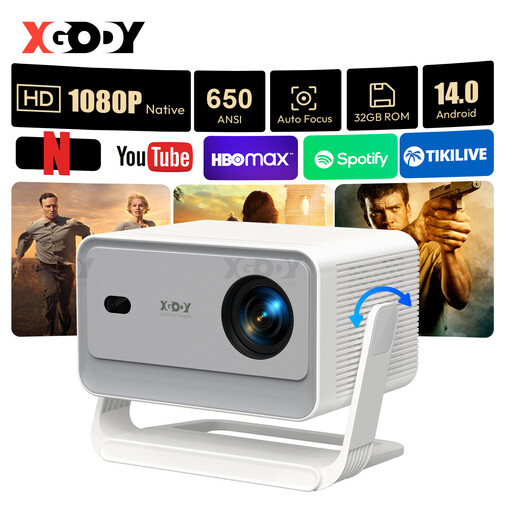
XGODY Gimbal A6 Pro portable projector

XGODY Gimbal A6 Pro

If your family videos are stored on an external device, check that the stated HDMI and USB compatibility works with your playback device.

Native 1080P; 650 ANSI; Android 14.0; WiFi6; BT5.4.

View at Joybuy

XGODY Gimbal N6 Pro portable projector

XGODY Gimbal N6 Pro

For videos played from an external device, check that the stated HDMI and USB compatibility suits your playback set-up.

Native 1080P; 700 ANSI; WhaleOS 3.0; WiFi6; BT5.4.

View at Joybuy
Dangbei Atom portable laser projector

Dangbei Atom Portable Laser Projector

If the projector needs to sit off to one side, check before buying that the correction angle and positioning distance you need are within the specifications for the particular version.

1080p; 1200 ISO Lumens.

View at Joybuy

Magcubic HY350Max portable projector

Magcubic HY350Max

The stated rotation of the stand may be useful if you need flexible positioning. Still, check that the image correction will work for your planned off-centre position.

Native 1080P; 900 ANSI; Android 14; 180° Rotation.

View at Joybuy

XBJ 360° Portable Smart Projector, European Version

XBJ 360° Portable Smart Projector, European Version

This mains-powered model may be suitable if there’s a power socket nearby. If positioning it off to one side, check the correction angle you’ll need.

Full HD 1080P; 500 Lumens; 360° Rotation; Wi-Fi; Bluetooth; HDMI.

View at Joybuy

Frequently asked questions about projectors for family videos

Does keystone correction help if the family is sitting to the side of the screen?

No. It corrects the image geometry when the projector is positioned at an angle, not the viewers’ viewing angle. Check the view from the seats at the edges separately from the screen itself.

How can I work out the right positioning distance before everyone gets together?

Measure the available distance between the projector and the screen, as well as your desired picture width. BenQ Germany defines throw ratio as throw distance divided by picture width. Compare this figure with the specifications for the particular model, and check that an off-centre position will work too.

Can I simply play videos from a USB stick?

Not just because there’s a USB port. Check whether the specific model can read files and which formats it supports, then test one of your own recordings in advance. Alternatively, you could check whether a suitable HDMI playback device will work.

What should I test before family movie night?

Test the planned distance, the view from the side seats and one of your own video files. If you’ll be running the projector on battery power, also check that it will last for the planned viewing time. BenQ Germany notes that stronger digital keystone correction can affect sharpness and picture size, among other things.

What consumer rights apply when buying online in Germany?

When consumers buy from a business online, they generally have a 14-day right to cancel, subject to exceptions and the relevant conditions. The European Union’s Your Europe website also explains that goods bought in the EU are covered by a legal guarantee of at least two years. This legal guarantee is separate from any voluntary manufacturer’s warranty.