What should you look for when buying?
First decide how you want to get your photos onto the projector. Then compare the lighting conditions at your venue and the power supply available.
Direct playback from storage
A good fit if: you want to present without a computer and the specific model’s manual and supported file formats are suitable for your images.
Trade-off: A USB port alone doesn’t guarantee file playback. You’ll also need a suitable file manager, supported formats and easy-to-use controls.
Computer via HDMI
A good fit if: you want to manage your files and their running order on a computer, or direct playback hasn’t been confirmed.
Trade-off: You’ll need a computer, a compatible video output or adapter, and a cable. An HDMI input doesn’t confirm that your computer is compatible.
| What you need |
What to check before buying |
Who it matters most to |
| Opening local photos |
USB playback and supported image formats; alternatively, HDMI with a compatible computer. |
If I want to show prepared images without running into format or connection issues, I’ll check that file access is confirmed. Around 36% of consumers say local playback is their most important buying consideration. |
| Showing photos in ambient light |
Brightness figure, including the measurement standard and operating mode; planned image size and whether the room can be darkened. |
If my room won’t be completely dark, I want landscape details to remain visible across the planned screen area. Around 29% of consumers prioritise visibility in ambient light. |
| Presenting without a mains socket |
Built-in battery and battery life; brightness in battery mode. |
If I’m presenting in different locations without access to a mains socket, I need suitable battery life and an image that remains visible in battery mode. Around 21% of consumers prioritise mobility without mains power. |
| Finding the right setup |
Throw distance and achievable image size; a stand or other setup aids for the intended location. |
If I’ve already sorted out playback, room lighting and power, the main thing is whether the projector will fit in the space available. Around 14% of consumers prioritise flexible positioning. |
Joybuy products for HDMI playback
This selection includes portable projectors whose specifications list HDMI as a way to display local photos from a compatible computer. Also check that the power supply, connections and setup are right for your venue.
 No image available
XGIMI Vibe One Match Night Collection
The HDMI input provides a way to display local photos from a compatible computer. The title also specifies a built-in battery.
Full HD 1080p; 250 ISO lumens according to the product title. The bundle includes a projection screen with stand, according to the description.
Joybuy
 No image available
XBJ Portable Projector, native 1080p
The listed HDMI port may offer a way to display local photos from a compatible computer.
Native resolution: 1080p; 700 ANSI lumens and a stand that rotates 280° according to the product title. The stated 4K support does not mean the projector has native 4K resolution.
Joybuy
 No image available
XGODY Gimbal N6 Pro
The HDMI port is listed as an option for displaying local photos from a computer.
Native resolution: 1080p; 700 ANSI lumens according to the product title. The title also specifies automatic focus and keystone correction.
Joybuy
 No image available
XBJ 360° Portable Smart Projector
The HDMI port listed in the product title can be used to display local photos from a compatible computer.
Full HD 1080p and 500 lumens according to the product title. It also specifies 360° rotation and an image size of up to 120 inches.
Joybuy
 No image available
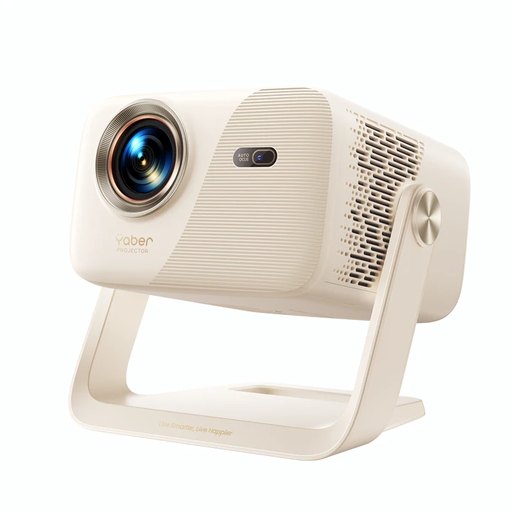
Yaber L2
The HDMI port listed in the description may provide a way to connect a compatible computer.
Native 1080p FHD resolution and 520 ISO lumens according to the product title. The title also specifies a 360° gimbal stand.
Joybuy
Frequently asked questions
Is a USB port enough to show photos from a memory stick?
No. The port must be able to read files. Check which image formats are supported and how to open them: BenQ describes the GV50’s USB-A port as a reader, while XGIMI notes that the MoGo 4 range has no built-in file manager and recommends using an additional app. Alternatively, you can display photos from a compatible computer via HDMI.
How do I set up a mobile photo evening?
First, check the projection surface and available throw distance. Then test your files and the playback method you plan to use. If you’re running on battery, compare brightness and battery life in the same mode. If the image looks too dark in the available room light, you can darken the room or reduce the image size.
What are my rights in Germany if a product is faulty or I buy online?
If a product is faulty, you have statutory rights against the seller. These are separate from any voluntary manufacturer’s guarantee. Verbraucherzentrale generally states a two-year period for goods to be free from defects. Online purchases usually come with a 14-day right to cancel. The requirements, when the period starts and any exceptions depend on the specific purchase.
What should I look out for when it comes to product safety?
The Bundesnetzagentur lists a correctly applied CE marking, identifiable manufacturer details and German instructions with the required warnings among the things to check. BenQ has issued a specific recall notice for the GV31: due to a possible fire risk from battery overheating, it advises users to stop using the projector immediately and contact its recall service. This notice applies to the GV31, not to other models across the board.
Can I simply project landscape photos at a public event?
No. Storing images locally doesn’t automatically give you the right to use them. Under copyright law, whether a screening counts as public depends, among other things, on who it is intended for. If you’re using someone else’s protected images, check that you have the necessary rights. If people are recognisable in the photos, § 22 KunstUrhG may also be relevant. Whether any exceptions apply depends on the individual case.


