Presenters with viewers further back
If you’re showing model railway footage to a group, plan the image size, the viewers’ distance from the screen and the available space for the projector together.


When showing model railway footage to viewers sitting further away, start by working out the image size you need. You can then check whether the throw distance, room lighting and available space suit the specific projector. A small battery-powered projector may not be the best choice if a large image or good visibility in ambient light matters more than being able to operate without mains power. However, a battery model could be suitable for a room that can be blacked out well and has no plug socket. Native resolution and a video input that matches your source device also matter if you want to see fine details on the trains.
If you’re showing model railway footage to a group, plan the image size, the viewers’ distance from the screen and the available space for the projector together.
If you can’t reduce the light freely during your presentation, room lighting and image size become important factors in your choice.
If you regularly transport your projector, consider whether a low weight is enough or whether you need a built-in battery for the way you’ll use it.
Suitable if: viewers will be sitting further away, you need a larger image and there’s a plug socket where you plan to set it up. Epson Deutschland lists Full HD, up to 4,600 lumens of white and colour brightness, and an image diagonal of 31–310 inches for the EB-L260F. These specifications apply to this model and don’t guarantee the same results in every room.
Bear in mind: ‘Portable’ doesn’t automatically mean battery-powered. The image width and throw distance need to suit the space you actually have.
Suitable if: being able to move between locations or operate without a plug socket matters more, and the room can be darkened well. BenQ Deutschland lists a built-in battery, native 1080p, HDMI and 500 ANSI lumens for the GV50.
Bear in mind: The GV50 has a fixed throw ratio of 1.2. Make sure its brightness and battery life suit your planned image size and usage mode.
Suitable if: your setup location varies but mains power is available. Anker lists an optical throw ratio range of 0.9:1 to 1.5:1 for the NEBULA X1.
Bear in mind: A zoom range doesn’t replace measuring the room. The manufacturer’s specifications alone can’t guarantee a clear view from every seat or a certain level of visibility in ambient light.
These percentages refer to consumers choosing a portable projector for model railway footage; each person is grouped according to their main priority.
| Priority | What to look for when buying | Who is this especially important for? |
|---|---|---|
| Image size and viewing distance | Measure the screen width and possible projector location; check the specific model’s throw ratio and image size range. | If I want viewers further back to be able to make out small trains, I plan the image width and projector position together. Around 36% of consumers put finding the right image size first. |
| Visibility in ambient light | Check whether you can block out windows and room lighting; compare brightness figures only when they use the same measurement standard. | If the lights need to stay on during the presentation, I pay attention to how image size and room lighting work together. For around 29% of consumers, visibility in existing light is the priority. |
| Fine image detail | Check native resolution rather than just the supported input signal resolution; make sure the source device’s video output matches the projector input. | If you want to see small details on trains or their markings, check the native resolution and your video footage first. Around 21% of consumers put detail visibility first. |
| Transport and power supply | Don’t assume a low transport weight means the projector has a battery; check the battery, stated runtime and suitable video input. | If I present at different venues, I want to know whether I really need a battery and whether I can connect my source device. Around 14% of consumers prioritise transport and reliable playback. |
Throw distance is the distance from the projector to the screen; viewing distance is the distance from the viewer to the screen. They answer different planning questions.
Measure both distances separately and use the throw ratio to check what image width is possible from your intended projector position.
An unsuitable location may mean you need to move the projector or buy additional mounting accessories.
A stated image size range doesn’t tell you how easy it will be to make out fine details at your planned size and in your room’s ambient light.
Consider image size and room lighting together. Don’t treat ANSI, ISO and LED lumens as equivalent unless they’re measured on the same basis.
Depending on the room, you may need to darken it or use a different projection surface.
A low transport weight doesn’t prove that a projector runs on a battery. For example, the ViewSonic M2e datasheet lists a power adapter, while BenQ lists a built-in battery for the GV50.
Check the battery and runtime specifically. If the projector runs on mains power, make sure there’s a plug socket within reach.
Depending on where you set it up, you may need a power lead and a safe way to route the cable.
Worth considering when comparing compact home projectors with portable mains-powered models.
Worth considering if you’re looking for a compact projector to use at different venues that can be darkened well.
Worth considering if you need a relocatable home projector, have access to mains power and may need to vary the distance from the device.
Worth considering for relocatable home projectors with an adjustable stand or automatic image adjustment.
Worth considering for lightweight Full HD devices in smaller presentations with controlled lighting.
The following Joybuy products include portable projectors. For model railway footage, check that the image width you need, room lighting and power supply suit the way you plan to use the projector.
 No image available
The battery mentioned in the product name may be useful at venues without a mains socket nearby; check that the stated runtime suits your needs.
5000mAh battery; 1.5 hours of runtime; 4K support; ToF autofocus.
 No image available
The battery listed in the title makes this model worth considering for presentations without a plug socket; take your planned image size and room lighting into account when choosing.
1080P FHD; 800 ANSI lumens; up to 2 hours of battery life; HDMI 2.1 and USB-C.
 No image available
The built-in battery may be useful at different venues without a plug socket; check that the stated runtime is long enough for your presentation mode.
Full HD 1080p; 450 ISO lumens; 2.5 hours of battery life; Google TV; EA SPORTS FC 26 Game Code.
 No image available
This set includes a screen and stand, which could make it a good choice for different setup locations; check that the included screen is the right size for your needs.
FHD 1080P; 250 ISO lumens; built-in battery; 70-inch screen with stand.
The included screen is 70 inches; you’ll need a different screen for a larger projection area.
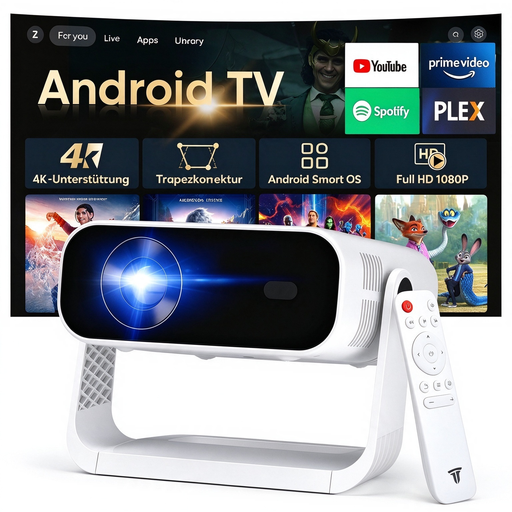 No image available
The product name describes this device as portable; check that mains power is available at your intended location before choosing it.
240 ANSI lumens; 4K video decoding; HDMI; Android 14; Wi-Fi 6; Bluetooth 5.4; 240-inch screen size stated in the product name.
No. Throw distance is measured from the projector to the screen, while viewing distance is measured from the viewer to the screen. If viewers will be sitting far back, first work out the image size you need, then use the throw ratio to check where the projector can be placed.
Only if the projector input and laptop support the right kind of video transmission. BenQ specifies USB-C with DisplayPort functionality for the GV50 and also lists HDMI; check the connections on your specific source device.
Plan for a stable surface, clear ventilation openings and time to check the focus and image size again. Autofocus or automatic keystone correction can make setup easier on models with these features, but you should still check the sharpness using your own footage.
For products covered by the relevant CE regulations, the German Federal Network Agency lists checking the required CE marking and accompanying information in German as traders’ responsibilities. Check the information for the specific offer; it isn’t an independent confirmation of image quality.
Old electrical equipment can be returned under the conditions set out in the ElektroG; which retailers are required to take it back depends on the legal requirements. Used batteries and rechargeable batteries must be collected separately from unsorted municipal waste.