Who should consider these options?

Trainers working in long rooms

You need to position the projector in a fixed location and achieve the right image width. Epson recommends considering room size, screen position and image size together when planning; the throw ratio of the specific model is also key.

Trainers working in bright rooms

You demonstrate processes while participants take notes or work hands-on with the lights on. Epson Germany’s information on business projectors is a useful starting point, but visibility needs to suit the room and image size.

Trainers using detailed material

When you’re showing small labels, user interfaces or technical drawings, what remains visible from the back row matters. Compare the models’ native resolutions and check your actual content; the specifications from Epson Germany, BenQ and Acer Germany cover different resolutions.

What should you look for when buying?

Lamp-based business projector

Best suited to: Mains power is available and you want to show presentations or videos on a larger screen. Epson Germany lists Full HD and 4,100 lumens for the EB-FH54; BenQ lists Full HD and 3,800 ANSI lumens for the MH560.

Things to consider: Check the throw ratio and space needed for the specific model, as well as the lamp-life figures for the different operating modes.

Laser business projector

Best suited to: You’re planning frequent demonstrations and want to take the stated long light-source life into account. Epson Germany lists Full HD, up to 4,600 lumens and up to 20,000 hours for the EB-L260F laser light source.

Things to consider: The manufacturer’s stated lifespan alone doesn’t tell you what image size or visibility you’ll get at your venue.

Compact battery-powered projector

Best suited to: You give demonstrations at different venues without reliable access to a socket and can control the room lighting. XGIMI lists Full HD, 700 ISO lumens and up to 2.5 hours of battery life for the Halo+.

Things to consider: ISO and ANSI lumen figures aren’t directly comparable; battery power doesn’t guarantee that a large image will be visible in a bright room.

WXGA instead of Full HD

Best suited to: You mainly show large-scale processes and little small text. Acer Germany lists a resolution of 1,280 × 800 pixels and up to 5,000 lumens for the X1328Wi.

Things to consider: For small labels and technical drawings, bear in mind its lower native resolution compared with the Full HD models mentioned above.

Buying priority What to check Who should pay particular attention?
Image size at a long throw distance Measure the distance between the lens and the projection surface, along with the usable image width; check the projection range of the specific model. If the projector’s position is fixed at the far end of the room, I want to know whether the image will fill the available space. This is the main priority for around 36% of consumers.
Visibility with the lights on Assess the room lighting, planned image size and brightness rating together; if possible, view the image under the conditions you expect to use it in. If participants will be working with the lights on, I need an image that remains clear in those conditions. Around 29% of consumers put this priority first.
Small details from the back row Compare native resolution rather than just supported input signals; check real demonstration content from the rearmost seat. For small menus or labels, I want to know in advance whether the content will be readable from the back. Around 21% of consumers say detail visibility is their top priority.
Transport, power and connections Check the power supply at the venue, demonstration length and connections on the source device against the specific model. If I’m often changing venues, setup and available connections matter just as much as the power supply. Around 14% of consumers make these their main buying priorities.

Common buying and planning mistakes

  • Assuming a large maximum screen size will work at your existing setup

    Whether you can achieve the desired image width depends on the throw ratio and the distance actually available.

    Measure the room and check the specific projector’s throw range before choosing a model.

  • Choosing a battery-powered projector for a bright training room just because it’s portable

    A battery and compact design solve the power-supply question, but they don’t prove that a large image will be visible with the lights on.

    Check the room lighting and target image size first. Prioritise battery power if there really is no socket at the venue.

  • Confusing supported input signals with native resolution

    Native resolution matters for small labels and user interfaces. Acer lists the X1328Wi as WXGA, while BenQ lists the MH560 and Epson Germany the EB-FH54 as Full HD models.

    Compare native resolutions and check the smallest details you’ll actually show from the rearmost seat.

  • Taking the light-source lifespan as a promise of maintenance-free use

    BenQ notes that the MH560’s lamp life varies by operating mode; Epson Germany lists up to 20,000 hours for the EB-L260F’s laser light source.

    Check the operating mode, maintenance information and conditions for the specific model separately.

Key brands to consider

Epson

The documented EB-FH54 and EB-L260F models represent portable business projectors with lamp and laser light sources respectively.

  • Epson Germany lists Full HD and 4,100 lumens for the EB-FH54, and Full HD and up to 4,600 lumens for the EB-L260F.
  • These are manufacturer figures and don’t prove that a projector is suitable for every room or viewing distance.

BenQ

The MH560 is an example of a Full HD business projector with a lamp light source.

  • BenQ lists 3,800 ANSI lumens, a throw ratio of 1,49–1,64 and a weight of 2,3 kg.
  • According to BenQ, lamp life depends on the operating mode and usage. Also check that the throw ratio and image width suit your room.

Acer

The X1328Wi is a WXGA option for demonstrations featuring large images.

  • Acer Germany lists up to 5,000 lumens and a resolution of 1,280 × 800 pixels.
  • For small labels, check the native resolution and visibility from the rearmost seat; the brightness rating alone doesn’t guarantee readability.

XGIMI

The Halo+ is an example of a compact projector with a built-in battery.

  • XGIMI lists Full HD, 700 ISO lumens and up to 2.5 hours of battery life.
  • These manufacturer figures don’t prove that a large image will be sufficiently visible in a bright training room.

Projectors at Joybuy

This selection includes portable projectors for flexible demonstration venues. For each model, check the distance to the projection surface, room brightness and how clearly your content can be seen before planning to use it in a specific training room.

Aurzen Tri-Fold DLP Mini Projector

Aurzen Tri-Fold DLP Mini Projector

The foldable design and built-in stand are intended for use in different locations; check how visible the image will be in your planned room.

The product title lists a 5.000-mAh battery, 1,5 hours of runtime, ToF autofocus, Wi-Fi, Bluetooth and USB-C. 4K is listed as a supported format, not as the native resolution.

Joybuy

XGODY N7 Cine Smart Projector

XGODY N7 Cine Smart Projector

The stated throw ratio can help you plan the distance, but still check the image size for your intended room and viewing distance.

The product title lists 1.000 ANSI lumens and native 1080p; 4K is listed as supported. It also lists a throw ratio of 1,1:1, 60 inches at 1,33 m and a maximum of 140 inches.

Joybuy

XGIMI Vibe One Match Night Collection with projection screen and stand

XGIMI Vibe One Match Night Collection

The built-in battery is useful for venues without reliable access to a socket. The projection screen included in the set doesn’t remove the need to check visibility in the room.

Specifications include Full HD 1080p, 250 ISO lumens and a built-in battery. The product description lists a 70-inch projection screen with stand.

Joybuy
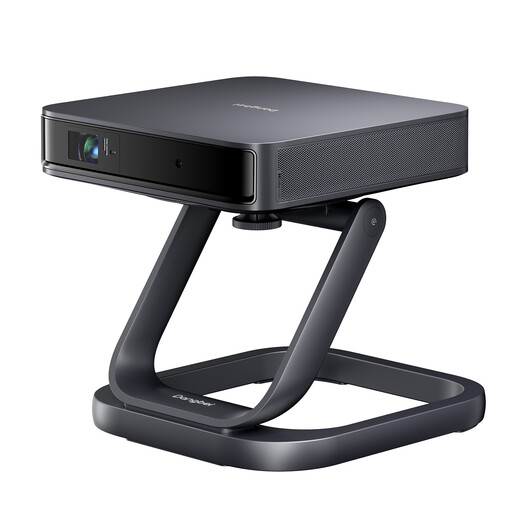
Dangbei Atom Portable Laser Projector with desktop stand

Dangbei Atom Portable Laser Projector with desktop stand

The stated throw ratio can help you plan when you know the distance. Check that the recommended image size matches your room measurements.

Specifications include native 1080p, 1.200 ISO lumens, a throw ratio of 1,2:1 and a recommended image size of 60–100 inches. The stated weight is 1,28 kg.

Joybuy
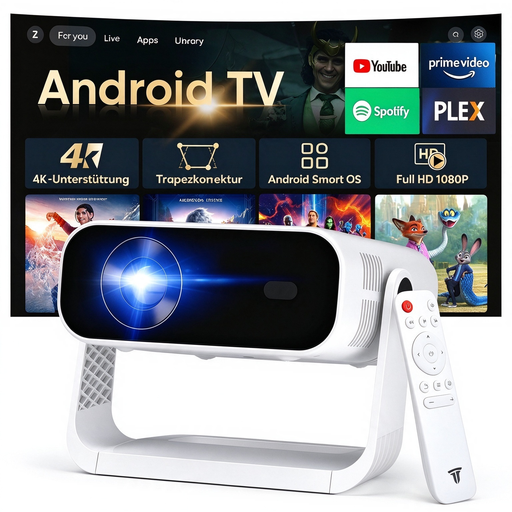
SRESNAIL AE211-B portable projector

SRESNAIL AE211-B

HDMI and USB are listed for connecting an external device. Check that these connections work with the source device you’ll use for your demonstration.

The product title lists 240 ANSI lumens and 4K video decoding; the description gives a weight of 0,8 kg and a 360° rotating gimbal stand. No throw ratio is specified.

Joybuy

Frequently asked questions

How can you work out the required throw distance before buying?

Measure from the planned lens position to the projection surface and work out its usable image width. Check these measurements against the specific model’s throw ratio or use a suitable distance calculator before deciding on the image size.

Will the maximum image size work for the back row?

No. The maximum image size alone doesn’t tell you whether small text will be visible at your desired image width and with the room lighting you have. Check real demonstration content from the rearmost seat you plan to use.

What should you check when setting up and using a projector?

Check the space available, power supply and connection to the actual source device at the venue. For lamp models, the stated lifespan depends on the operating mode; check the maintenance information and compatible replacement parts for the specific model.

What labelling is required when selling a projector in Germany?

Equipment covered by the relevant EU harmonisation legislation must carry the required CE marking before it is placed on the market. Germany’s Federal Network Agency and Section 18 of the EMVG cover the requirements within their respective scopes; the marking doesn’t prove image quality or suitability for a particular training room.

Does the consumer legal guarantee automatically apply to a purchase by a training provider?

The EU information on consumer rights applies to purchases made by consumers and can’t automatically be extended to a business purchase. If the training provider is buying, check the contractual warranty terms separately; a voluntary manufacturer’s warranty is not the same as a statutory legal guarantee.