What should you look for when buying?
First, map out the projector’s position and the seating positions separately. You can then compare image correction, room brightness, detail reproduction and power supply more effectively.
| Criterion |
What to check when buying |
Who will find this most important? |
| Projector positioned to the side |
Check for horizontal keystone correction, not just vertical correction, and look at the conditions under which it works. BenQ quotes automatic correction of up to ±30° for the GP100, provided the projection distance in the direction of projection is no more than 2 m. |
If the projector can’t sit directly in front of the screen, the right horizontal correction matters to me. Around 36 % of consumers say positioning the projector to the side is their main concern. |
| Visibility with the room lights on |
Assess the room lighting, image size and legibility from the planned position. When comparing brightness figures, bear in mind that they may be based on different measurement methods. |
If the group needs to watch or take notes with the room lights on, I want the demonstration to be easy to see from their seats. For around 29 % of consumers, legibility with the room lights on is the main concern. |
| Legibility of small details |
Test the smallest important label from the furthest and most off-centre seats. Also check that the projection distance and image width will work in the room. |
If I’m showing tool markings or small steps in a process, people need to be able to see them from the seats I’ve planned. Around 21 % of consumers focus above all on detail reproduction. |
| Use without a power socket |
Check whether the projector has a built-in battery and how long it lasts in the mode you need. Also make sure its connections are compatible with your presentation source. |
If I often give demonstrations somewhere without reliable access to a power socket, power is a key consideration for me. For around 14 % of consumers, being able to work at different venues without mains power is the main concern. |
Portable projectors at Joybuy
The Joybuy products below are portable projectors designed for flexible setups. For a training demo, check the brightness, image size and smallest important details in the room where you plan to use the projector.
 No image available
XGIMI MoGo 4, Match Night EU Edition with EA SPORTS FC 26 game code
Could be useful for demonstrations at different venues when you need battery-powered operation.
1080p, 450 ISO lumens and a built-in battery with up to 2,5 hours of battery life. These figures don’t replace a legibility test in your training room.
According to the product name, this edition includes an EA SPORTS FC 26 game code.
View at Joybuy
 No image available
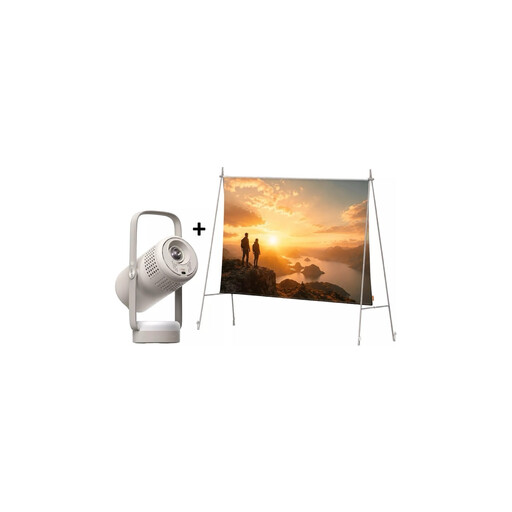
XGIMI Vibe One Match Night Collection
This set could suit you if you want to take a screen along with the projector.
The product name lists Full HD 1080p and 250 ISO lumens. The product details state that it has a built-in battery and offers up to 1,2 hours of video playback in Eco mode.
According to the product name, the set includes a screen and stand. Check whether the image size and brightness will be sufficient for your demonstration.
View at Joybuy
 No image available
Philoent Smart Projector 4K/1080P
The product description lists features for different projection distances. Before buying, check that the setup and image size will work in your room.
The description lists ultra-short-throw projection, autofocus and automatic 4D keystone correction.
The product name lists Wi-Fi 6 and Bluetooth 5.4. Also check the brightness and whether details will be legible for your intended use.
View at Joybuy
 No image available
XGIMI Vibe One Portable Mini Projector, 1080p
The built-in adjustable stand can be useful for changing setups. Check that the image correction works for the projector’s actual position.
The product name lists 1080p, 250 ISO lumens and a stand that adjusts through 160°. The product details state that it has a built-in battery and offers up to 1,2 hours of video playback in Eco mode.
The description lists autofocus and automatic keystone correction. Check that details are legible in the room where you plan to use it.
View at Joybuy
 No image available
XGIMI Elfin Flip Laser 1080P Smart Mini Portable Projector
Its portable design could be useful if you work at different venues. Check that the brightness is suitable for the room and the image size you want.
The product name lists 1080p, 1.600 ISO lumens, RGB triple laser, autofocus and a foldable design.
The best way to assess whether small labels will be legible is to test them with the materials you plan to use and from the actual seating positions.
View at Joybuy
Frequently asked questions
Do I need horizontal keystone correction because participants are sitting to the side?
Not for that reason alone. What matters is whether the projector is positioned at an angle to the screen. Assess the view from the side seats separately, based on the screen you plan to use.
How do I set up the image in a training room that changes from one session to the next?
Start by choosing the projector’s position and checking the projection distance, then align it as closely as possible with the screen. Next, use the correction feature designed for that particular model and check the smallest important detail from the actual seating positions.
What ongoing costs and terms should I check before buying?
For the specific model, check the light source, any consumable parts and the terms of any voluntary manufacturer’s guarantee. The German Consumer Advice Centre distinguishes statutory rights from a voluntary guarantee and explains that statutory rights are claims against the seller. The consumer rights that apply in a particular case may also depend on whether you’re buying as an individual or for a training provider.
Is the CE mark an independent quality mark for a projector?
No. According to the German Consumer Advice Centre, the manufacturer uses the mark to declare, on its own responsibility, that the product meets the relevant EU requirements when it is placed on the market. It isn’t an independent test of image quality or suitability for your demonstration.


